By: Adriane Andaya, Cofense Phishing Defense Center
The Cofense Phishing Defense Center (PDC) has analyzed several emails that may look like ordinary spam to the untrained eye. Threat actors attempt to mimic routine corporate emails and blend into everyday inbox traffic. As aware of the common phishing tac tactics grows, threat actors are turning to techniques such as device code phishing. To understand how this technique works, it is important to understand what access codes are and how they differ from the common username-and-password method of authentication. Access codes are temporary codes that are entered instead of the users’ credentials on devices that are requesting authentication. While this method can simplify sign-ins, attackers can abuse it. If a victim completes the sign-in process, they may unknowingly authorize the threat actor’s session, which potentially grants access to the account and associated resources.
.png?language=en "Figure1 (22)")
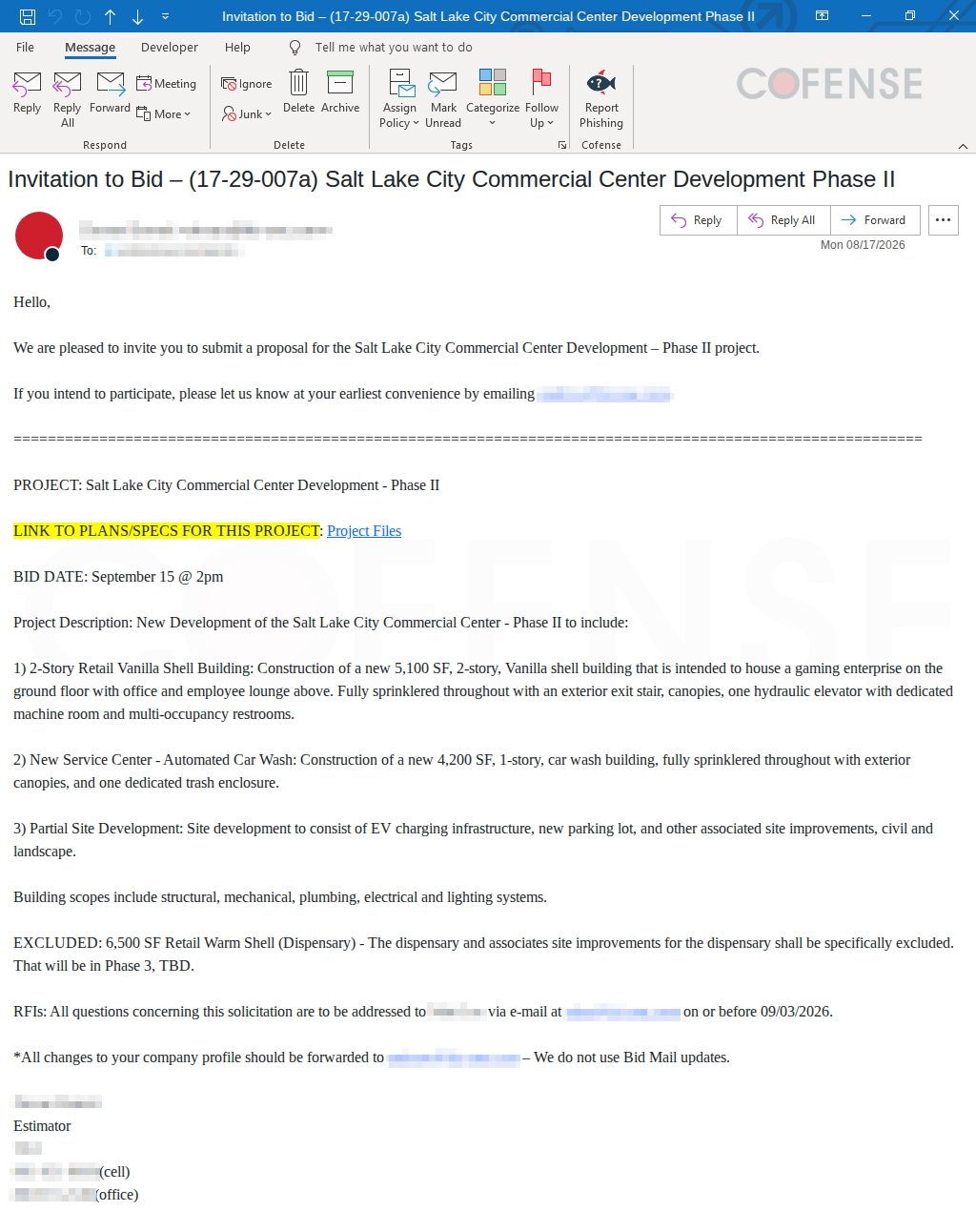
Figure 1: Fake bid invitation email
Cofense PDC analysts have handled several of these malicious emails that use subjects designed to capture the recipient’s interest. As illustrated in Figure 1, the email appears to be a regular bidding invitation, but when the recipient clicks on the link to view the project details, they’re redirected to a fake login page and prompted to enter their email. Microsoft branding is used to make the page appear more trustworthy.
.png?language=en "Figure2 (23)")
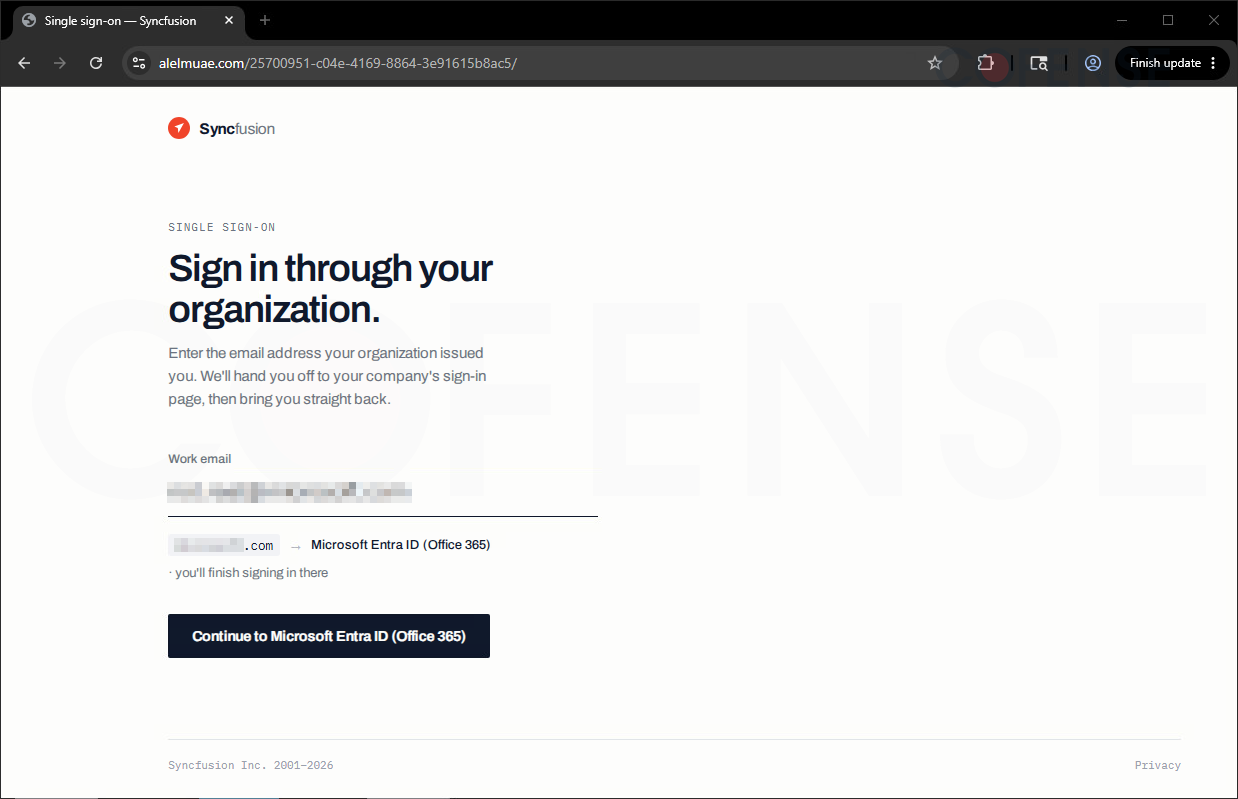
Figure 2: Syncfusion phishing login page from the embedded URL
.png?language=en "Figure3 (19)")
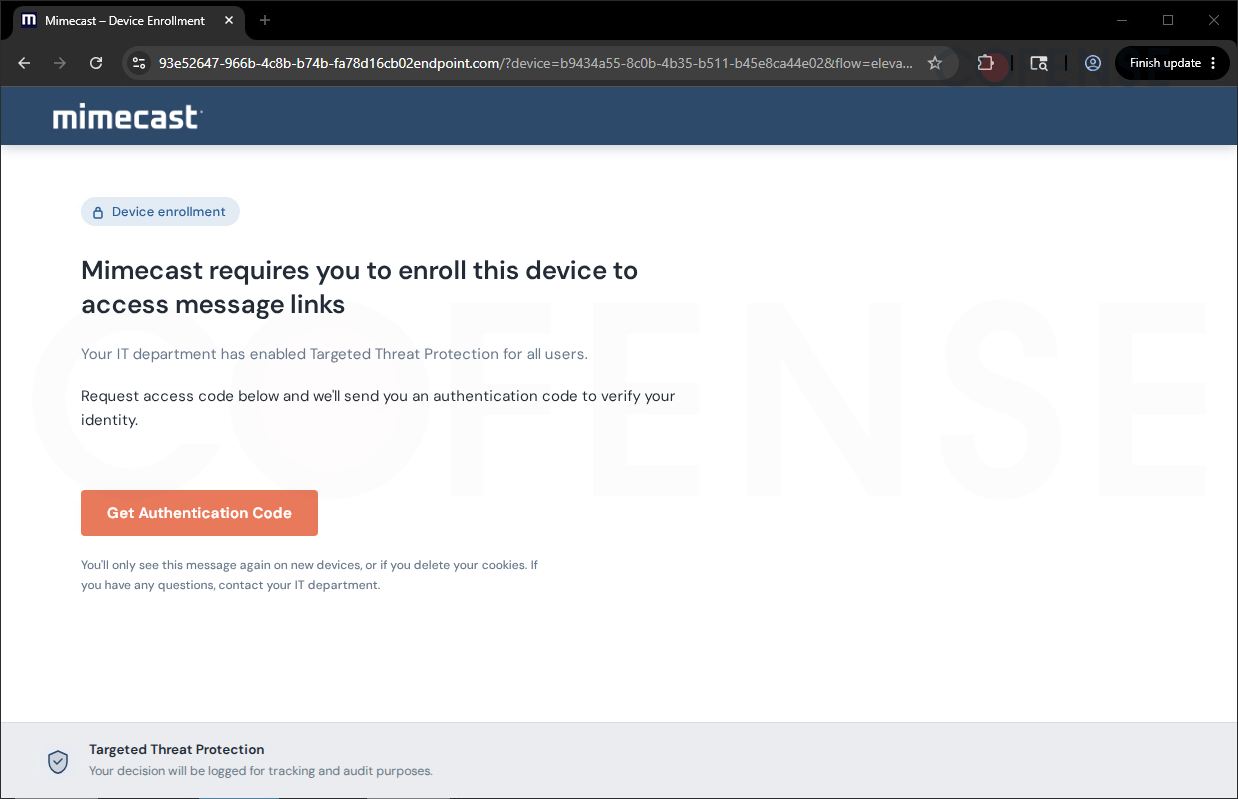
Figure 3: Spoofed Mimecast device enrollment page
As shown in Figure 2, the threat actors leveraged familiar brands such as Syncfusion and Microsoft to give the phishing page an appearance of legitimacy. The attack then proceeds after the victim has entered their email address. As seen in Figure 3, a very convincing spoofed Mimecast page adds another layer of legitimacy, encouraging the victim to enroll their device under the guise of an IT policy.
It is important to note that despite these familiar brands being used, the URL in the address bar does not match any of these brands’ registered domains. This mismatch should be an immediate red flag. By incorporating well-known brands, threat actors exploit familiarity to increase the likelihood of a successful phishing attempt.
.png?language=en "Figure4 (15)")
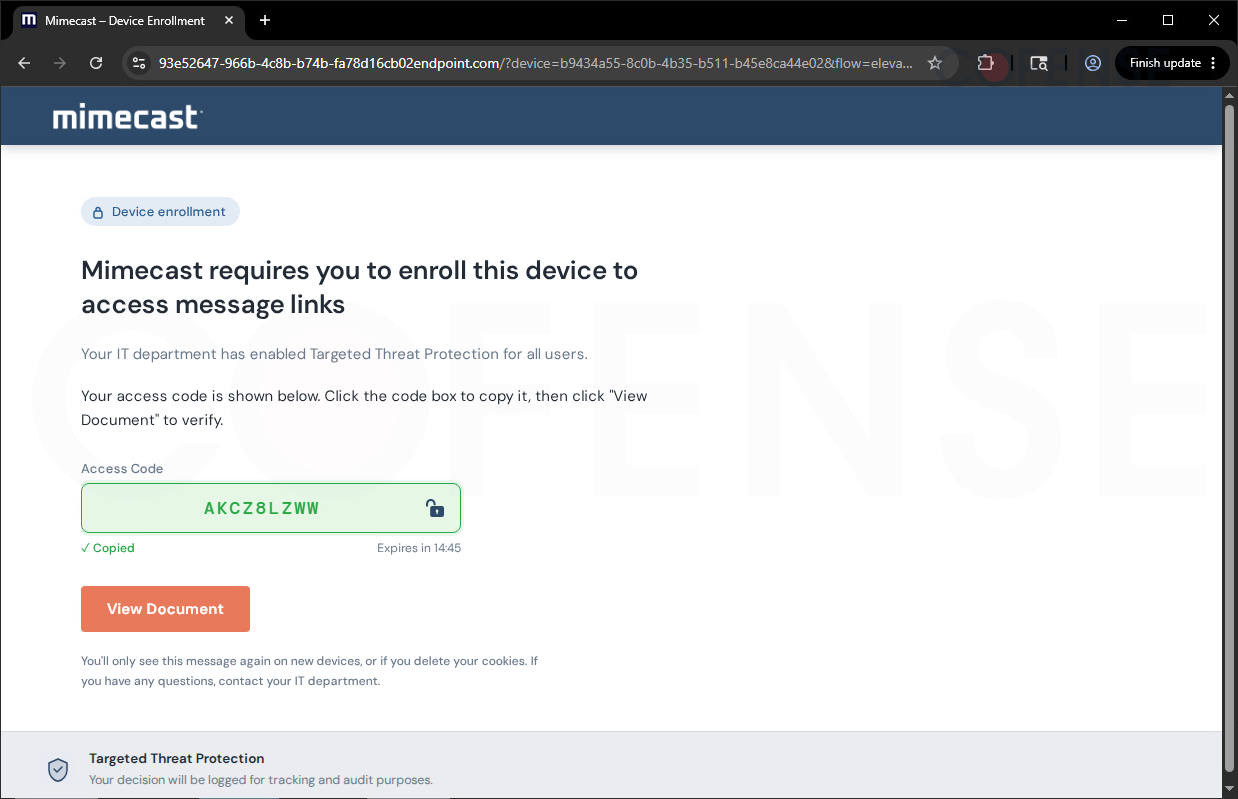
Figure 4: Access code generation
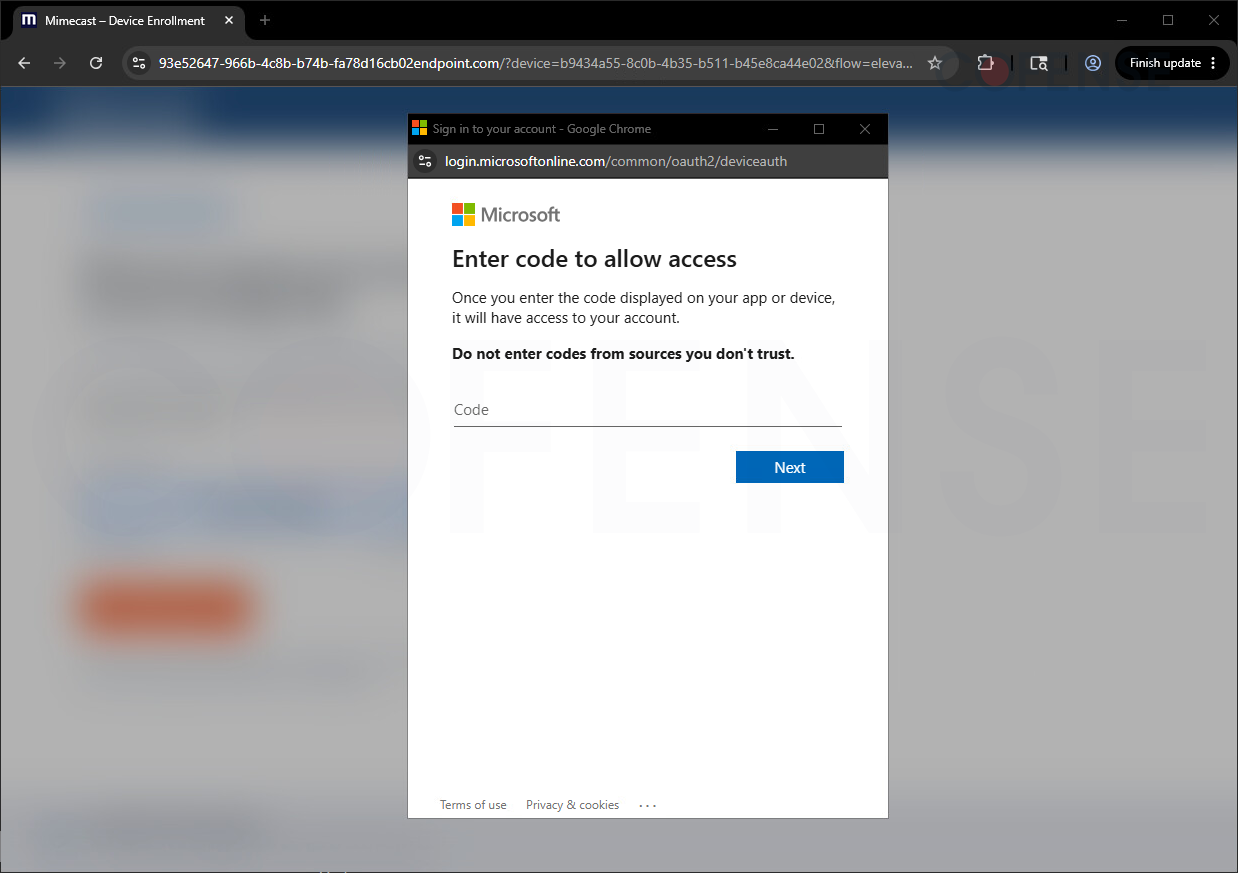.png?language=en "Figure5 (9)")
Figure 5: Microsoft pop-up window
Figure 4 shows that a code will be generated, and a button to “view the document” will be presented to the user, which opens a Microsoft window (Figure 5) prompting the user to enter the code to allow access. Microsoft warns that entering the code will grant the originating application or device access to the account without requiring the user’s password and may bypass the protection normally provided by MFA. The second warning advises users not to enter codes from unverified sources. If a code from an untrusted source has been entered, it must be treated as an account compromise, and you must immediately notify your IT department. You can also take these steps to prevent or minimize the account breach:
- Change the account password.
- Sign out of all active sessions or revoke existing sessions.
- Review recent account activity for suspicious or unauthorized access.
- Review authorized applications and remove any unfamiliar or suspicious entries.
- Re-verify registered security and MFA methods.
- Check for unauthorized account changes, including sent emails, deleted items, forwarding rules, recovery addresses, or other modified settings.
This tactic targets decision-makers, management-level personnel, and key figures, but anyone can fall victim to this phishing campaign. It is crucial to verify any agreement, contract, or other related documents, especially if they are from an unfamiliar sender. In some cases, even familiar emails have been compromised and have been used to send emails that contain malicious URLs or attachments. To prevent your account from being compromised, you must check for any suspicious signs on the website you will be redirected to before entering any credentials.
As the digital threat landscape continues to shift and threat actors exploit new attack vectors, practicing good cyber hygiene and staying informed about emerging threats remain essential. While no security measure can eliminate all risks, staying vigilant and adopting safe digital habits can go a long way toward keeping you and your credentials secure.
However, as sophisticated tactics like device code phishing demonstrate, individual awareness alone is not enough. Organizations also need the ability to detect and respond to threats that slip past traditional security controls. Cofense combines real-world threat intelligence, AI-driven detection, and human expertise to help organizations identify and respond to these evolving phishing threats.
Learn how Cofense can help strengthen your organization's phishing defenses: https://cofense.com/platform.