By: Sean Moleta and Mark Gammad, Cofense Phishing Defense Center
In recent threat campaigns, attackers have begun abusing the trust placed in DocuSign, a widely used electronic signature platform, to deliver JWrapper-ackaged malware. By impersonating DocuSign and SimpleHelp communications and embedding malicious executables within seemingly legitimate documents or download links, threat actors trick users into executing harmful payloads.
During our analysis of suspicious remote access activity, the Cofense Phishing Defense Center (PDC) identified multiple samples using the SimpleHelp Remote Monitoring and Management (RMM) tool. These samples were packaged with JWrapper, a Java-based installer framework that bundles the required JVM and application files into a single cross-platform executable. While JWrapper plays a role in delivery and installation, the core remote access functionality is provided by SimpleHelp itself, making it the primary focus from both detection and response standpoints. SimpleHelp is often deployed by legitimate IT teams but has increasingly been co-opted by threat actors due to its stealth, persistence, and ease of deployment across platforms. This blog will explore how attackers are leveraging SimpleHelp in real-world intrusions, how to identify its presence, and what defenders should look for.
JWrapper-wrapped SimpleHelp is increasingly abused by threat actors as a stealthy Remote Access Trojan (RAT). While SimpleHelp is a legitimate remote support tool, it is abused to package it into cross-platform executables with added obfuscation and persistence, making it ideal for silent, long-term access.
Analysis
Figure 1 depicts a phishing email disguised as a DocuSign notification. It claims that a document has been completed and prompts the user to click “VIEW COMPLETED DOCUMENTS.” This is a common phishing tactic used by attackers to trick recipients into clicking on malicious links. Several brands, such as Adobe Sign and Zoom Meeting, have been observed to be used by threat actors as depicted in Figures 2 and 3.
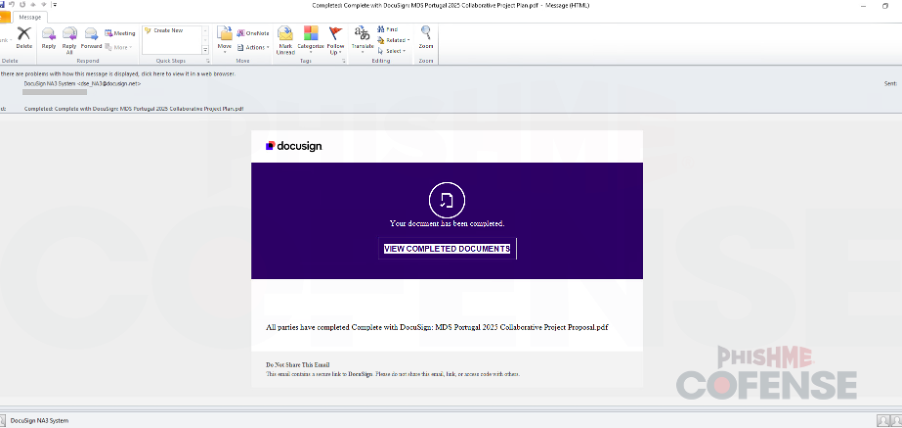
Figure 1: Email Body - Malware delivery using email DocuSign branding.
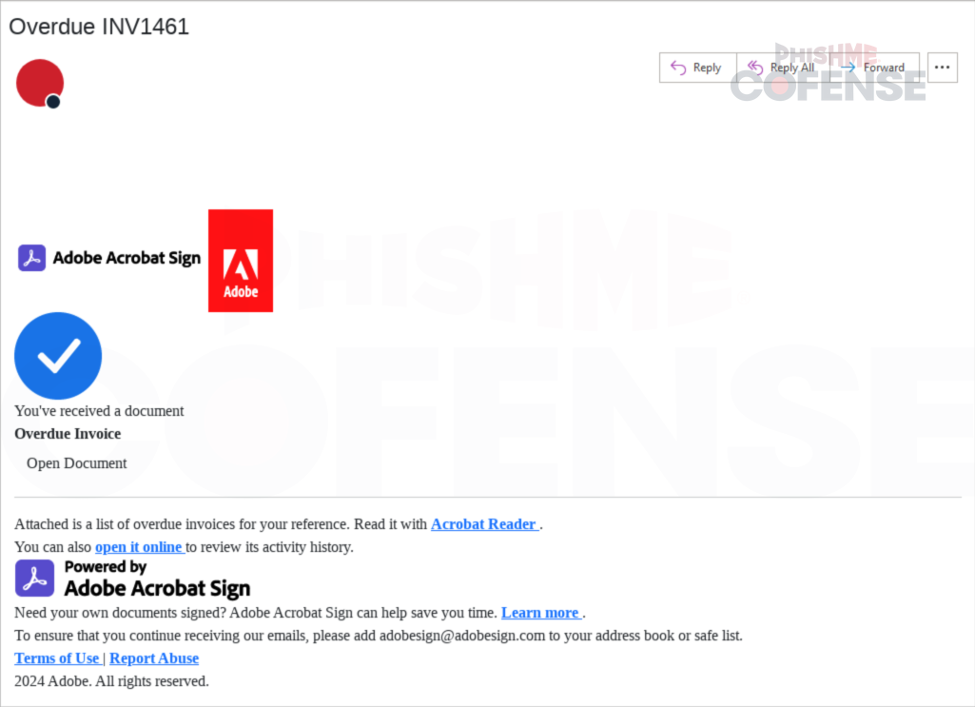
Figure 2: Email Body - Malware delivery using email Adobe Sign branding.
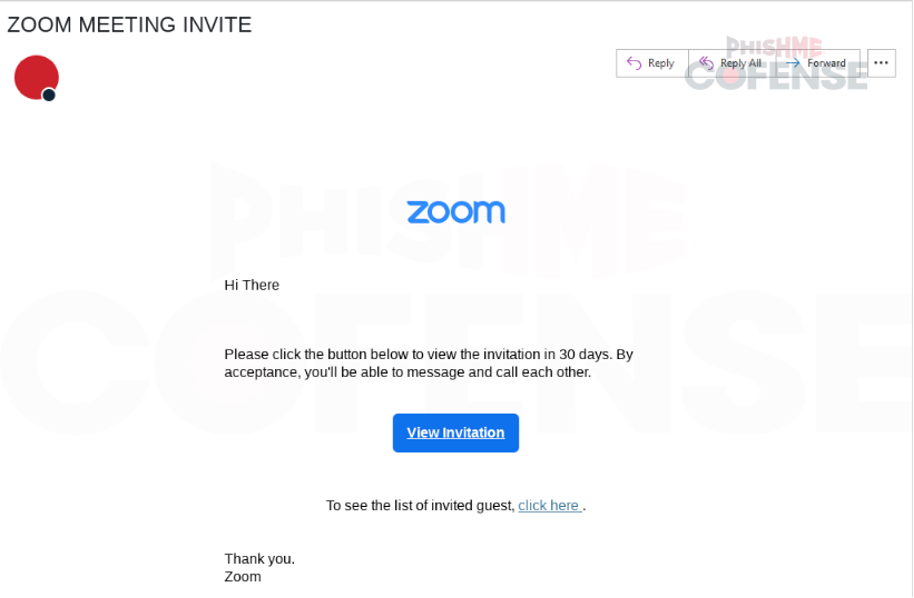
Figure 3: Malware delivery using email using Zoom Meeting branding.
However, hovering over the button reveals a suspicious redirect URL as illustrated in Figure 4:
hxxps[://]login[.]microsoftonline[.]com/[.][.][.]&redirect_uri=hxxps[://]cli[.]re/wy4ewp
This link initially appears to point to a Microsoft login page, but it redirects to a different domain (cli[.]re/wy4ewp), which could be used to:
- Steal login credentials (via a fake Microsoft login page)
- Deliver malware (such as a JWrapper-wrapped executable)
- Perform OAuth token abuse for account compromise
The attacker is using social engineering and a familiar brand (DocuSign) to trick users into trusting the email and clicking the link.
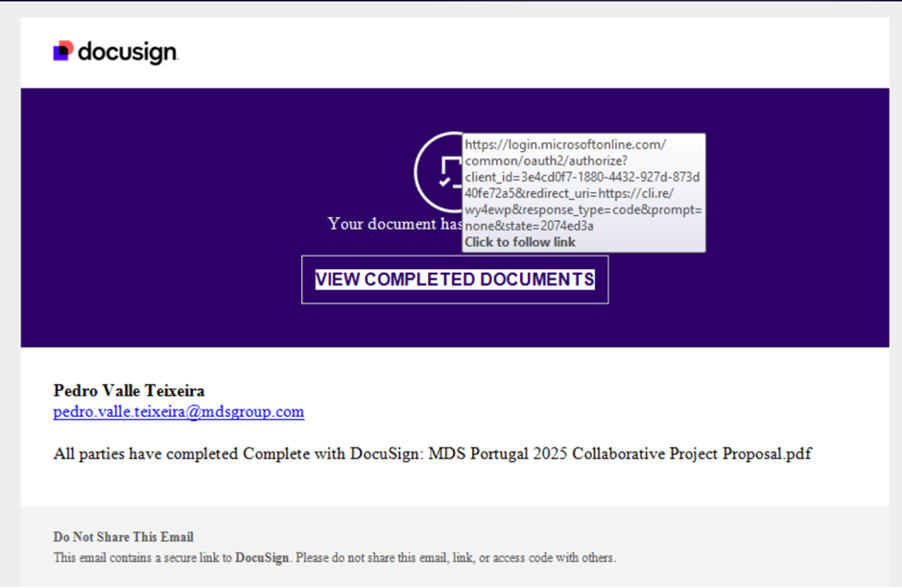
Figure 4: Primary entry point.
Figure 5 illustrates a fake Adobe Document Portal designed to trick users into downloading malware. This page is the redirect target from a phishing email link (Figure 2) and serves as the malware payload delivery point.
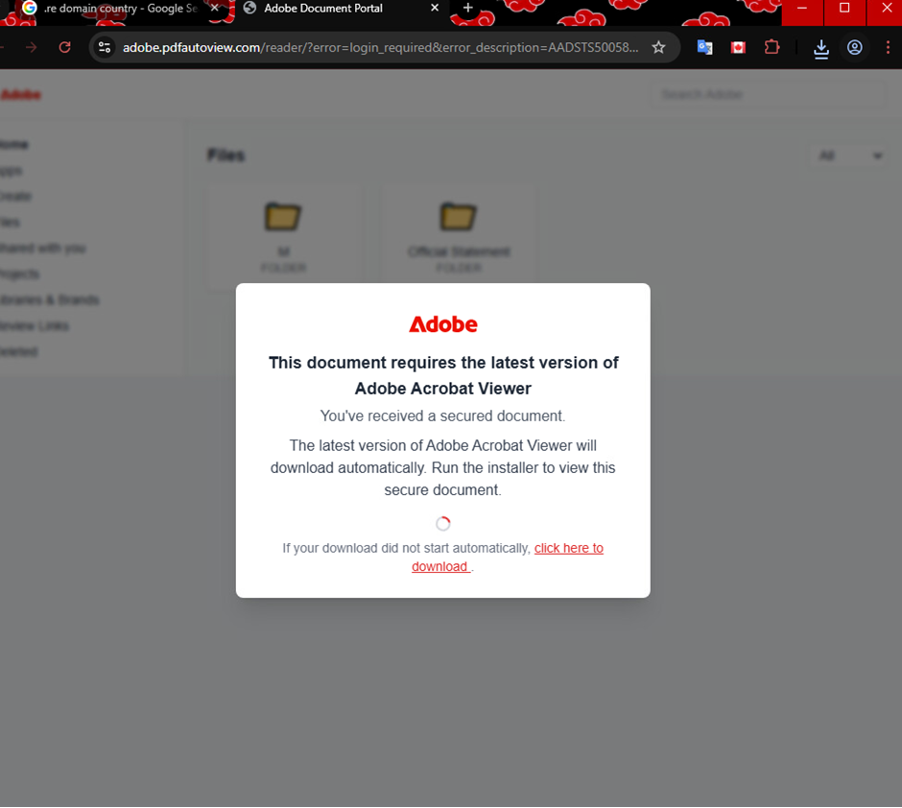
Figure 5: Malicious landing page.
The user is redirected to the payload site upon link interaction; the threat actor uses a spoofed Adobe Document Portal to trick victims into downloading and executing a malicious .exe file under the pretence of viewing a secure document.
Payload deployment:
After the redirection link, it automatically downloads an Adobe.ClientSetup.exe as indicated in Figure 6, the file is being downloaded. The file "Adobe.ClientSetup.exe" is not a legitimate Adobe installer. Instead, it is a malicious executable disguised as a software installer. The fake Adobe page lures users into downloading this file, which contains malware.
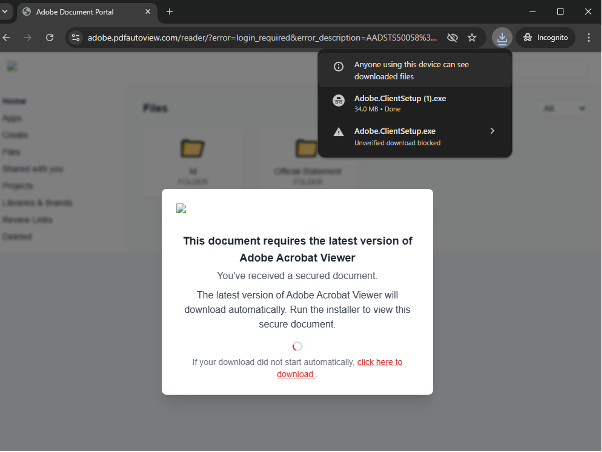
Figure 6: Redirect target containing the payload
After the redirection link, it drops a file named Adobe.ClientSetup.exe, which is a fake or malicious version meant to mimic legitimate Adobe software. Threat actors frequently use well-known software names to deceive users into trusting and executing malware.
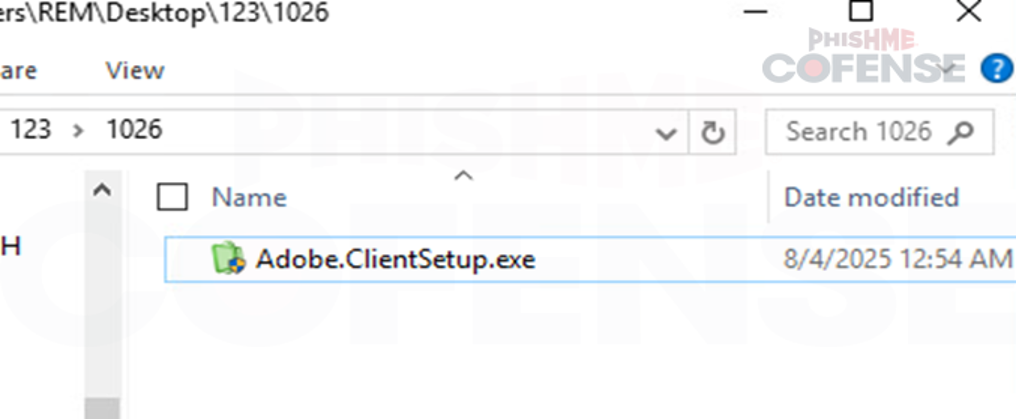
Figure 7: Downloaded executable file named "Adobe Client Setup" to further deceive victim as legitimate Adobe reader software.
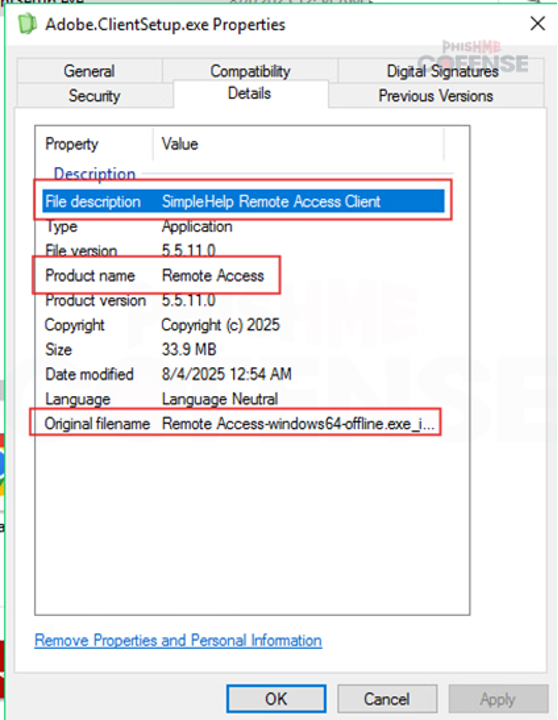
Figure 8: Further examination of downloaded file indicates it as "SimpleHelp Remote Access Client".
Payload Execution/Technical Analysis:
When the malicious software is executed, it is automatically installed and executed. As illustrated in Figure 9, it is also connecting to hxxps[://]klmgskmtn[.]com to download the actual profiles used by the threat actor.

Figure 9: Malicious software reaching out to download JWrapper from hxxps://klmgskmtn[.]com
As it appears in Figure 10, SimpleHelp is installed in the victim's system. Figure 11 also indicates the profile used by the threat actor for this SimpleHelp abuse. It is also observed that winpty agent is included in the profile. Winpty can be abused to run or hide malicious code execution.
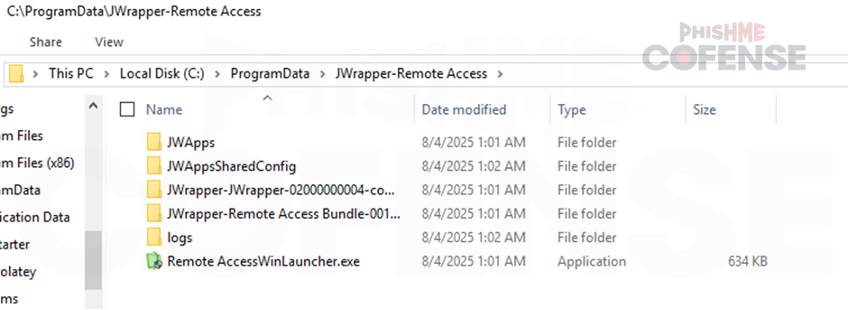
Figure 10: JWrapper installed on the victim's system.
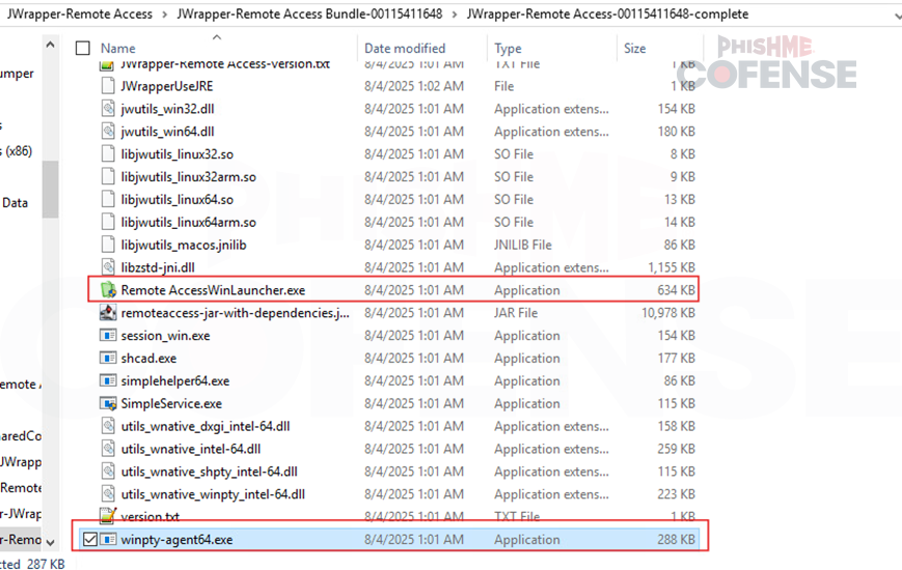
Figure 11: Profile used by the threat actor to abuse JWrapper.
Several command line prompts were also observed to be executed by the malicious software. As illustrated in Figure 12, a Netsh command was executed to create a new inbound firewall that would allow incoming connections to SimpleHelp without being blocked. Icalcs command was also executed as illustrated in Figure 13. This command was used to grant everyone full permission to all folders on the victim's file system.

Figure 12: Netsh Command.

Figure 13: Icacls Command.
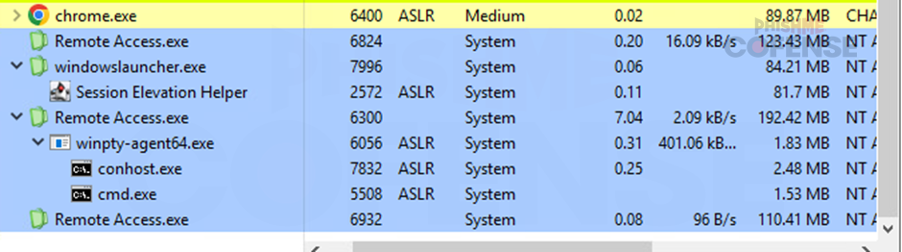
Figure 14: JWrapper successful installation.
After execution of the malicious software, it is illustrated in Figure 14 that SimpleHelp has been successfully installed and is running on the victim's machine. It is also observed communicating with the malware's command and control.
Final Thoughts
This malware campaign exemplifies how threat actors continue to refine social engineering tactics by leveraging trusted brands like DocuSign and Adobe to mask malware delivery. By embedding the SimpleHelp Remote Access client within a fake document viewer installer, attackers exploit user trust and deploy remote access tools under the radar. The use of the JWrapper framework enables stealthy persistence, making detection more difficult for defenders. Organizations must remain vigilant, educating users on phishing red flags, monitoring for unusual remote access activity, and applying prompt updates to known vulnerabilities like CVE-2024-57727. As this case highlights, even legitimate software can be weaponized, turning trust into a threat.
To defend against sophisticated campaigns such as this one that blend trusted brands with stealthy malware delivery, organizations need more than user awareness alone. Cofense Managed Phishing Defense Services provide expert-led detection, investigation, and response to phishing attacks that attempt to deliver malware and establish remote access. By analyzing reported emails, uncovering malicious payloads, and identifying active infrastructure, our PDC analysts help stop threats like JWrapper-wrapped SimpleHelp before they lead to persistent compromise. Schedule a demo with Cofense today to see how our managed services help protect your organization from brand impersonation and advanced phishing campaigns.
Stage 1 Observed Email Indicators of Compromise (IOCs): | |
File Name: MD5:
| Complete_with_Docusign_MDS_Portugal_2025_Collaborative_Project_Proposal.eml Ad4a6474d273255c34592e28759f9dca 7608a45fec8162fd6cf0b638308fbc45e82d0f71c0a65c2e68a20aab35cef15a 9.09 bytes |
Stage 2: Discovered Malicious File(s): | |
File Name: MD5: | Adobe.ClientSetup.exe |
File Name: MD5:
| Remote Access.exe |
Stage 2 - Observed Payload URL(s): | Payload IP(s): |
hXXps://techmails[.]top/?error=login_required&error_description=AADSTS50058%3A%20A%20silent%20sign-in%20request%20was%20sent%20but%20no%20user%20is%20signed%20in[.]%20The%20cookies%20used... | 104.21.32.1 |
Stage 2 – Observed Command & Control URL(s): | Command & Control IP(s): |
| 124.198.131.250 |
All third-party trademarks referenced by Cofense whether in logo form, name form or product form, or otherwise, remain the property of their respective holders, and use of these trademarks in no way indicates any relationship between Cofense and the holders of the trademarks. Any observations contained in this blog regarding circumvention of end point protections are based on observations at a point in time based on a specific set of system configurations. Subsequent updates or different configurations may be effective at stopping these or similar threats. Past performance is not indicative of future results.
The Cofense® and PhishMe® names and logos, as well as any other Cofense product or service