By: Kahng An, Intelligence Team
Cofense Intelligence has been tracking how threat actors abuse various legitimate online services to deliver malicious content embedded in legitimate business emails via arbitrary text fields. Legitimate websites often need to collect arbitrary text input from users to fill out usernames, meeting descriptions, or similar kinds of information. This text is often embedded within legitimate emails when the user performs actions such as sending meeting invitations, sharing documents, or resetting passwords. However, threat actors can abuse these arbitrary text input fields to embed misleading information that directs users to malicious websites or phone scams. When doing so, the email generated by the legitimate service would be sent from a legitimate email address but contain the embedded misleading content. The threat actor would then be able to forward the email to a potential victim, who would then receive an email that looks like it was sent from the legitimate service. This report covers how this TTP (Tactics, Techniques, and Procedures) works, common types of email samples with this TTP, and how to mitigate against this threat.
Key Points
- Threat actors can use text fields such as usernames, meeting descriptions, and document names to embed malicious content into legitimate emails from various online services.
- While this tactic can be broadly applied to many websites that embed arbitrary text fields into email bodies, this Strategic Analysis report focuses on examples abusing Zoom.
- Emails using this tactic will be sent through a legitimate service’s email, resulting in an email that can bypass traditional email security mechanisms.
- Recipients will receive an email that contains a From address from a legitimate business and the correct brand assets because the email is completely legitimate except for the embedded malicious content from the threat actor.
Using Account Customization for Arbitrary Text
When registering an account on online services, most websites require inputting some basic information such as a username or full name. Additionally, services such as online meeting platforms or file-sharing sites will often have text fields that are filled out by the user. Some common examples of this include usernames, document file names, and meeting descriptions. Many emails sent from these legitimate services can include these kinds of arbitrary text that are defined by the account holder. Because these fields are typically not sanitized to remove content such as URLs or phone numbers (or would be completely impractical to do so), threat actors can use these text fields to embed misleading malicious URLs or phone scams. Some services, such as Zoom, can even embed custom images within certain emails, allowing threat actors to include spoofed brand assets as well.
While there are many different ways threat actors can abuse this general flaw in many legitimate services, there are also equally as many different variations in how different services handle embedding arbitrary text into emails. The following is a non-exhaustive overview of some commonly abused text fields and how they may appear in emails with this TTP.
Usernames
Account usernames or full names are commonly used at the beginning of the email body to personally address the recipient. However, if a service contains an exceedingly large or unlimited character limit for names, threat actors can abuse this to include misleading content that looks like the intended message body.
File Names
Filesharing sites tend to have ways to directly share uploaded file links via email. If a threat actor were to name an uploaded document in a short message with a link to a malicious site, a recipient may believe that the shared file’s filename is the main part of the email body.
Meetings
Online meetings typically include text fields for an event name and description. Often times, both fields are included in email invitations, allowing threat actors ways to embed misleading content. Additionally, some online meeting services may even allow custom images to be uploaded and used on the email as custom branding assets.
Attack Flow
Generally, this tactic works in three steps. First, the threat actor would need to register an account on a legitimate service that has arbitrary text fields that are embedded in emails and fill in the text field with some sort of malicious payload. Next, the threat actor would need to have the legitimate service send an email with the same arbitrary text field to the account’s email address. While the exact way text fields are embedded in emails is different across different online services, the threat actor just needs to find any way for the service to send automated emails that include the malicious payload. Upon receiving the email, the threat actor can then forward the email to the intended victim. The victim would then receive an email that is seemingly from a legitimate service but contains some malicious payload within.
This tactic notably preserves the From address of the email because the email is never edited from the original version sent by the legitimate service. As a result, traditional email security headers such as DMARC, DKIM, and SPF will be bypassed by this attack. However, the To address of the email will still be the email’s original recipient, the threat actor’s account, and not the intended victim.
Commonly Abused Services
This TTP can be used on many different legitimate services. The following is a non-exhaustive list of different kinds of online services that are commonly exploited with this tactic. Threat actors can easily switch between different services, so rather than focusing on specific brands, this list will focus on broad categories of online service email types.
Account Setting Updates
Generally, any kind of email that is generated to confirm account setting changes will include the account’s username, full name, or email address as a part of the email in order to identify the affected account. However, because a threat actor can abuse these fields for arbitrary text insertion, threat actors can also use these kinds of account recovery emails in order to create malicious emails.
While different services will generate these kinds of emails under different circumstances, some common examples include:
- password reset requests
- email address changes
- logins from unfamiliar locations
- credentials changes (such as password or multi-factor authentication)
- account secrets changes (such as API keys)
The following sample email in Figure 1 abuses an email for a Zoom meeting host key being changed. Because the email addresses the email recipient within the body of the email, the threat actor is able to insert a malicious message within the body. Note how the From address (no-reply[@]zoom[.]us) is preserved, and the To address (michele[@]arnilserver[.]com) contains the threat actor’s email address.
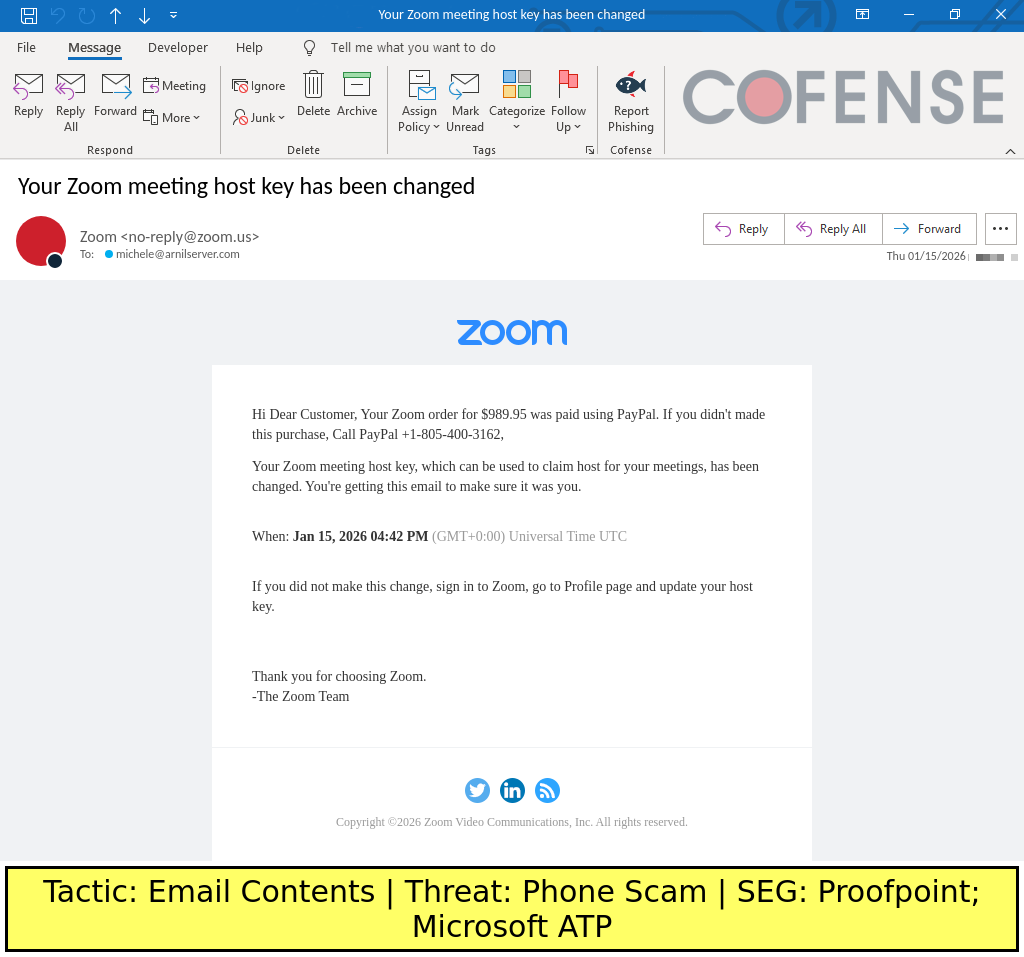
Figure 1: An abused Zoom email that has an account name that contains a phone scam message.
In this case, the threat actor was able to set the account’s name to the following text:
Dear Customer, Your Zoom order for $989.95 was paid using PayPal. If you didn’t made this purchase, Call PayPal +1-805-400-3162
Meeting Invitations
Online video conferencing and event scheduling services are easy for threat actors to abuse because of the level of customization they can provide via custom subject lines, event names, event descriptions, and other text fields. Additionally, services that allow custom branding assets such as header images can be abused to further create more convincing spoofed emails.
The following sample email in Figure 2 shows how a Zoom meeting invitation is abused to spoof the Social Security Administration and deliver a malicious meeting invitation that directs to a site that delivers ConnectWise Remote Access Tool (RAT). Again, note how the From address (no-reply[@]scheduler[.]zoom[.]us) is preserved and the To address (support9549[@]jessemercado[.]me) contains the threat actor’s email address.
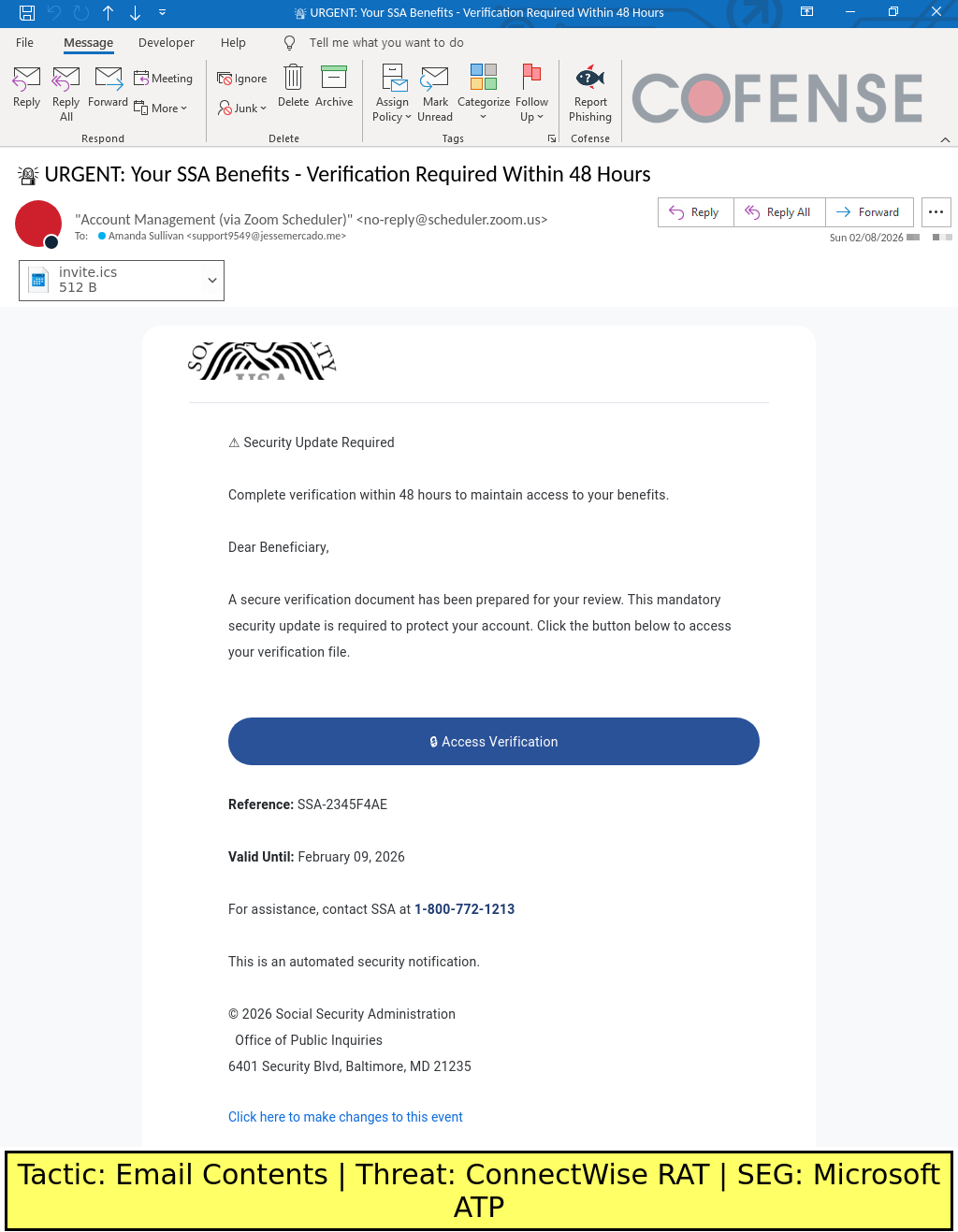
Figure 2: An abused Zoom email that has a custom event invitation with a malicious embedded link.
In this case, the threat actors used a combination of a custom subject line, header image, meeting description, and event location link to create an email that seems like it was sent from the Social Security Administration. The attached calendar file, which is automatically generated by Zoom as a part of meeting invitations, delivers the same custom event description and location link. The main malicious part of the email is the event location link, which directs to a malicious website that delivers ConnectWise RAT. ConnectWise RAT is a technically legitimate RAT abused by threat actors.
Conclusion
This TTP is particularly difficult to filter because it abuses legitimate services to send emails with embedded malicious content. Because these emails are sent through legitimate business emails, they will pass traditional email security headers such as DMARC, DKIM, and SPF. Various Secure Email Gateway (SEG) technologies also seem to struggle to filter this TTP because the majority of the email contains legitimate content sent from a legitimate service. From a user-facing perspective, the email will also be sent from a legitimate business email and contain the correct brand assets in the email template. This means that some common email security messages, such as ones about the email being from an “external” or “first-time” sender, will likely not be shown.
The most reliable way to detect this TTP ultimately requires contextual threat intelligence and appropriate training to recognize threats. While email filters will focus on the legitimate aspects of the email, threat actors want potential victims to only glance at the legitimate parts of the email and read the embedded malicious content instead.
Mitigation
While traditional email filtering systems tend to struggle with this TTP, wary recipients should be able to recognize the suspect malicious content within the email. While not the easiest or most automated solution, threat awareness training will help recipients recognize the dangers hidden in plain sight. Recipients should stop to think about whether the email makes sense. For example, an urgent request to review financial documents likely would not be sent via a Zoom meeting invitation.