By: Adrian Andaya and Gabriel Mamaril, Cofense Phishing Defense Center
Before you click “Accept” on calendar invites, think twice — it could be a phishing scheme. The Cofense Phishing Defense Center (PDC) has identified a new tactic involving fake Microsoft and Google Calendar invites designed to steal your login credentials. Phishing invitations are becoming increasingly sophisticated, often mimicking designs from well-known platforms like Microsoft or Google. While they may look convincing, they’re anything but safe. A quick look at the sender's email address is one way to spot an impersonation. It usually doesn't match the actual domain these companies use. Threat actors are taking advantage of emails commonly found in the business world, such as scheduling meetings on calendars. The goal is to deceive employees into entering their login credentials by mimicking routine activities. An example often seen is fake but harmless-looking meeting invites, since these are part of employees’ daily routines, most people don’t think twice before clicking.
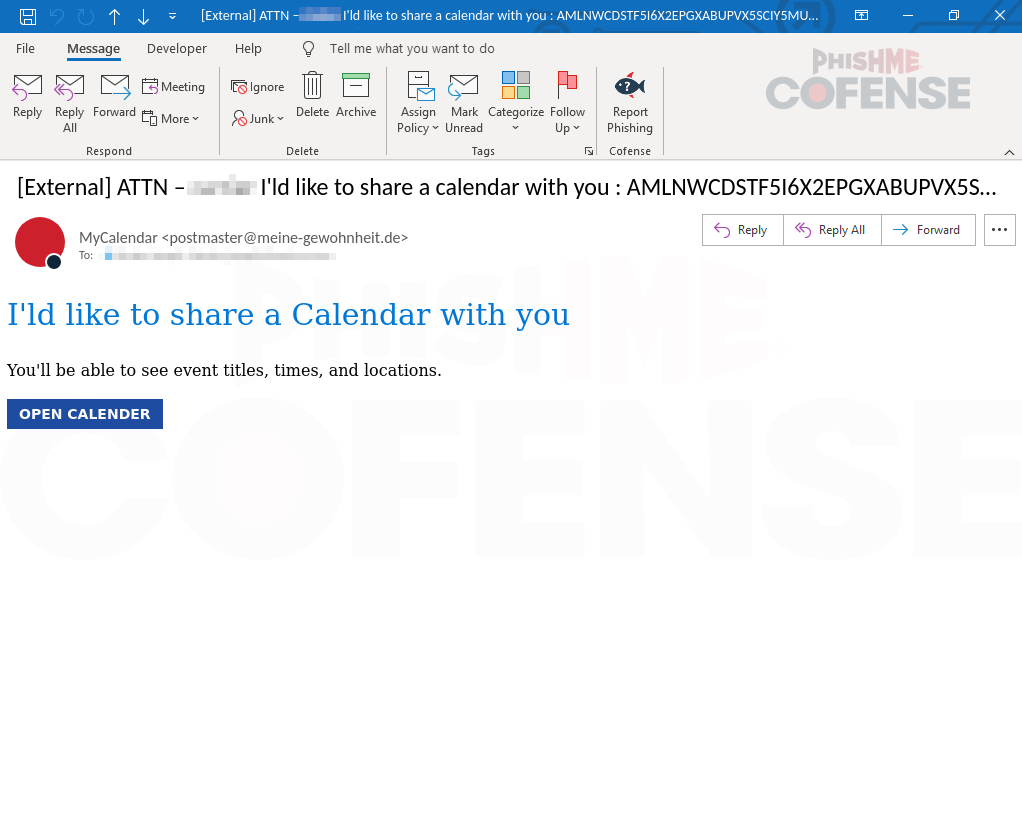.png?language=en "Figure1-(13)")
Figure 1: Spoofing of Microsoft calendar invitation
Threat actors use email spoofing to trick recipients and lure them into sharing their login credentials. It can often be spotted by carefully checking the sender’s email address. Spoofed addresses usually differ slightly from the legitimate ones that are being impersonated. The difference is often easy to notice, but in some cases, it can be deceiving, as it alters a single character or letter (e.g., Microsoft to Micr0soft). In this case, the threat actor spoofed an email address to make it appear as though the message came from “postmaster@,” but it originated from an unknown domain.
In this case, the threat actor used a button designed to mimic Outlook’s appearance in order to mislead users and increase the risk of a phishing attack, as seen in Figure 1. Threat actors make the email appear authentic by using familiar colors and creating a fake urgent calendar invitation. The use of similar colors is deceptive, as it makes the message more visually appealing. Once it catches the target’s attention, they may click without thinking since the button looks identical to the real one..PNG?language=en "Figure2-(13)")
Figure 2: Microsoft phishing login page redirected from a button
After clicking the button, the user is redirected to a phishing page, which displays a fake Microsoft login screen that closely resembles the real one (Figure 2). Further examination of the URL makes it clear that the site does not belong to Microsoft, since the domain differs from the official Microsoft login page. Once credentials are entered on the login page, the phishing attempt is successful, as the user has unknowingly submitted their login information.
.PNG?language=en "Figure3-(13)")
Figure 3: Fake Google Calendar invitation
In a similar campaign, Google Calendar invites are exploited through the use of a randomized from address, a sense of urgency, and an embedded malicious link, as shown in Figure 3. The from address uses a random or gibberish-looking address to avoid getting filtered as spam. Additionally, the invitation begins with the word “deadline,” creating a sense of urgency to accept it. This urgency is linked to the embedded malicious URL, which is designed to trick the target into clicking it without thinking twice.
Threat actors are mimicking the appearance of Google Calendar invites to help create a sense of familiarity to lure their targets to click the link. These invitations appear authentic at first because their format closely resembles legit Google Calendar invitations, however upon closer inspection, it becomes evident that they are spoofed. The email is also spoofed to look like an official Google invitation, particularly at the bottom of the message, to enhance its credibility. While visuals can be deceiving, keen observation is crucial to avoid phishing attacks that use Google Calendar invite techniques.
.PNG?language=en "Figure4-(13)")
Figure 4: Microsoft phishing login page from embedded URL
Figure 4 shows the landing page that is reached after clicking the embedded malicious URL found in the fake Google Calendar invite. The redirect page uses a non-Microsoft domain but displays a “Microsoft login page,” like the first example. Although this phishing attempt appears to spoof Google Calendar, the redirect still led to a Microsoft login page. This could indicate that the attackers are attempting to compromise the email accounts of the target company to launch more sophisticated phishing campaigns. By doing so, they can use the stolen credentials to phish other employees within the organization.
In conclusion, these two campaigns show how threat actors are exploiting calendar invitations due to their popularity in corporate environments. This tactic allows them to gather sensitive information if users are not vigilant. It is crucial to verify the authenticity of calendar invites and carefully check the sender’s details. Avoid clicking on suspicious links from unknown senders, as doing so could lead to a data breach within the company.
To stay ahead of evolving tactics like calendar-based phishing, organizations need expert-led defense that moves as fast as attackers do. Cofense Managed Phishing Defense Services combine real-time threat intelligence with hands-on analysis and response from seasoned security experts. Our analysts in the PDC investigate reported emails, identify active campaigns, and help stop threats before they escalate across your organization. If you’re ready to reduce risk, ease the burden on your security team, and gain confidence against advanced phishing attacks, schedule a demo with Cofense today.
Stage 1 - Observed Email Infection URL: | Infection URL IP(s): |
hXXps://(redacted)[.]oceanlist[.]net/?&em= |
|
Stage 2 - Observed Payload URL(s): | Payload IP(s): |
|
|
All third-party trademarks referenced by Cofense whether in logo form, name form or product form, or otherwise, remain the property of their respective holders, and use of these trademarks in no way indicates any relationship between Cofense and the holders of the trademarks. Any observations contained in this blog regarding circumvention of end point protections are based on observations at a point in time based on a specific set of system configurations. Subsequent updates or different configurations may be effective at stopping these or similar threats. Past performance is not indicative of future results.
The Cofense® and PhishMe® names and logos, as well as any other Cofense product or service names or logos displayed on this blog are registered trademarks or trademarks of Cofense Inc.