By Don Santos, Cofense Phishing Defence Centre
In the sales process, few emails carry as much weight as an invitation to bid. It opens the conversation that can eventually lead to revenue, and professionals are conditioned to treat it with urgency and care. Threat actors understand this, and they have learned to pair that urgency with a simple tactic: the password-protected document. Password protection lends the file an air of legitimacy, mimicking a practice companies use every day, while providing threat actors with a critical advantage - most email security tools cannot inspect the contents of an encrypted file. In this walkthrough, we break down how an important sales invitation and a "secured" document combine to set up a tricky and deceptive credential phishing campaign.
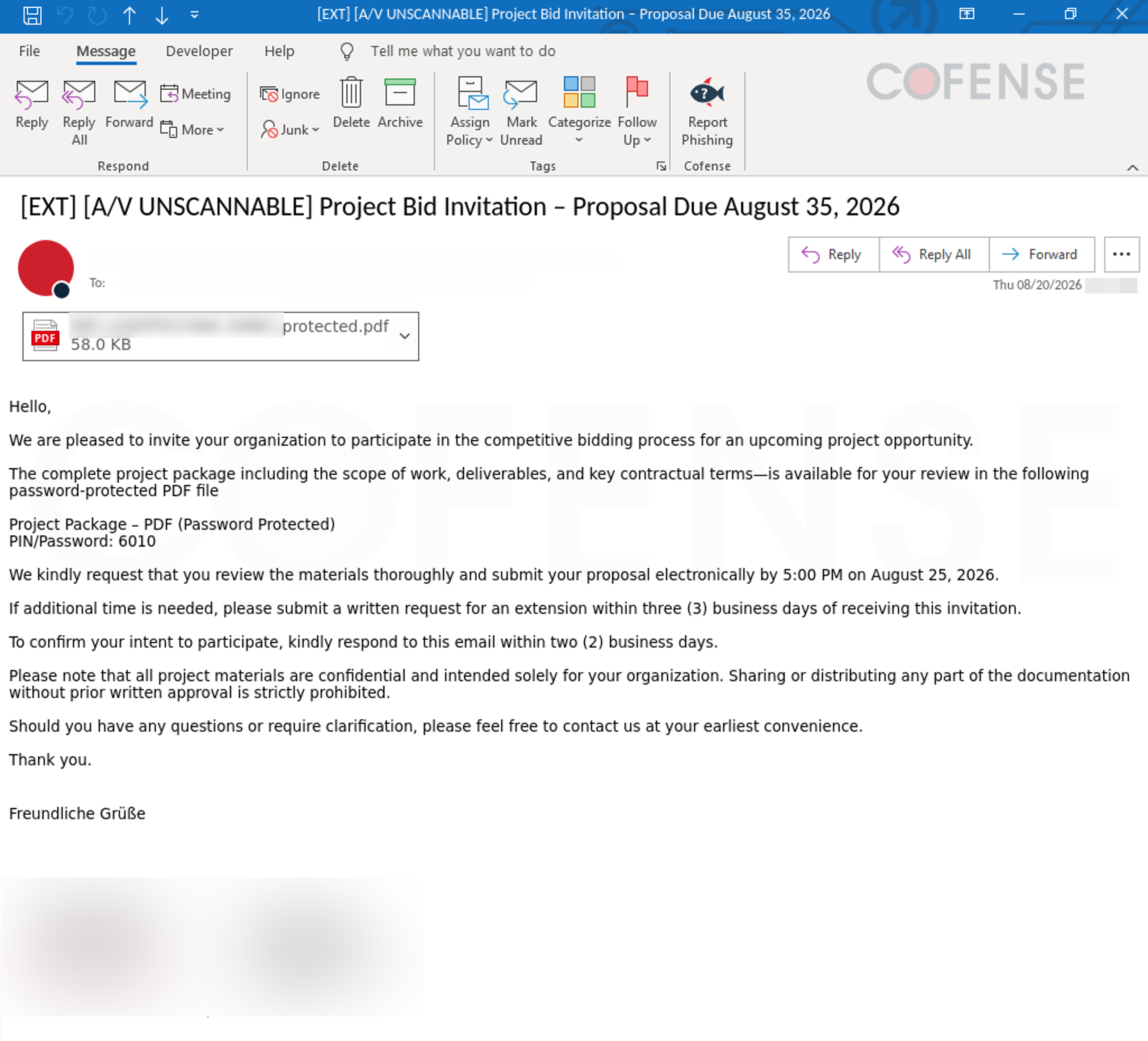
Figure 1: Invite to Bid Email Body
The campaign starts with an email titled "Project Bid Invitation - Proposal Due August 35, 2026" as shown above in Figure 1. The subject and opening message immediately signal good news: an invitation to bid for a new project. The prospect of new business has a way of lowering an employee's guard because it often encourages a sense of urgency, not scepticism. The message says more details are in the password protected PDF attachment. This is another factor that makes the campaign tricky, as it’s a simple yet remarkably effective tactic for evading suspicion. It builds a false sense of trust with the recipient, and more importantly, it allows suspicious URLs or payloads to evade detection from automated email security tools. These tools typically work by scanning a file’s contents for suspicious patterns, but encryption keeps that content unreadable until a password is manually entered, letting the payload bypass detection entirely. Invitations to bid and password-protected files are also used in legitimate business processes, imitating these makes it difficult for untrained employees to spot suspicious emails, as shown in Figure 1. Adding to the difficulty is the fact that the sender's email address itself may belong to a legitimate, previously compromised account rather than an obviously spoofed or unfamiliar domain. This adds another layer of trust, removing one of the most apparent red flags before the recipient even opens the message.
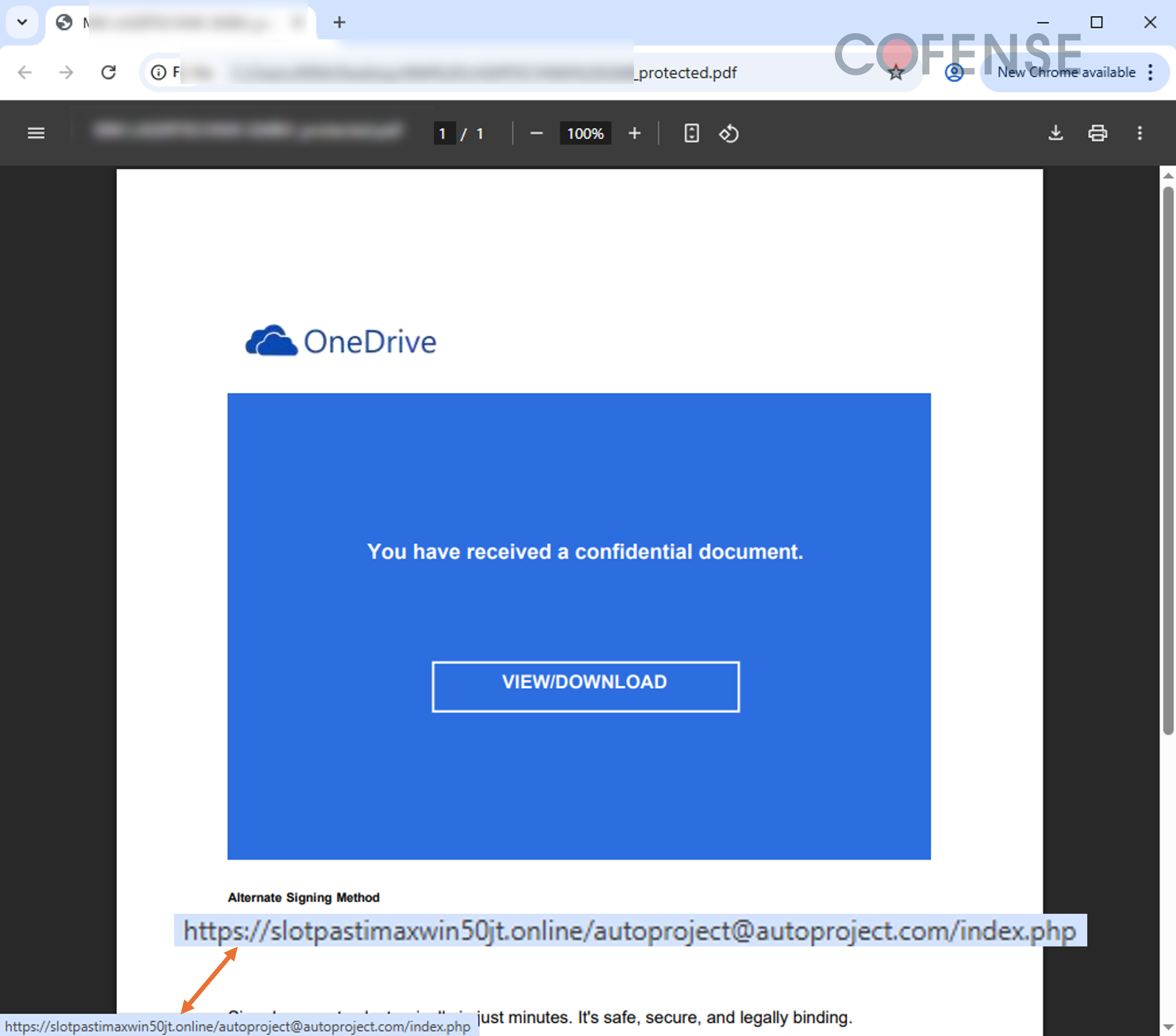
Figure 2: Inside the Password Protected PDF
If the recipient does proceed with opening the attached PDF and unlocking it, the file reveals content as shown in Figure 2: a single button styled to resemble a OneDrive document preview, prompting them to "View" or "Download" the project files. With only one possible action, there is no room for ambiguity, and the familiar OneDrive branding makes the next click feel valid and legitimate. Hovering over the button reveals the underlying URL, [hXXps://slotpastimaxwin50jt[.]online/autoproject@autoproject[.]com/index[.]php], a clear red flag, as this is not a OneDrive domain, but a redirecting URL designed to carry the recipient further into the campaign.
.png?language=en "Figure3 (20)")
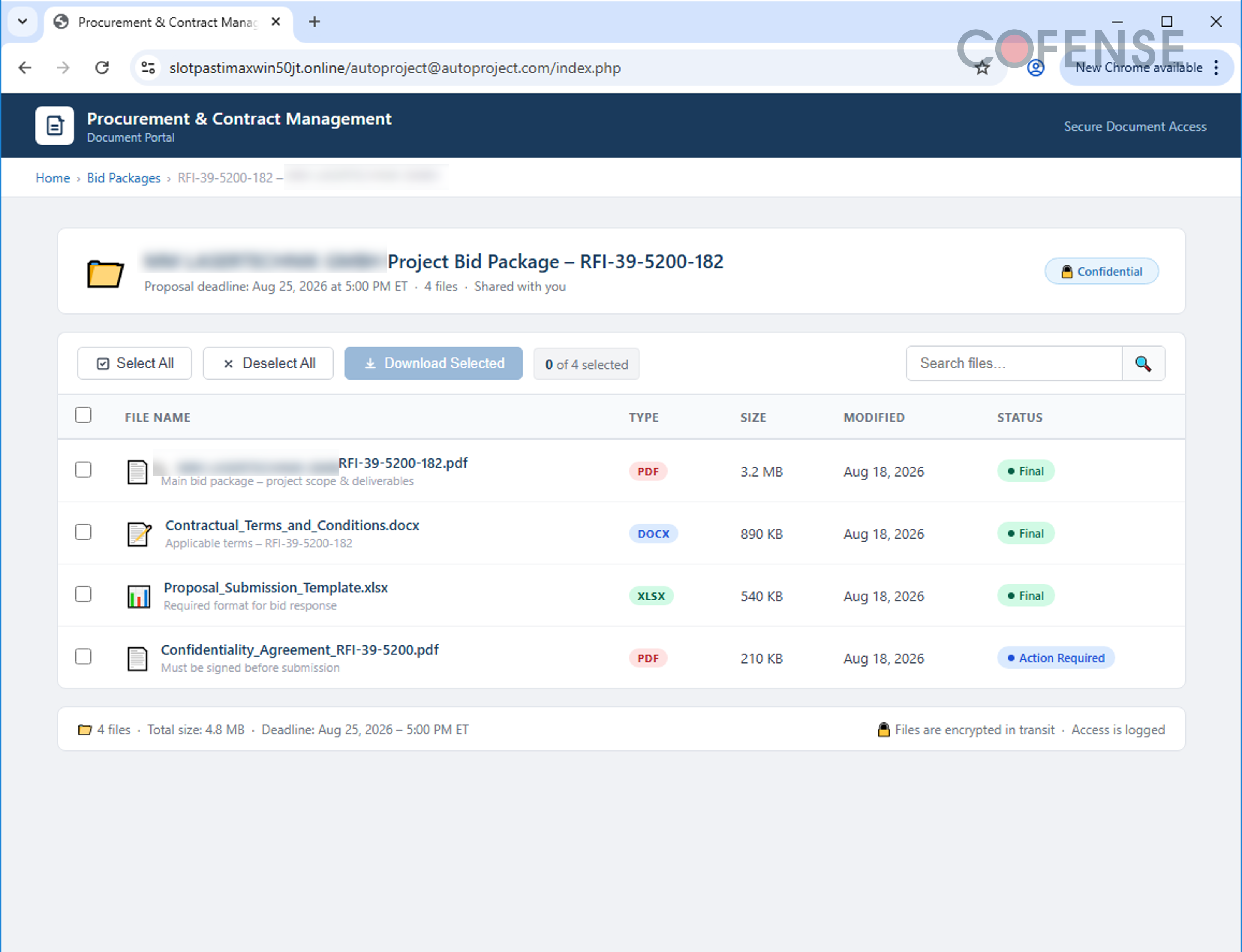
Figure 3: Fake Bid Document Drive
Clicking the View/Download button leads to a page that resembles a shared document drive, complete with a list of files that appear to be related to a real contract, as shown above in Figure 3. This displays an effort to be consistent with the "invitation to bid" narrative, keeping the intended target hooked and committed to see the process through. Just like a legitimate shared document page, the intended target can choose which files to download via checkbox, then click "Download Selected", continuing the illusion of a normal bid process.
.png?language=en "Figure4 (16)")
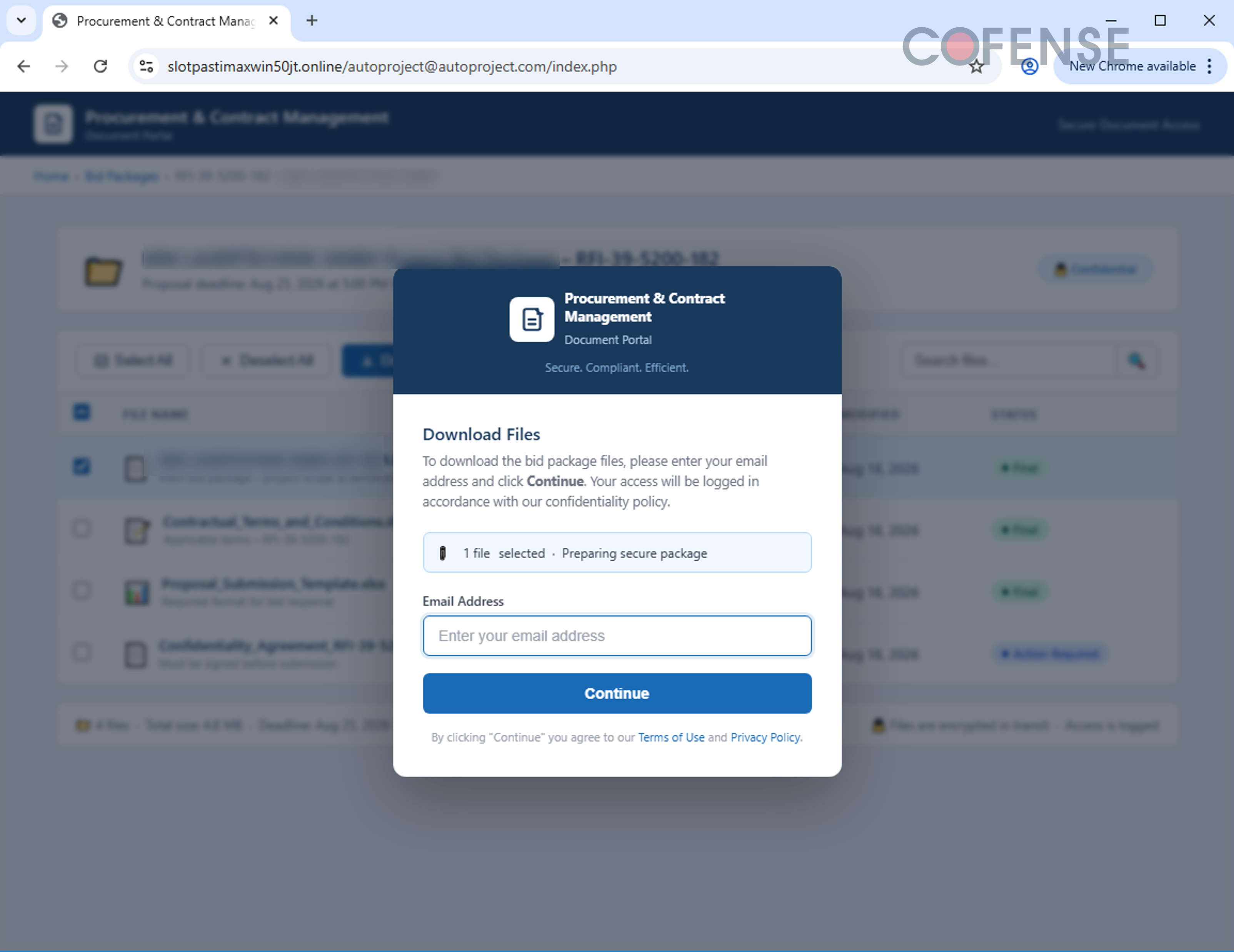
Figure 4: Email Input Required
Once the "Download Selected" button is clicked, a pop-up window appears asking for an email address, as seen in Figure 4. This again mimics the behaviour of real shared document platforms, which often request a login email to confirm that only the intended recipient can access the file. Entering an email to continue redirects to the fake Microsoft login, closely resembling the real Microsoft sign-in, first asking for an email, then a password, as shown in Figure 5. Looking at the address bar reveals the URL [hXXps://mm-lasertechnik[.]lastingonlineexperiences[.]de/1Dmw9/?key=NKsIDYXvtY], a clear indication that the victim is not on a real Microsoft sign-in page. If the victim proceeds to enter their email and password here, the credentials are sent directly to the attacker's server [hXXps://nbpn[.]lastingonlineexperiences[.]de/nasa[.]php], completing the phish.
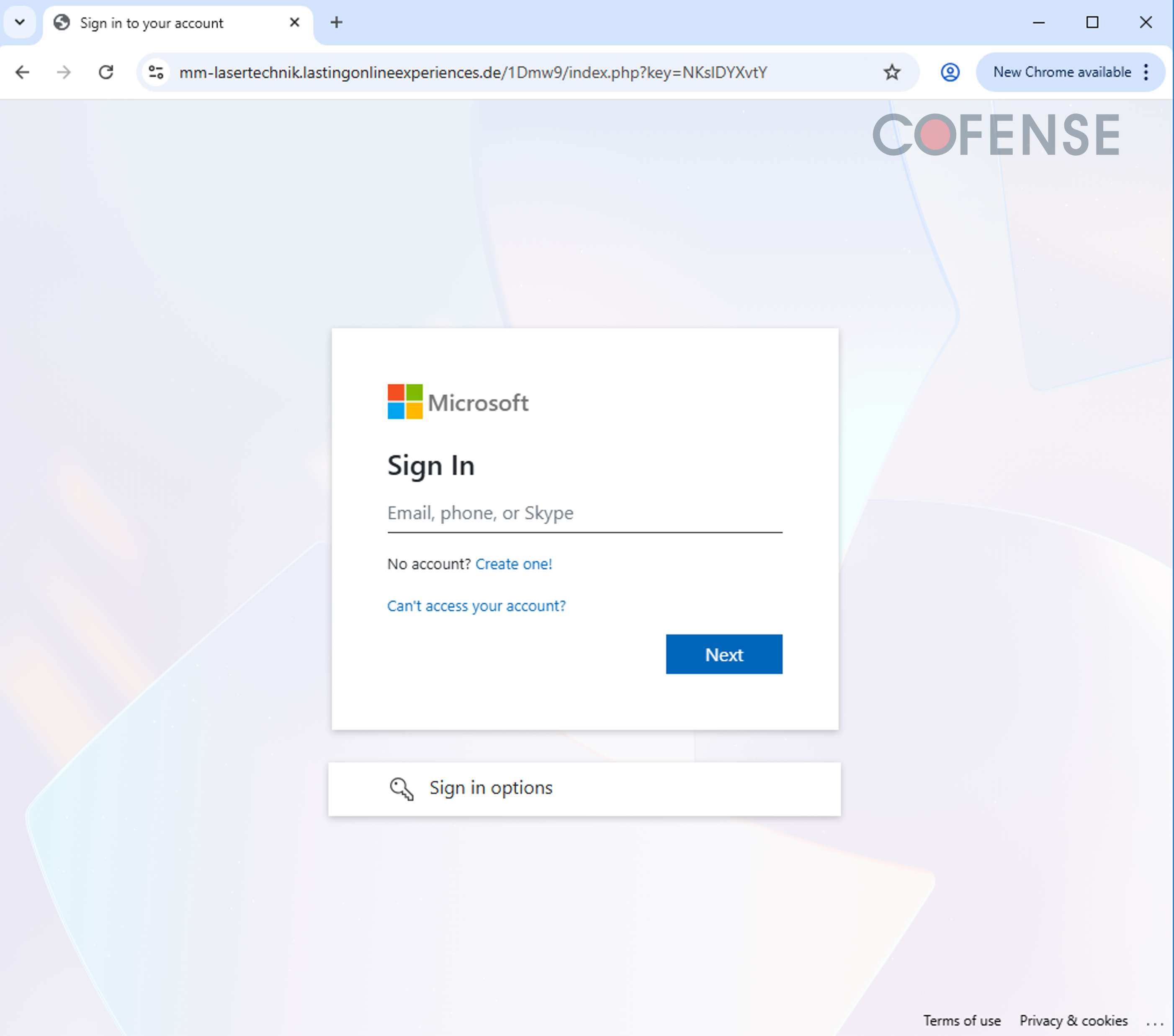
Figure 5: Fake Microsoft Login Page
This campaign shows how threat actors continue to weaponize everyday business processes such as invitations to bid, password-protected files, and shared document platforms, turning them into effective phishing campaigns. The best defence is a habit of caution at every stage: Was this bid expected? Does the sender's domain check out? Does the URL of the login page match the platform it claims to be? When something feels off, contact your IT or security team before entering any credentials, as a moment of caution costs far less than a compromised account. Cofense combines phishing-specific AI trained on expert-validated, real-world intelligence with campaign-level remediation. Once a threat is confirmed, analyst-controlled quarantine can extend across the related campaign, with explainable decisions and a full audit trail. Schedule a demonstration to see how Cofense helps stop trusted-brand credential phishing after it gets through.
Email(s) IOCs:
Stage 1: Discovered Malicious File(s): |
File Name: MM LASERTECHNIK GMBH_protected.pdf |
Stage 2 – Observed Payload URL(s): | Payload IP(s): |
hXXps://slotpastimaxwin50jt[.]online/autoproject@autoproject[.]com/index[.]php | 67[.]205[.]150[.]245 |
hXXps://mm-lasertechnik[.]lastingonlineexperiences[.]de/1Dmw9/?email= | 104[.]21[.]82[.]118 172[.]67[.]157[.]109 |
All third-party trademarks referenced by Cofense whether in logo form, name form or product form, or otherwise, remain the property of their respective holders, and use of these trademarks in no way indicates any relationship between Cofense and the holders of the trademarks. Any observations contained in this blog regarding circumvention of end point protections are based on observations at a point in time based on a specific set of system configurations. Subsequent updates or different configurations may be effective at stopping these or similar threats. Past performance is not indicative of future results.
The Cofense® and PhishMe® names and logos, as well as any other Cofense product or service names or logos displayed on this blog are registered trademarks or trademarks of Cofense Inc.