By Enrico Silverio, Cofense Phishing Defense Center
You’re checking your inbox like any other day when a LinkedIn notification pops up, hinting at a promising opportunity. It feels exciting and completely normal to click. Yet with that single action, your login credentials may already be slipping into the hands of a cybercriminal. This is the danger hiding in plain sight: phishing emails that look so ordinary they disarm even the most cautious users. A moment of curiosity or urgency is all it takes for an attack to succeed.
This is consistent with a recent trend observed by the Cofense Phishing Defense Center (PDC). The analysts in the PDC have identified a phishing campaign that uses LinkedIn message notifications to lure users into logging in to view a supposed opportunity, ultimately disguising itself to steal users’ credentials.
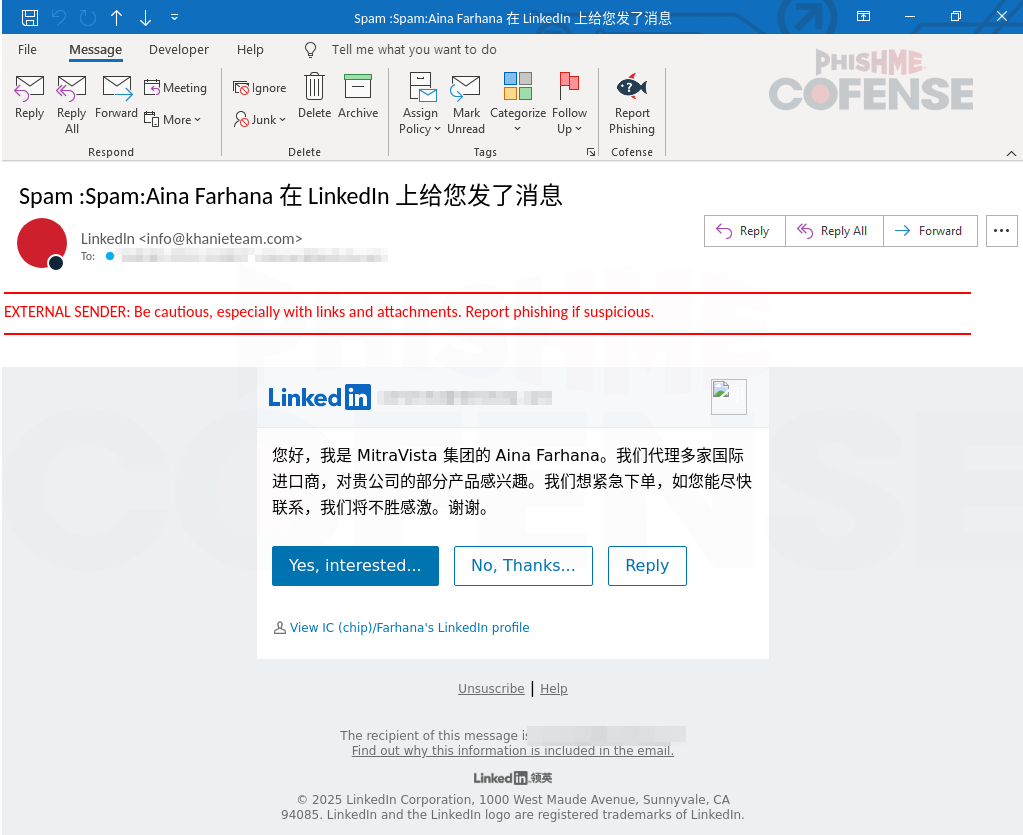
Figure 1: Email Body
Analyzing the email in Figure 1, the entire message appears convincingly similar to a legitimate LinkedIn notification informing you that someone has sent a message. The font, logo, and formatting closely match those of real LinkedIn notification emails. Even the subject line, though simple, imitates LinkedIn’s style. The display name is also spoofed, adding to the deception and making the email appear authentic. In the body of the email, when translated, the sender presents themselves as a person working for a reputable company and prompts the user to contact them urgently to discuss a potential business opportunity. This contains the “hook” designed to grab the user’s attention and utilizes common social engineering tactics used by threat actors such as manipulating users through emotional triggers and giving a sense of urgency to a situation. Once the user takes the bait, they are presented with three prominent buttons that appear to allow interaction with the message, but instead redirect the victim to a malicious, spoofed LinkedIn page. Upon closer inspection, another red flag reveals the email’s malicious nature. The sender’s address comes from the domain “khanieteam[.]com,” which is not associated with or owned by LinkedIn. This domain was also found to be only a few days old at the time of discovery and analysis, further indicating malicious intent.
.PNG?language=en "Figure2 (16)")
Figure 2: Phishing Page
After clicking any of the three buttons, the user is redirected to a fake LinkedIn login page, as shown in Figure 2. The page prompts the victim to enter their credentials. At first glance, the spoofed page looks identical to the legitimate LinkedIn login page, matching even the smallest details, but it is entirely fraudulent. This is a common tactic utilized by threat actors wherein they mimic the legitimate websites of commonly known businesses or brands, tricking victims into a false sense of security. The most obvious warning sign is the URL. The domain “inedin[.]digital” is not associated with or owned by LinkedIn. It was also observed to have been created only two months before the time of analysis, which strongly suggests suspicious activity. The threat actors deliberately selected a domain name that visually resembles “LinkedIn,” repeating familiar letter patterns like “in” and “din” to deceive users who might only do a quick glance before logging in.
This email analysis demonstrates that even messages that appear legitimate, routine, or something as harmless as a simple notification, as seen in this case, can serve as tools for deception. No matter how familiar an email may look, we cannot assume we are fully safe. Threat actors continue to evolve in both technical sophistication and persistence by crafting highly convincing schemes to exploit human trust and curiosity. Remaining vigilant, verifying sources, and thinking twice before clicking are essential steps in defending ourselves against increasingly creative cyberattacks.
Threats like this demonstrate how easily sophisticated phishing attacks can bypass traditional defenses and exploit human trust. With Cofense Managed Phishing Remediation and the Cofense Phishing Defense Center (PDC), organizations gain access to expert analysts who rapidly identify, investigate, and neutralize phishing threats before they can cause harm. By combining human intelligence with advanced automation, Cofense helps security teams respond faster and stay ahead of evolving attacks. Learn more about how Cofense can strengthen your phishing defense strategy: https://cofense.com/managed-services
Email(s) IOCs:
Stage 1 - Observed Email Infection URL: | Infection URL IP(s): |
hXXps://notifcation[.]inedin[.]digital/?xgsrdh=12602024008489914930&provider=4__cmppbWVuZXpAaWJlcmRyb2xhLmNvbQ==__xvpji__lkkd | 104.21.80.1 |
Stage 2 – Observed PayloadURL(s): | Payload IP(s): |
hXXps://singletoncop[.]info/webxr[.]php | 192.99.81.100 |
All third-party trademarks referenced by Cofense whether in logo form, name form or product form, or otherwise, remain the property of their respective holders, and use of these trademarks in no way indicates any relationship between Cofense and the holders of the trademarks. Any observations contained in this blog regarding circumvention of end point protections are based on observations at a point in time based on a specific set of system configurations. Subsequent updates or different configurations may be effective at stopping these or similar threats. Past performance is not indicative of future results.
The Cofense® and PhishMe® names and logos, as well as any other Cofense product or service names or logos displayed on this blog are registered trademarks or trademarks of Cofense Inc.