By: Hendrix Garcia, Cofense Phishing Defense Center
NoteGPT is an AI-generated tool that converts lengthy lectures, meetings, or videos into concise, easy-to-read notes in just seconds. While seemingly useful, threat actors are now exploiting it to host fake files and lure victims. They upload malicious content to NoteGPT, then share what appears to be a harmless “document” or “note”.
Because NoteGPT is a legitimate platform, many users let their guard down. Once victims click through, they’re redirected to credential phishing pages disguised as familiar login portals like Microsoft or Google. At this point, users are asked to sign in to access the file, unknowingly handing their credentials straight to threat actors.
The Cofense Phishing Defense Center (PDC) recently identified a new phishing campaign utilizing NoteGPT and Microsoft branding. This campaign tricks users into thinking they’ve received a secure document via OneDrive – a common tactic to build trust. But instead of opening a legitimate OneDrive file, the link redirects them to a NoteGPT page.
The goal? To steal a recipient’s professional credentials by just clicking the button from the received email. This particular campaign leverages familiarity as an attack vector to appear more convincing.
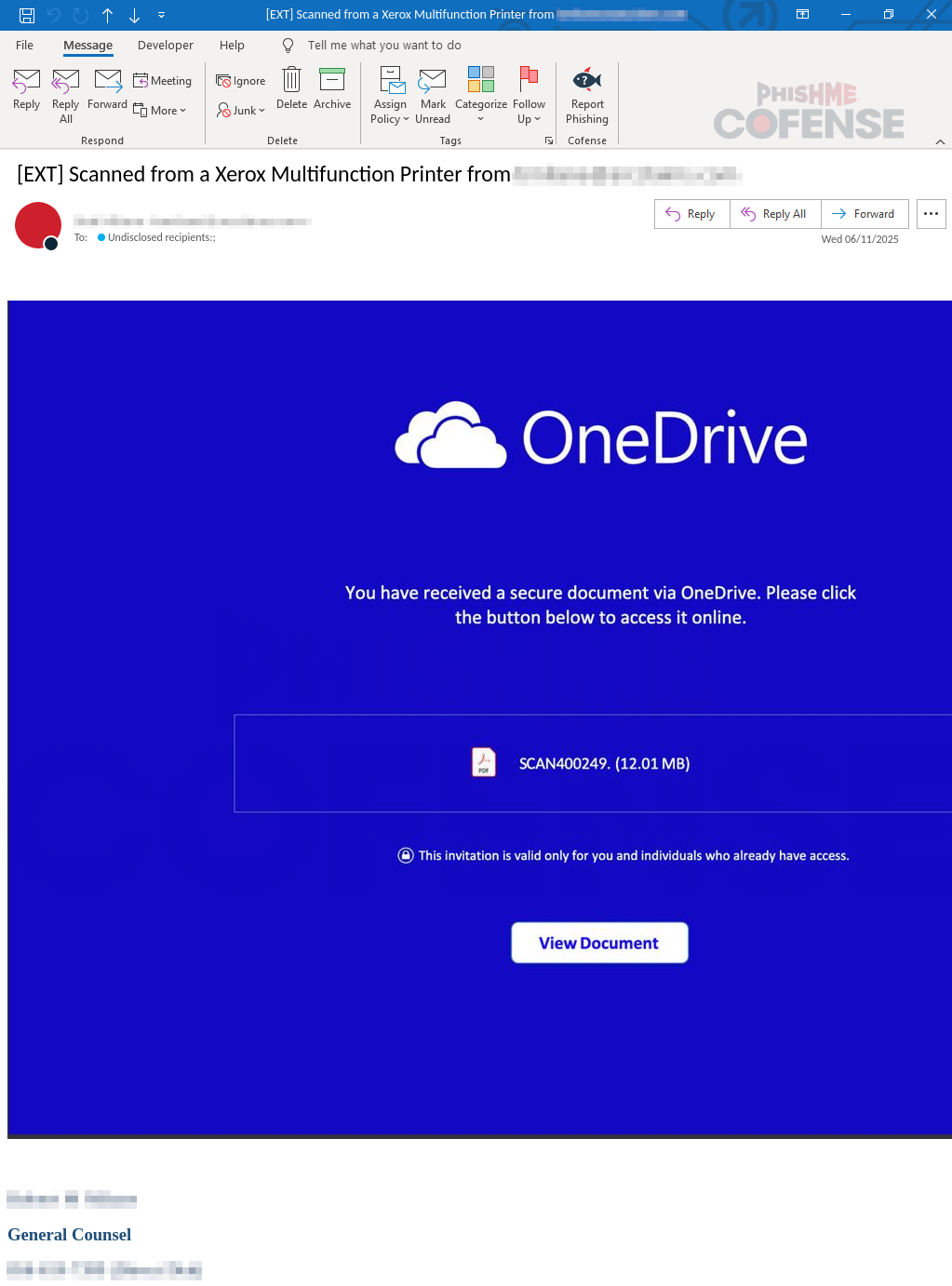
Figure 1: Email Body
The phishing threat cleverly disguises itself as a legitimate email from a risk and claims management company. On the surface, it looks like just another routine notification – informing the recipient that they’ve received a secure document via Microsoft OneDrive. As shown in Figure 1, the email appears to be sent by the company’s General Counsel using a spoofed address that closely mimics a real one, which adds an extra layer of authenticity.
What makes this especially dangerous is how simple it all seems.
The subject line is plain and unassuming, designed to look like a regular scanned document – something most professionals wouldn’t think twice about opening.
But once you get to the email body, things take a turn. The threat actor starts to hint at the importance of the document, claiming the file is a “secured document” sent via OneDrive.
It even mimics Microsoft’s branding – from the logo to the layout – making it harder to distinguish from a real OneDrive file-sharing notification. These factors contribute to making the email appear authentic as possible and luring users into a false sense of security.
.png "Figure2-(11).png")
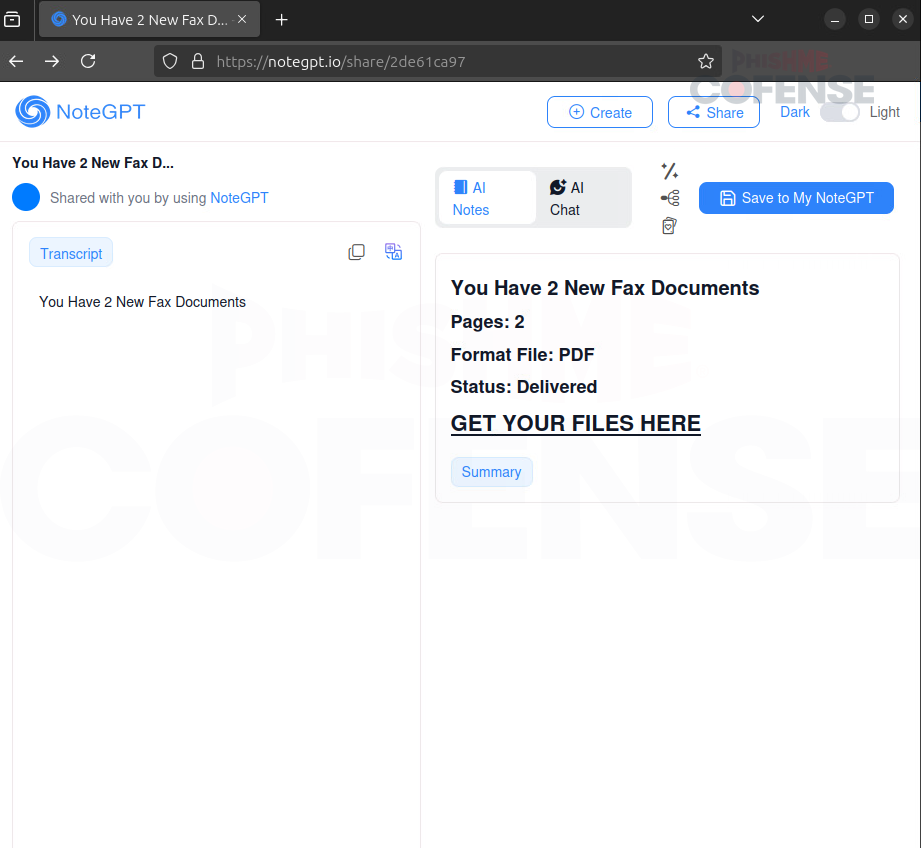
Figure 2: Infection Page
When a user clicks “View Document,” they are unexpectedly redirected to a NoteGPT page instead of a OneDrive document, as shown in Figure 2. Most people wouldn’t question this. The use of NoteGPT is a clever twist. It is not a common platform for such attacks, which makes it easier to catch victims off guard.
To the average user, the page might seem harmless because they might think it is just an AI-generated summary or a quick note adding to the illusion of legitimacy.
What makes this attack even trickier is that fraud is difficult to detect when hosted on the NoteGPT website, as the URLs won’t clue a user in to the actual content of the document.
Additionally, if a company is using NoteGPT, they are not likely to block the service’s domain. The threat actors take advantage of that and lure the user with a tempting “Get your files here” button, as seen on the right side of Figure 2. That single action triggers the next stage of the phishing scheme, and the user is redirected to a fake login page where credentials are at risk.
.png "Figure3-(11).png")
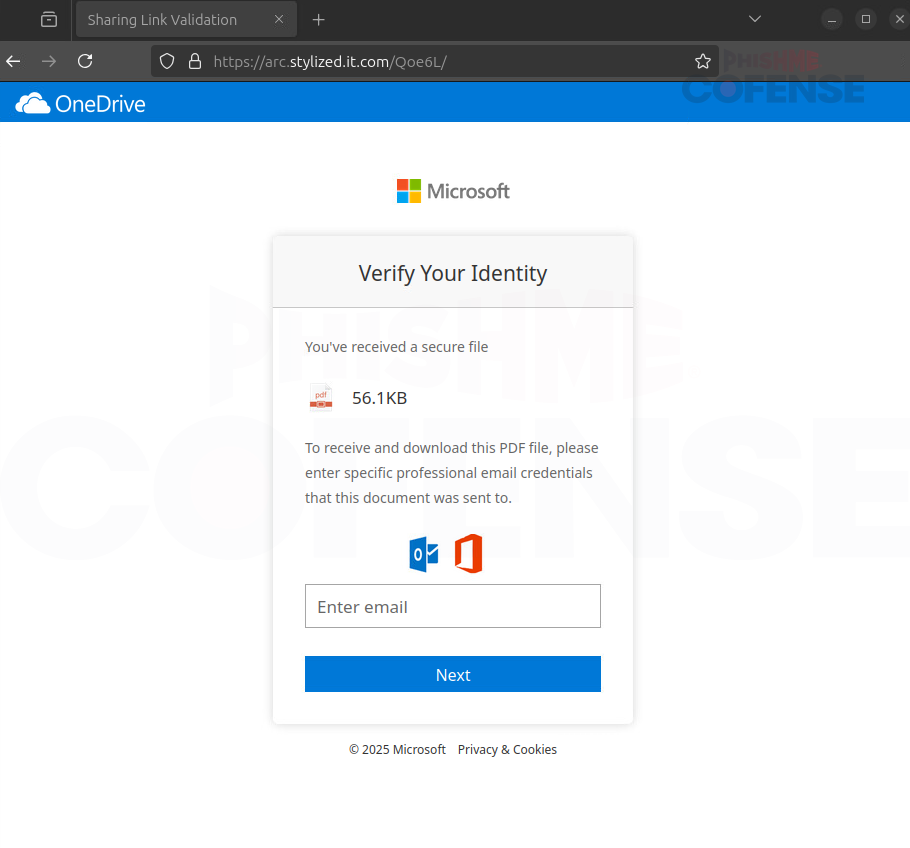
Figure 3: Phishing Page
Figure 3 is the final stage of the phishing process. At first glance, it looks like the user landed on a legitimate Microsoft login page. The layout mimics Microsoft’s secure file-sharing interface almost perfectly, which is why many unsuspecting users might still believe it’s real.
It prompts the user to enter their email credentials just like any normal sign-in screen would, but the URL tells a different story. Instead of a legitimate Microsoft URL, we observe the malicious URL “arc[.]stylized[.]it[.]com” shown in Figure 3. This is a major red flag, and threat actors are counting on their use of familiarity and branding so that the malicious URL goes unnoticed.
This NoteGPT phishing scheme serves as yet another reminder that threat actors are getting craftier, combining sophisticated design with new technologies that appear authentic to trick users. It no longer needs a catchy line or poor grammar. A familiar logo, a convincing layout, and appropriate timing can all be used to trick someone into giving their login information.
Users need to be informed and educated, so they do not make the error of providing their credentials to a threat actor. Therefore, if you receive an email saying that you’ve got a “secure document” out of nowhere and it links to a platform you aren’t expecting, like NoteGPT, pause before you click. Check the sender, look over links, and when in doubt, don’t open it.
Cofense Managed Phishing Detection and Response platform provides organizations with comprehensive phishing defense by allowing them to rapidly detect, investigate, and remediate user-reported phishing threats that evade perimeter defenses.
Request a demo today to learn more about how Cofense can help your organization neutralize phishing threats before they reach employee inboxes.