By: Cole Adkins Cofense Phishing Defense Center
Meta, the parent company of platforms such as Facebook and Instagram, plays a major role in both personal communication and business operations worldwide. A new phishing campaign is emerging that abuses Meta’s verification system and 2FA tokens to gain account access and steal sensitive information.
This campaign is particularly convincing and targets both individual users and businesses. Below, we examine how it works and how to better protect against it.
The Cofense Phishing Defense Center (PDC) has identified a credential phishing scheme targeting Meta users by impersonating the Meta brand and its verification system.
The phishing campaign presents itself as a Meta verification request that needs to be activated. Its goal is to lure recipients into clicking a Google Form and submitting their login credentials through multiple steps, including through their 2FA token.
.PNG?language=en "Figure1 (17)")
Figure 1: Email Body
As demonstrated in Figure 1, the email’s subject line is designed to grab the user's attention by stating that account verification has been approved. It uses a Gmail account with the display name shown as “Meta Verified” to reinforce the legitimacy of the email.
Embedded in the body of the email is the phishing URL redirect that goes to a Google Form. When this URL is clicked, it will take the user to the landing page of the attack. Additional elements in the email body, such as the signature from the “Meta Verified Team,” further attempt to build trust and credibility.
.PNG?language=en "Figure2 (18)")
Figure 2: Meta Verified Google Doc
As shown here in Figure 2, once the user clicks the phishing link embedded in the email body, they are redirected to this Google Form branded as “Meta Verified.” It’s noteworthy that while the document itself is legitimate, it has been crafted by the threat actor using a convincing template to mimic Meta’s verification process.
The form is presented as the first step toward account verification and even includes attention-grabbing details below the next phishing redirect, letting the user know what they have to gain by verifying their account. This approach is designed to encourage users to proceed without hesitation.
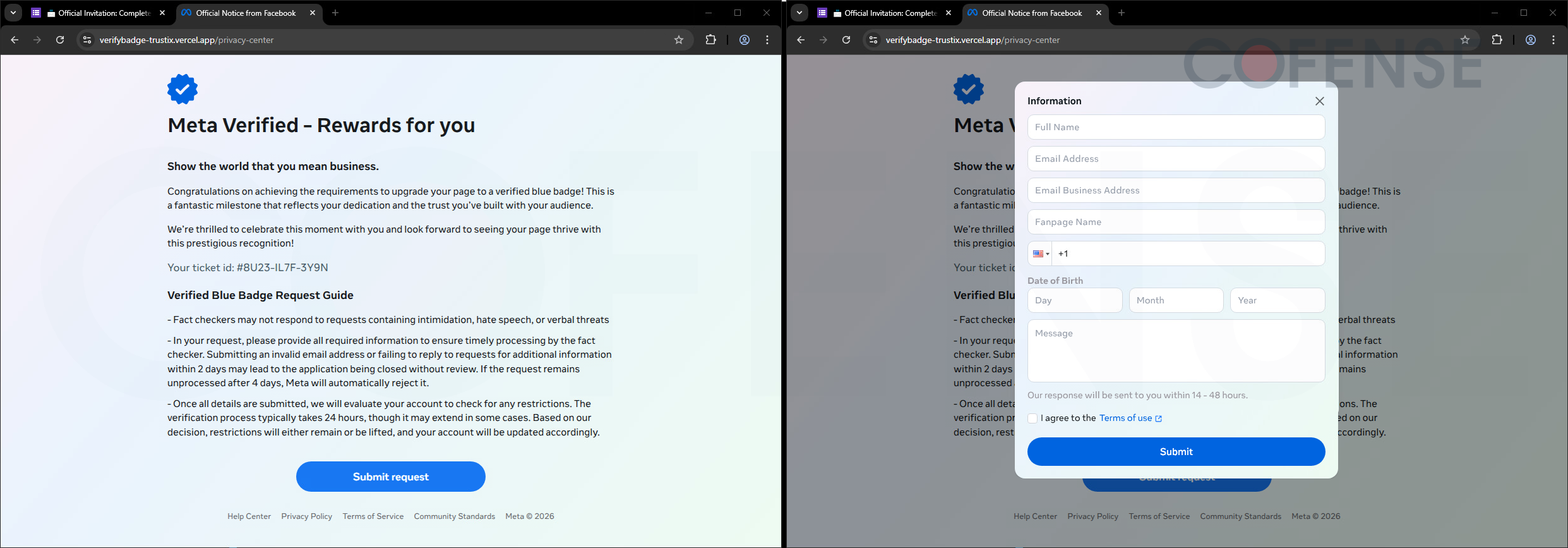
Figure 3-4: Initial Meta Verified Phishing Landing Pages
The page displayed in Figure 3 has been designed to appear as Meta Verified-branded. At first glance, many users may trust the page based on its appearance. The URL may also appear legitimate, suggesting a connection to Meta’s privacy center. This, however, is false as the “vercel.app” domain is a legitimate hosting service that is commonly abused by threat actors to create phishing pages impersonating trusted brands, including Meta.
This domain mismatch is a key indicator that users should look for. After clicking the submit request button on the page, the user is taken to the next stage (as seen in Figure 4), where sensitive information begins to be collected.
Edited for clarity and to generalize the abuse of legitimate hosting service used in phishing campaigns and to emphasize the next sentence as a key phishing indicator.
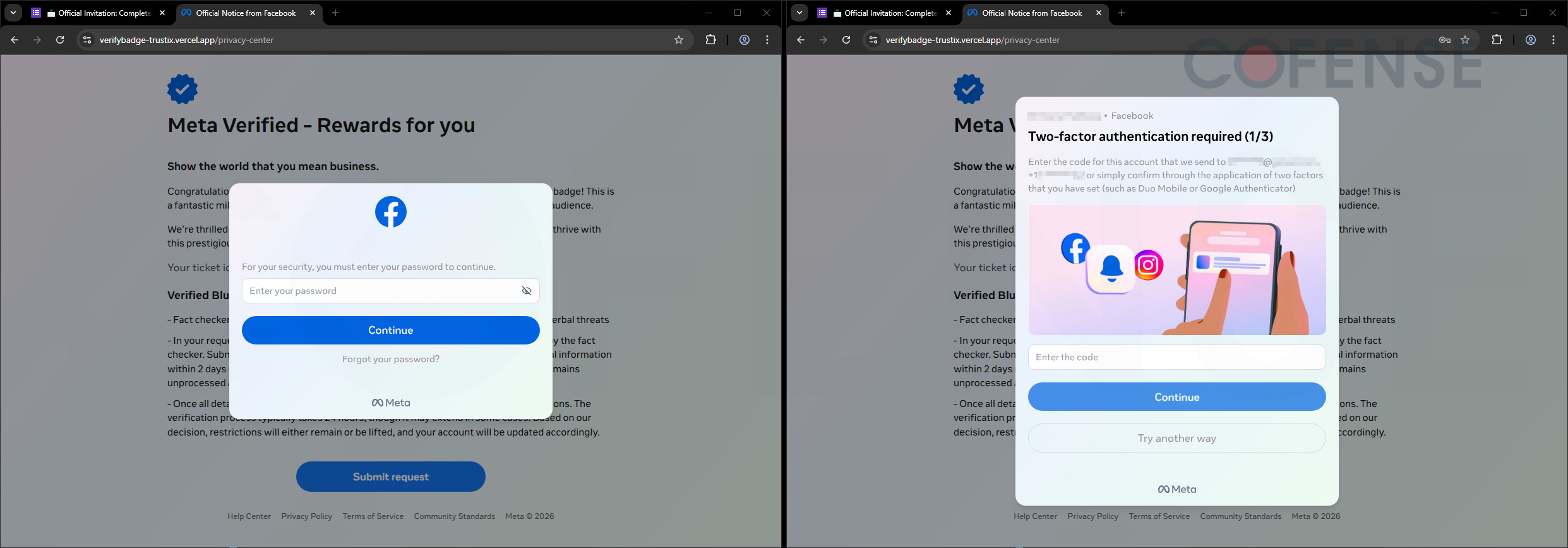
Figure 5-6: Continued Phishing Pages Including 2FA
After entering personal details, a box will appear that gathers the user’s password information and prompts them to continue. What is interesting about this phishing attempt is that the next part, as seen in Figure 6, which is set up to gather the user’s 2FA token. This is uncommon and indicates that this is a live phishing operation.
After the user enters their 2FA token, it will be captured by the threat actor in real time. The token and credentials will be used to log into the user’s account almost immediately. This does not leave much margin for error on the user’s end. Once credentials are entered, the threat actor will begin acting immediately to secure the account that is now compromised.
This phishing campaign demonstrates how, with just a few wrong clicks of a button, a user can lose their account in real time. It also highlights why it is important for users to stay vigilant and up-to-date with the latest phishing tactics that are being used. As shown in this example, 2FA is now being captured in real time and is being used to access accounts almost immediately.
Cofense Managed Phishing Threat Detection and Response (MPDR) can help organizations identify and mitigate these threats, keeping them ahead of emerging phishing campaigns. Schedule a demo today to learn more.
Email(s) IOCs:
Stage 1 - Observed Email Infection URL: | Infection URL IP(s): |
hXXps://forms[.]gle/cV8Fbu9eNgHpdY1dA | 199.36.158.100 |
Stage 2 – Observed Payload URL(s): | Payload IP(s): |
hXXps://verifybadge-trustix[.]vercel[.]app/privacy-center | 64.29.17.3 |
All third-party trademarks referenced by Cofense whether in logo form, name form, or product form, or otherwise, remain the property of their respective holders, and use of these trademarks in no way indicates any relationship between Cofense and the holders of the trademarks. Any observations contained in this blog regarding circumvention of end point protections are based on observations at a point in time based on a specific set of system configurations. Subsequent updates or different configurations may be effective at stopping these or similar threats. Past performance is not indicative of future results.
The Cofense® and PhishMe® names and logos, as well as any other Cofense product or service names or logos displayed on this blog are registered trademarks or trademarks of Cofense Inc.