By: Kahng An, Intelligence Team
A recent series of phone scam emails has been able to bypass traditional email security measures by placing malicious messages within document names, online meeting descriptions, or account name fields. These emails redirect otherwise legitimate business emails to potential victims, and are particularly notable for embedding phone scams and other malicious content while still retaining the legitimate business’s From address. This makes the email appear to originate from a trusted sender, even though it actually contains a malicious message written by the threat actor. While spoofing the From address would typically trigger failures from Sender Policy Framework (SPF) headers and editing an email would typically trigger failures from DomainKeys Identified Mail (DKIM) headers, these sample emails pass both these security checks because the email was technically sent from a legitimate and trusted source.
Key Takeaways
- At a high level, the attack chain is as follows:
- The threat actor registers an account on a legitimate service and abuses a text field where they can input an arbitrary message (such as a document file name, online meeting event name/description, or user account name). This field is used to display the malicious phone number and lure.
- A legitimate business email is sent to an email inbox that the threat actor controls. This is commonly done by sharing an invitation to the document, event meeting room, or any other similar kind of email that would embed the malicious content within the email body.
- The threat actor redirects the email to an Exchange Online email server used to send the message to potential victims. During this process, the From address header is not changed.
- The Exchange Online server sends the malicious emails to potential victims.
- The original To address does not change to the address of the recipient.
- When using an email redirection function, the From address header is not changed in these emails, making the email appear as if it is from the spoofed business.
- These emails also pass traditional email security headers such as SPF, DKIM, and DMARC and have been seen bypassing various Security Email Gateways (SEG) such as Proofpoint, Microsoft ATP, and Cisco IronPort.
Campaign Overview
Emails within this campaign use edited versions of legitimate business emails to deliver convincingly spoofed emails to recipients. Notably, most of the body contents of the emails seem legitimate except for a phone scam message or similar malicious threat in the email’s body. Figure 1 shows a sample email using this tactic. In this case, the phone scam was inserted within the account name field of this email. The threat actor likely used the phone scam message “Dear Customer, Your Zoom order…” as the name of the Zoom account to embed the malicious content within the email. Note how most of the email appears to be a legitimate Zoom message, and only the phone scam body contents and the To address make the email look suspicious.
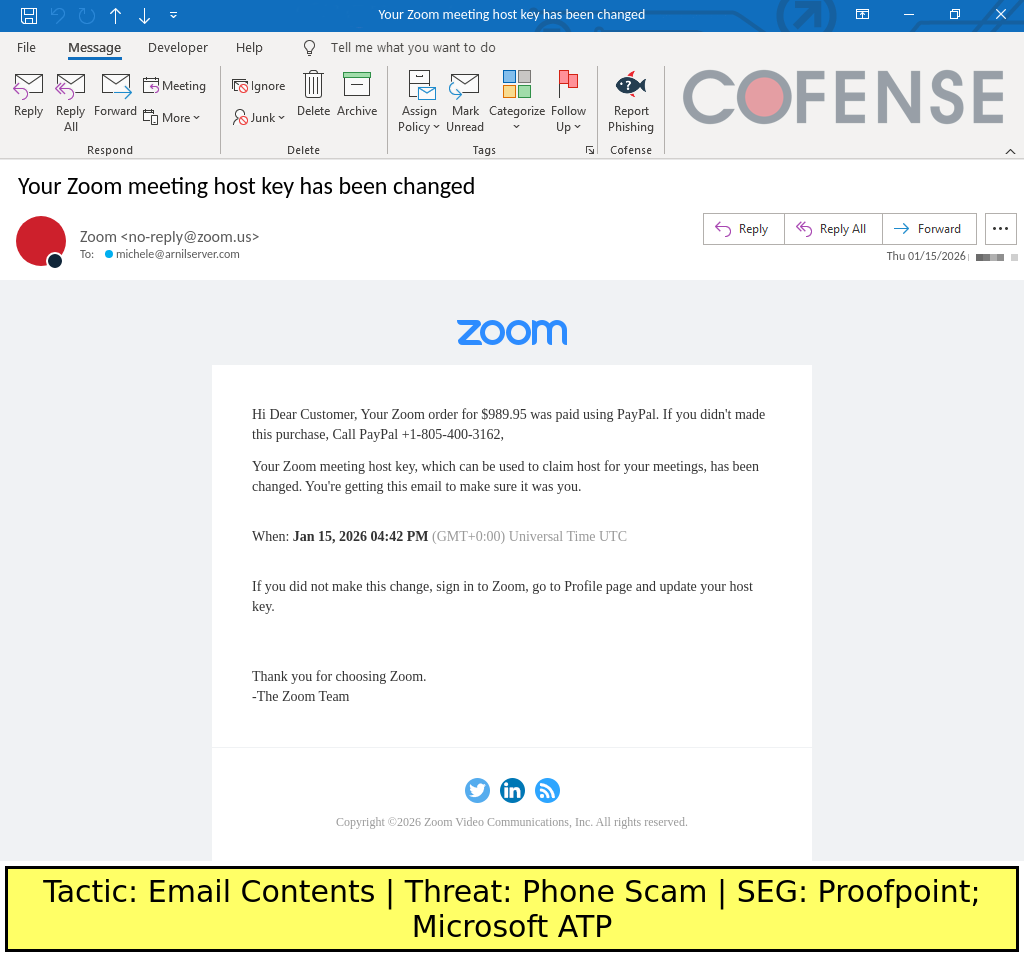
Figure 1: A sample email that redirected a real Zoom email with malicious content. Note how the From address is still marked as from “zoom[.]us” and how the body contents includes a phone scam inserted by the threat actor.
These emails work by having the threat actor create an account on a legitimate service and input arbitrary text into a field that will later be included in outgoing emails. This can usually be done by creating some kind of document, meeting invitation, or account name that will be referenced within an email. After this is done, the threat actor would need to receive a legitimate email that happens to include the malicious text that was created by the threat actor. Once the email is received, the threat actor can then redirect the email to the intended victims.
In the case of the email shown in Figure 1, the threat actor received a legitimate Zoom email sent to michele[@]arnilserver[.]com. This email was then redirected to new_batch2[@]l873mye[.]onmicrosoft[.]com, which is likely an Exchange Online email server controlled by the threat actor. When the email is redirected to this mail server inbox, the From header was not changed in transit, and Resent-From and Resent-To headers (containing michele[@]arnilserver[.]com and new_batch2[@]l873mye[.]onmicrosoft[.]com, respectively) were added to the email to indicate that the email was redirected. The mail server sent the received emails to a list of potential victims, giving the final email shown in Figure 1.
Besides the suspect message about an order that needs to be contested via a phone number, the most obvious giveaway that the email is malicious is that the email was sent to michele[@]arnilserver[.]com and not the actual recipient. Even though the recipient would obviously not have that email address, Microsoft Outlook does not display the recipient’s email address in this case, instead showing the original To header, which was set to the threat actor’s email address. Some other email clients appear to display Resent-To and Resent-From headers by default, which will make the suspect nature of the email a bit more apparent without investigating the email further. Figure 2 shows how the Resent-To and Resent-From headers are shown in Apple Mail, which exposes these headers in a clear user-facing way.
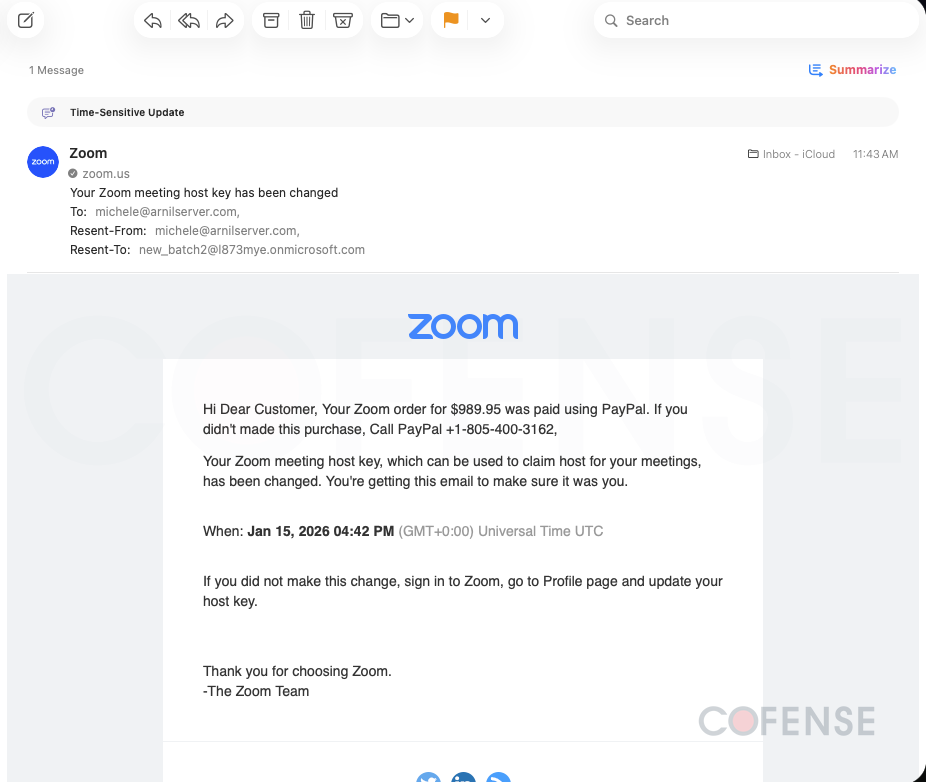
Figure 2: The sample Zoom-spoofing email when viewed in Apple Mail. Note how the Resent-From and Resent-To headers are shown to the user without needing to look at the raw email contents.
While spoofing legitimate brands is an extremely common tactic, being able to resend emails while making it still seem like the email is from the original, legitimate sender is a particularly notable tactic. Threat actors using this tactic are able to convincingly send emails that seem more legitimate to both human recipients and AI email scanning technologies that attempt to filter out malicious emails based on heuristic indicators. Additionally, not all email clients display the Resent-From and Resent-To headers when viewing emails, making these malicious emails seem more legitimate at a quick glance.
Conclusions
This campaign’s ability to evade all traditional email security measures, as well as various SEG technologies, makes it particularly difficult to defend against with email filters. Because the only reliable indicator that the email is malicious is by recognizing that the email contents seem suspicious, recipients will need to be on the lookout on all emails for suspicious indicators. Even though the From address looks like a legitimate business email, the email body contains a malicious phone number that is not related to the business. Additionally, the email contains Resent-From and Resent-To headers that show unrelated email addresses used by the threat actor to send the email to potential victims. While these indicators can be overlooked at a glance, recipients should always be on the lookout for potential malicious threats in emails.
Campaigns like this demonstrate how threat actors continue to exploit trusted services and legitimate email infrastructure to bypass traditional security controls. Because these attacks can evade SPF, DKIM, DMARC, and even secure email gateways, organizations need visibility beyond header-based detection and automated filtering alone. Cofense combines human-reported intelligence with advanced threat detection to identify and stop sophisticated email threats that other controls miss. To see how Cofense can help your organization detect, analyze, and respond to these evolving attacks faster, schedule a demo at https://cofense.com/demo.