Threat actors are impersonating leaders of partner universities in emails alleging a sexual misconduct violation has occurred, using sensitive claims to trick victims into installing abused, technically legitimate Remote Access Tools (RATs) on their computers. The alleged misconduct case is entirely fabricated, serving as a façade for delivering malware.
If successful, the intrusion can give threat actors the same access as if they were physically at the compromised computer. From there, they can typically access emails, documents, and other sensitive information, potentially leading to regulatory noncompliance and sensitive data breaches.
In this campaign, the threat actors impersonate the president or dean of universities such as Notre Dame, the University of Virginia, and the Medical College of Wisconsin. Instead of a document file, an abused, technically legitimate RAT called Zoho Assist is downloaded to the victim’s computer.
The campaign emails are comprehensive and look official, which can catch people off guard, especially if they are in a rush or multitasking. If the email recipient clicks the phishing email link, they are sent to a Google Drive file first. This first URL helps obfuscate malware from the email security technologies. The Google Drive file contains another link, which downloads a malicious Zoho Assist instance.
Cofense Intelligence consolidates campaign data like indicators of compromise (IOCs) and phishing email content in Active Threat Reports (ATRs). ATRs contain the full infection chain from the initial phishing link to the final malware file or credential phishing C2. If one ATR IOC appears in the organization, IT professionals can read the ATR to understand the phishing attack’s impact and mitigations. Unlike other email security blocklists with stale IOCs, IOCs from ATRs are fresh and based on phishing attacks received mere hours ago. Each ATR has been curated by an analyst. This human-vetted intelligence provides context and the campaign information necessary to mitigate future phishing attacks. For this university sexual misconduct phishing campaign, actionable intelligence can be found in ATRs like 419498, 419566, and 414029.
Key Points
- Phishing emails in this campaign typically spoof a real university’s letterhead, signature block, and email domain, so they look like they came from actual university leadership.
- Public health is especially important given that it is one of 16 sectors designated by CISA as critical infrastructure.
- Zoho RAT was delivered in all instances of this campaign.
- Zoho RAT is a technically legitimate RAT capable of viewing and controlling the screen, transferring files off the computer, and delivering files such as ransomware.
Phishing Email Content
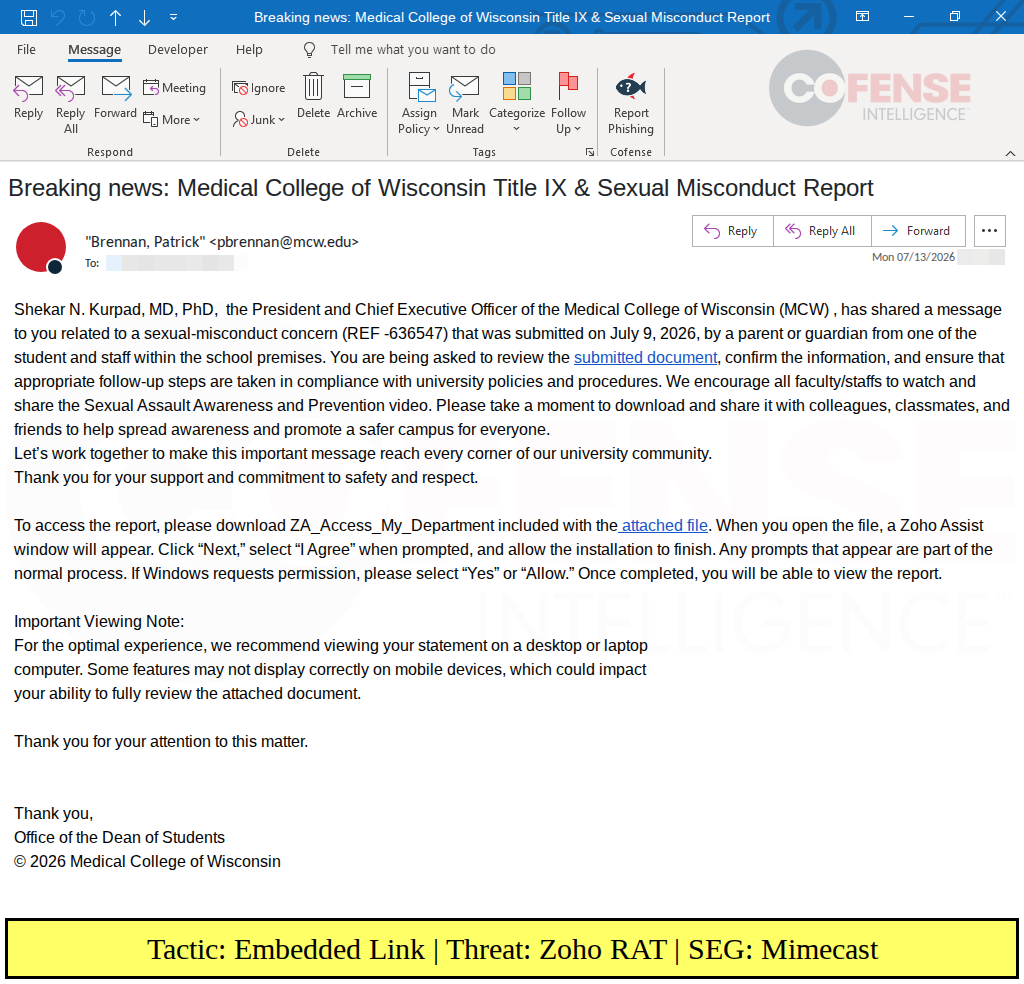
Figure 1: Sample email delivering Zoho RAT via a Google Drive Link (ATR 419566).
In the campaign shown in Figure 1, threat actors sent phishing emails regarding a sexual misconduct concern involving either a university student or staff member. The subject matter is especially important to the phishing recipient if they work with university students and thus may be vulnerable to a Title IX case. The email is customized by using the sender’s university leadership (like the president, dean, etc.) in the opening and signature block. The sender address spoofs the university’s domain. Phishing emails in this campaign typically copy the real university’s email signature block. By using authority and a potential Title IX violation, threat actors hope to overpower skepticism and encourage clicking on the phishing URL.
Curiously, the email states plainly that Zoho Assist will be downloaded. The email also provides instructions on how to navigate the installation process. While legitimate emails may require downloading files, they typically do not require downloading programs.
Analyzing different emails from this campaign shows that threat actors are likely working from a shared template. The differences between each phishing attempt are primarily the university leadership in the opening and the university email signature block. Although those are customized, the rest of the email contains few variances. Despite that, the email is sufficient enough to bypass some email security technologies. If this campaign starts getting caught, threat actors will almost certainly find other ways to bypass email security controls, such as using AI-based polymorphic phishing to add more variations between emails.
Phishing Link Content
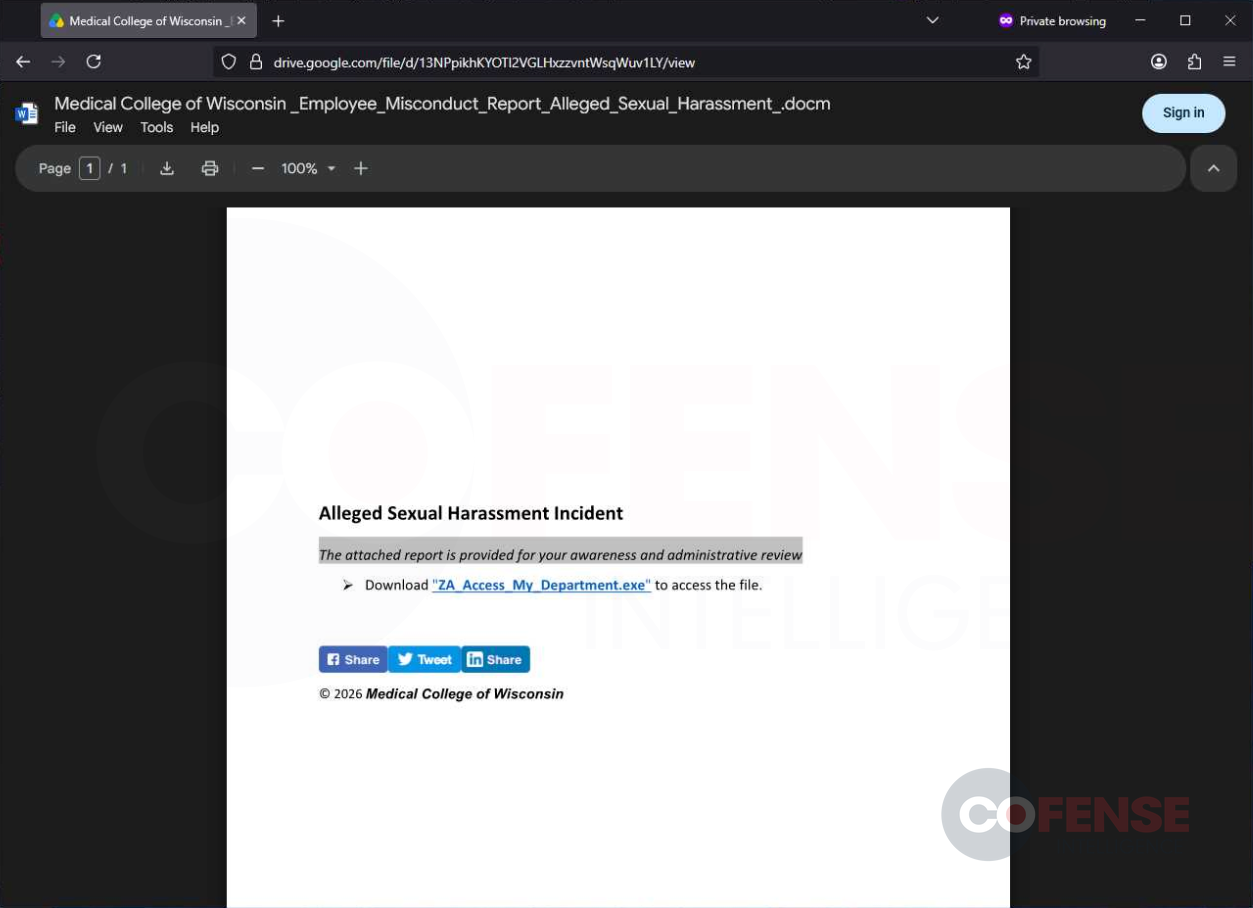
Figure 2: A Google Drive file with a link to download Zoho RAT (ATR 419566).
If the recipient clicks on the link in the phishing email, they are brought to Google Drive to view a file. The Google Drive file (Figure 2) does not detail the misconduct concern but rather provides another link to download and access the file. The customization of the Google Drive document is consistent with the customization in the phishing email. Clicking on the link in the Google Drive file downloads Zoho RAT. Domains abused to host Zoho RAT include non-Google cloud services and threat actor-controlled websites.
Using Google Drive to deliver malware is not a new tactic. Prior notable campaigns include Poco RAT targeting Spanish victims and the various information stealers targeting the Hospitality industry. Given how other Google services are still abused for malicious redirecting, it seems likely that modern email security controls struggle to differentiate legitimate Google links from malicious ones. Having a consistent and reliable way to bypass email security controls is useful to threat actors, which is likely why Google Drive was used in this campaign.
In this campaign, Zoho RAT was uploaded to both abused non-Google cloud services and threat actor-controlled domains. Threat actor-controlled domains used in this campaign are typically newly registered domains less than a month old. Although threat actors can customize websites they own, it can be easier for IT professionals to block such newly registered domains. Alternatively, threat actors can first abuse a legitimate cloud service to host malware (like SharePoint) to bypass email security controls, lower suspicions, and hide the malware download or credential phishing page behind something that looks routine. Although users may be less wary when downloading files from cloud services like SharePoint, the cloud service may be able to block the abusive content.
Who Was Targeted?
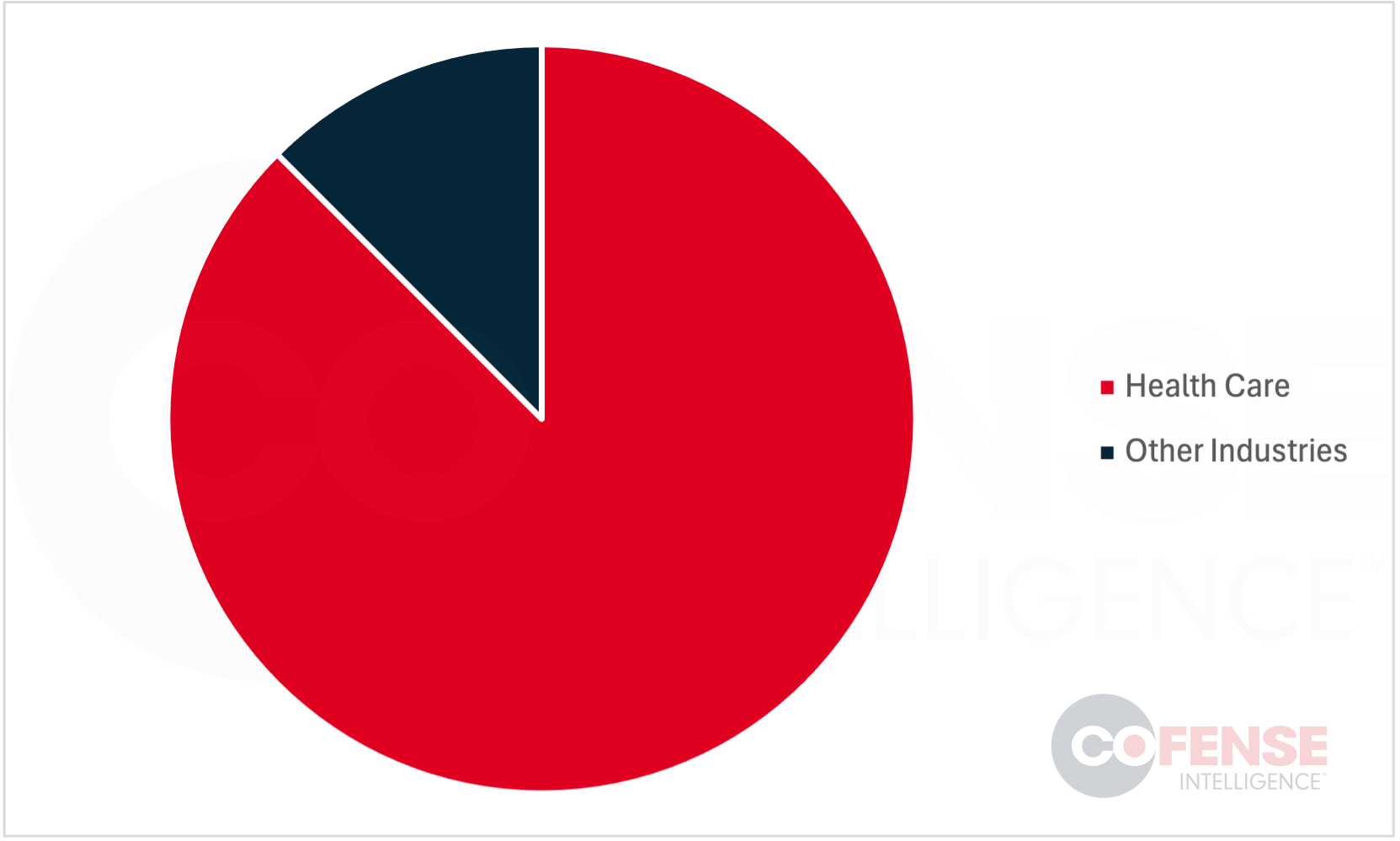
Figure 3: Industries targeted by the University Sexual Misconduct Campaign.
The bulk of the phishing attempts appear to be against health care industry-affiliated universities. This makes it likely that threat actors intentionally targeted these organizations. This is concerning because Public Health is one of the sectors identified by CISA as critical infrastructure. Attacks on critical infrastructure could have “a debilitating effect on security, national economic security, national public health or safety, or any combination thereof”.
Conclusions
This report details the university sexual misconduct campaign that appears to target the public health industry. Some key details include the likely intentional targeting of medical colleges and teaching hospitals, the oddly upfront program installation guide, and the potential for AI-polymorphic attacks in the future. It is unlikely to be a coincidence that over 80% of the targets were healthcare-related universities, so the public health industry should stay vigilant against intrusions and regulatory noncompliance. Although the current iteration of this campaign appears to use a simple generative program, it is already enough to bypass current Integrated Cloud Email Security (ICES) controls. The ICES bypass is already happening without AI-generated variations.
Mitigations
- Contact the legal department for help. When receiving a notification from a different university, it can be worthwhile to see if the legal department has received any guidance. By contacting a third party, the legitimacy of the notification can be checked while preserving the organization’s partnership.
- Stay vigilant with downloaded files. Although the phishing email states that “AZ_Access_My_Department” will be downloaded, the employee should take pause, especially when dealing with external files. Remind staff that if a document supposedly requires installing new software, this is a warning sign worth stopping for.
- Closely monitor systems to catch phishing attempts early and remediate compromised accounts quickly. Tools such as Cofense Triage and Vision give security teams the visibility needed to act before an account is fully compromised.
- Invest in human-vetted threat intelligence to complement automated feeds. Automated systems are fast but cannot always tell a legitimate use of a tool from a malicious one, and human analysis adds the context and confidence that speed alone cannot provide.