Since September 2026, threat actors have been sending emails that appear to be an invitation to a private Anthropic AI meeting, but are actually attempts to steal Google and Microsoft login credentials. Exclusive access to new AI technology is valuable to many organizations, which is why threat actors use it as a lure in their phishing emails.
Risks to the organization from this campaign include threat actors compromising a sensitive account, accessing the account’s sensitive documents (e.g. proprietary marketing material), and using the compromised account as an initial vector to further infiltrate the organization. Employees must stay vigilant, as these phishing emails bypass current email security technologies due to the abuse of legitimate tools like URL shorteners and CAPTCHAs.
Cofense Intelligence consolidates campaign data, including indicators of compromise (IOCs) such as malicious web addresses, phishing email content, and broader campaign context, into Active Threat Reports (ATRs), providing a comprehensive view of identified threats. ATRs contain the full infection chain from the initial phishing link to the final malware file or credential phishing resource. If one ATR IOC appears in the organization, cybersecurity professionals can read the ATR to understand the phishing attack’s impact and mitigations. Each ATR has been curated by a human analyst. This human-vetted intelligence provides context and the campaign information necessary to mitigate future phishing attacks. For this private Anthropic AI preview campaign, actionable intelligence can be found in ATRs 423868, 423866, and 423475.
Key Points
- The campaign contains a tantalizing, private offer to preview Anthropic AI technology, which may be enough for employees to click before inspecting the email.
- The video teleconference software GoTo Webinar, which is used to send legitimate meeting emails and is usually not blocked by email security technologies, was abused to send a threat actor’s URL instead.
- The URL shortener zpr[.]io, which turns long URLs into short links, has been abused to help these phishing emails bypass current email security technologies.
- CAPTCHAs, which are tests that confirm a real human is visiting the website, are similarly abused to prevent automated analysis.
- Threat actors use subdomains and dashes (-) to obfuscate the malicious URL.
Step 1: The Invitation Email
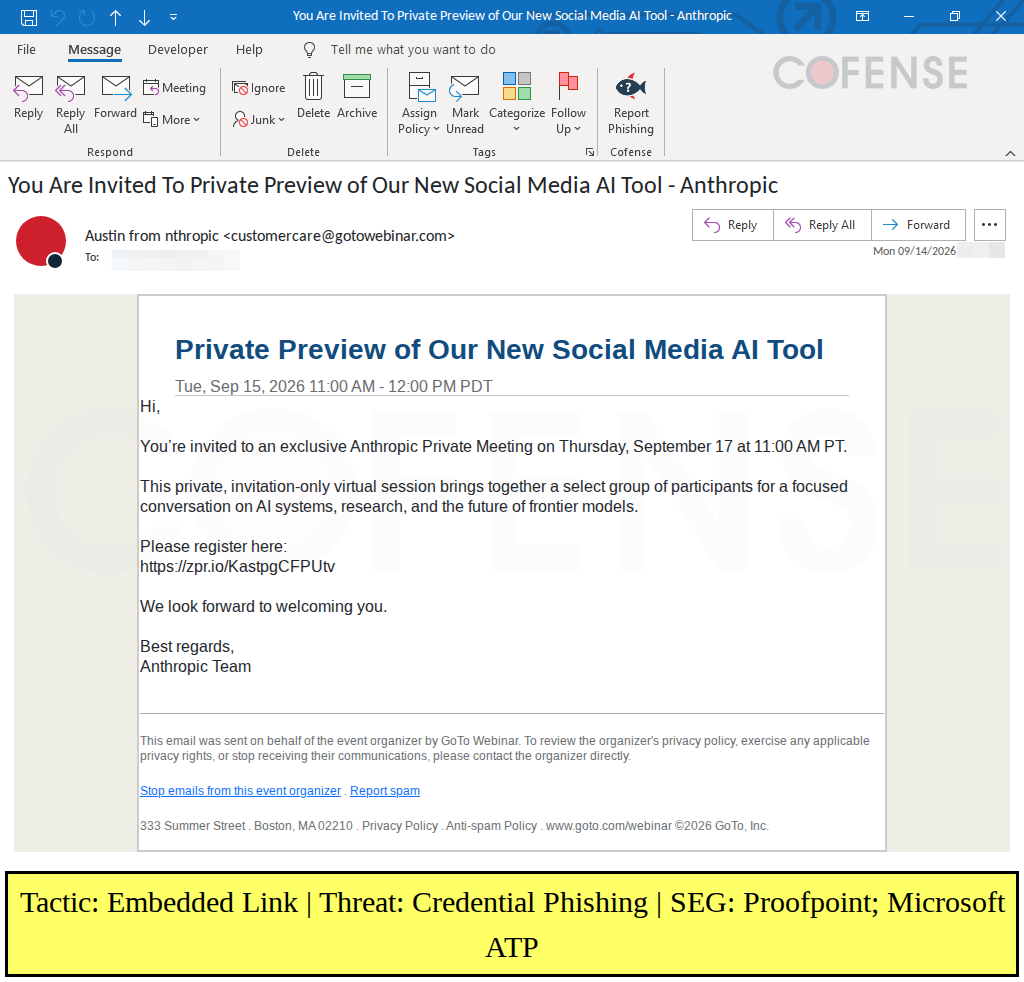
Figure 1: Anthropic meeting invitation email used in credential phishing (ATR 423475).
Emails in this campaign claim to be an exclusive invitation to see Anthropic’s new AI tool. Many organizations are deciding how AI fits into their business, so a private preview would be very valuable if the email were real. As developments in AI continue to dominate the news cycle, getting a private preview of advancements in Anthropic’s AI is an effective phishing lure.
The phishing email appears to be an abuse of the legitimate GoTo Webinar service. The email sender address appears to be customercare@gotowebinar[.]com. Threat actors have previously abused that email address and GoTo Webinar’s free trial in 2020. The email also contains a footer with GoTo Webinar branding.
The text in the email contains no obvious spelling errors. The email sender name, however, reads “Austin from nthropic” with the “A” missing from Anthropic. Although this is a small misspelling, it is still a useful warning sign.
The link in the email appears to be generated by Zapier’s URL shortener service. Zapier is a legitimate business process automation company, and their URL Shortener is designed to work with Claude, ChatGPT, and other MCP-compatible AI. Unfortunately, this tool has been abused by threat actors during this Anthropic AI Preview campaign. In other campaigns, threat actors have abused non-AI, trusted services like link shorteners or cloud collaboration platforms as the first link in a phishing campaign to avoid being blocked by email security technologies.
Step 2: The First Checkpoint
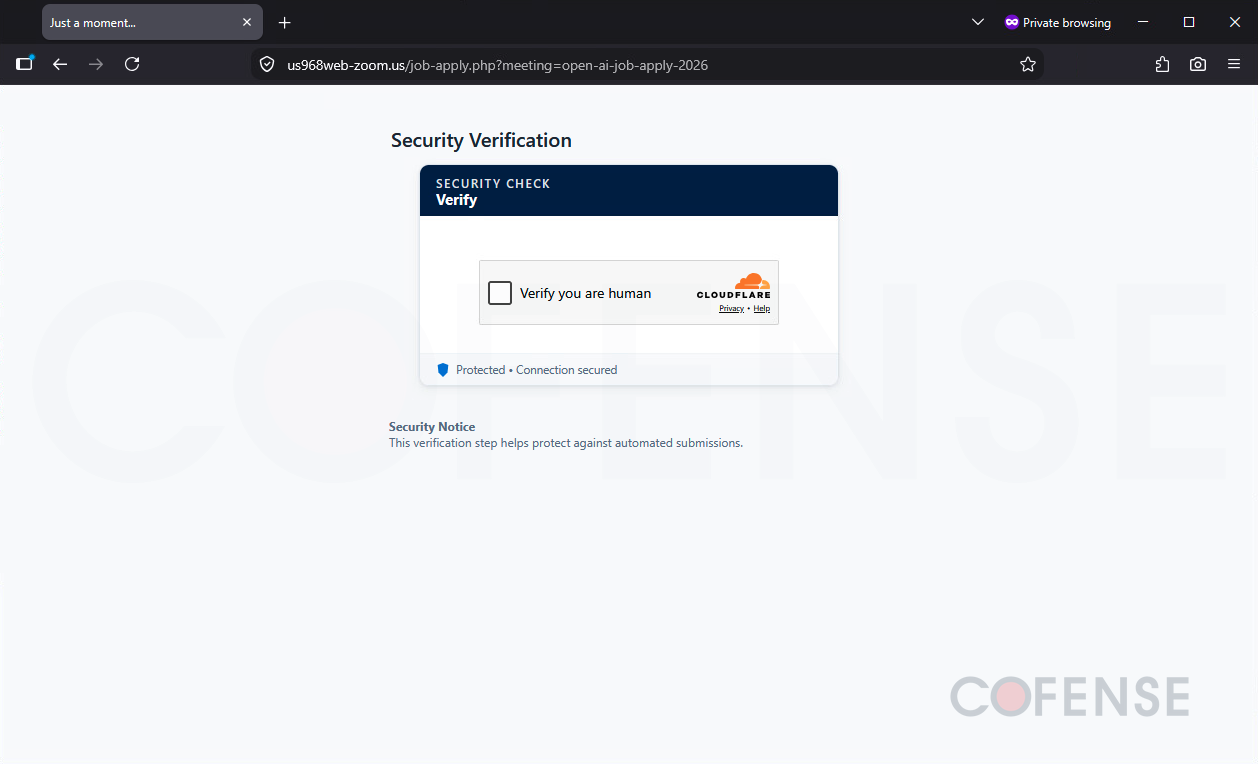
Figure 2: Cloudflare CAPTCHA page to hinder automated analysis (ATR 423868).
If the phishing email link is clicked, a CAPTCHA page appears. This Cloudflare CAPTCHA must be completed before the phishing content is shown. This CAPTCHA is the first of two checkpoints that help threat actors block automated scans of their website. Because CAPTCHAs are common on legitimate websites, phishing recipients may believe all is well and everything is secure because of the CAPTCHA.
Step 3: The Fake Meeting Page
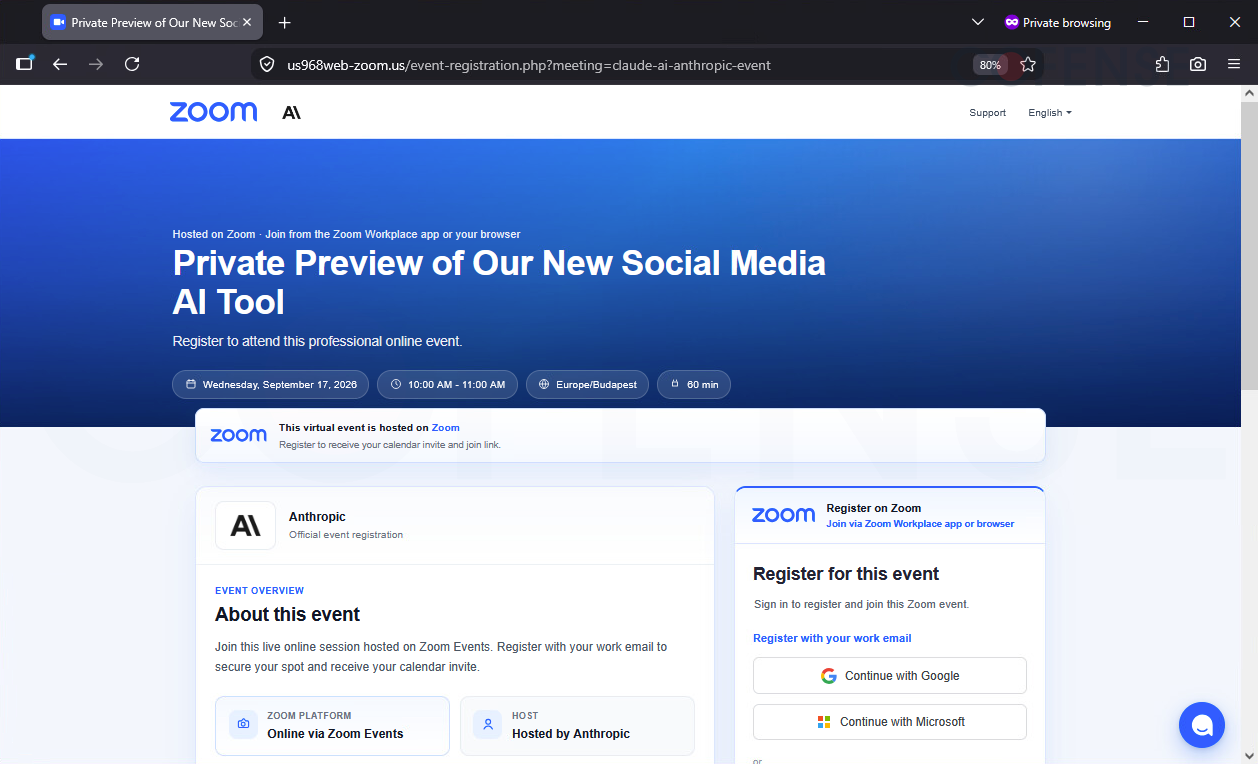
Figure 3: Zoom-spoofing page with Anthropic meeting information (ATR 423475).
After completing the CAPTCHA, a Zoom-spoofing meeting invitation page appears. This brand does not match the GoTo Webinar branding from the email. The page’s Zoom branding is consistent with the “zoom” in the malicious domain, us968web-zoom[.]us.
If the phishing recipient wants to attend the “meeting”, they need to register for the event. They are prompted to register with their work email. Credential phishing occurs when the user clicks on either “Continue with Google” or “Continue with Microsoft”.
Step 4: The Second Checkpoint
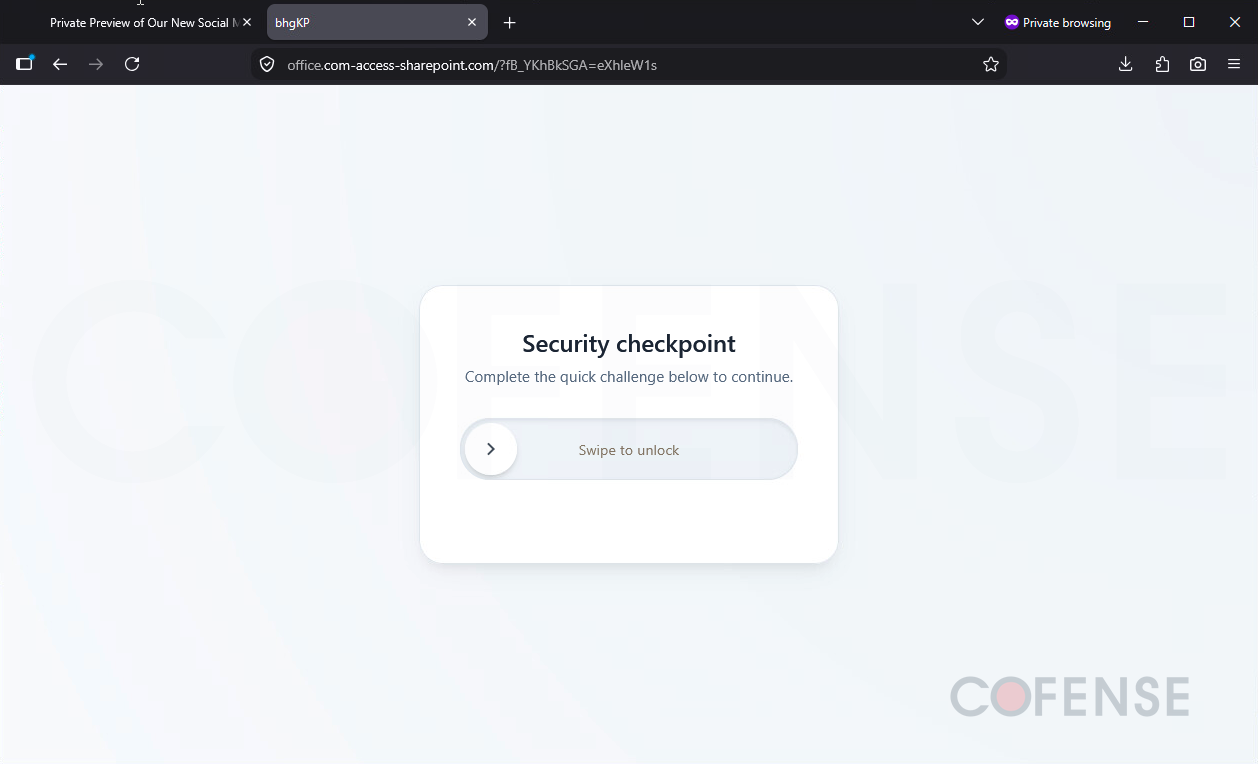
Figure 4: Custom CAPTCHA page to further hinder automated analysis (ATR 423475).
After clicking “Continue with Google” or “Continue with Microsoft”, another CAPTCHA page appears. This CAPTCHA requires a sliding motion to “unlock” the page. This custom CAPTCHA also appears to be good at detecting and blocking analysis from the most popular VPN services, scanners, Tor browser, and other tools used by defenders.
Because the phishing attack has two distinct CAPTCHAs, automated analysis tools may not be able to follow every step in the credential phishing attack.
Step 5A: The Fake Google Login Page
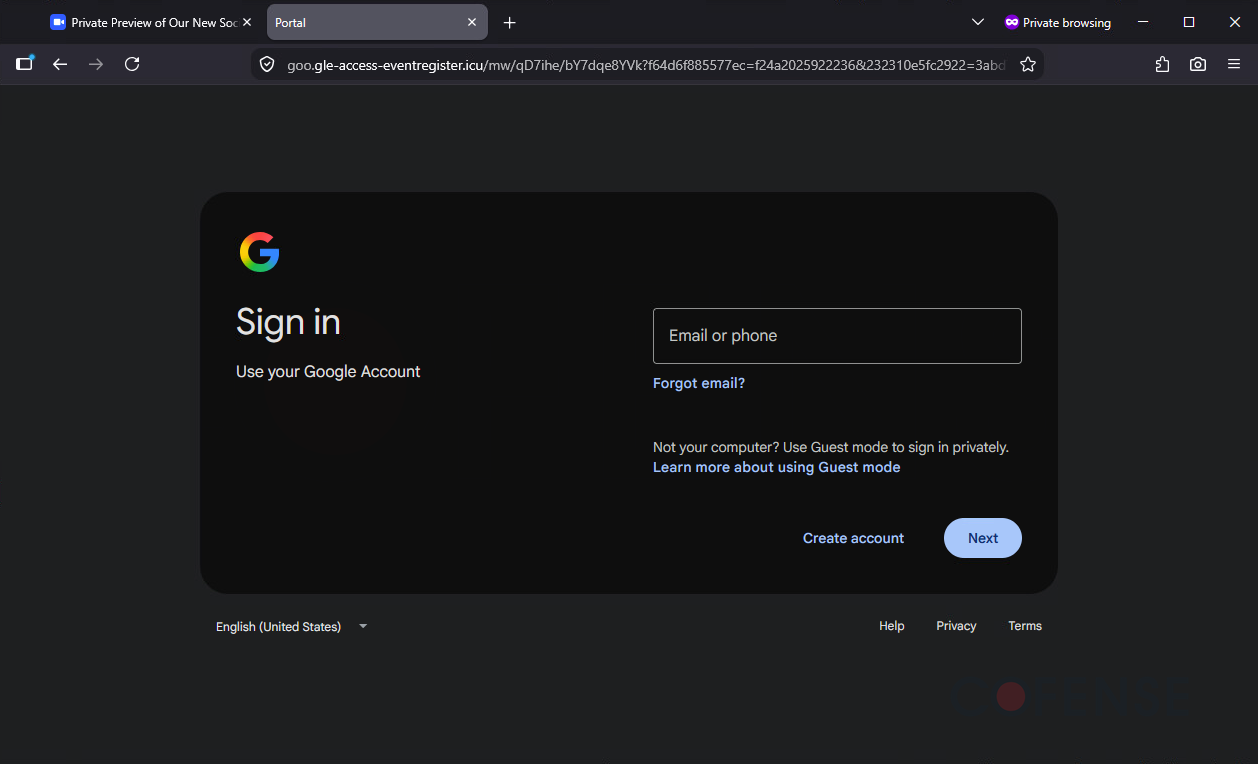
Figure 5: Google credential phishing page after custom CAPTCHA (ATR 423866).
If “Continue with Google” is clicked and the CAPTCHA is completed, the Google credential phishing page appears. Currently, the Google credential phishing page only captures usernames. It is likely that the page is misconfigured as it does not prompt for a password. After credentials are submitted, the browser does not redirect to the real Google login page, nor does a fake confirmation appear.
Not only is the phishing page remarkably similar to the legitimate Google login page, but the subdomain is also tricky. Employees who quickly read goo[.]gle-access-eventregister[.]icu might not recognize that the URL is not Google.
Step 5B: The Fake Microsoft Login Page
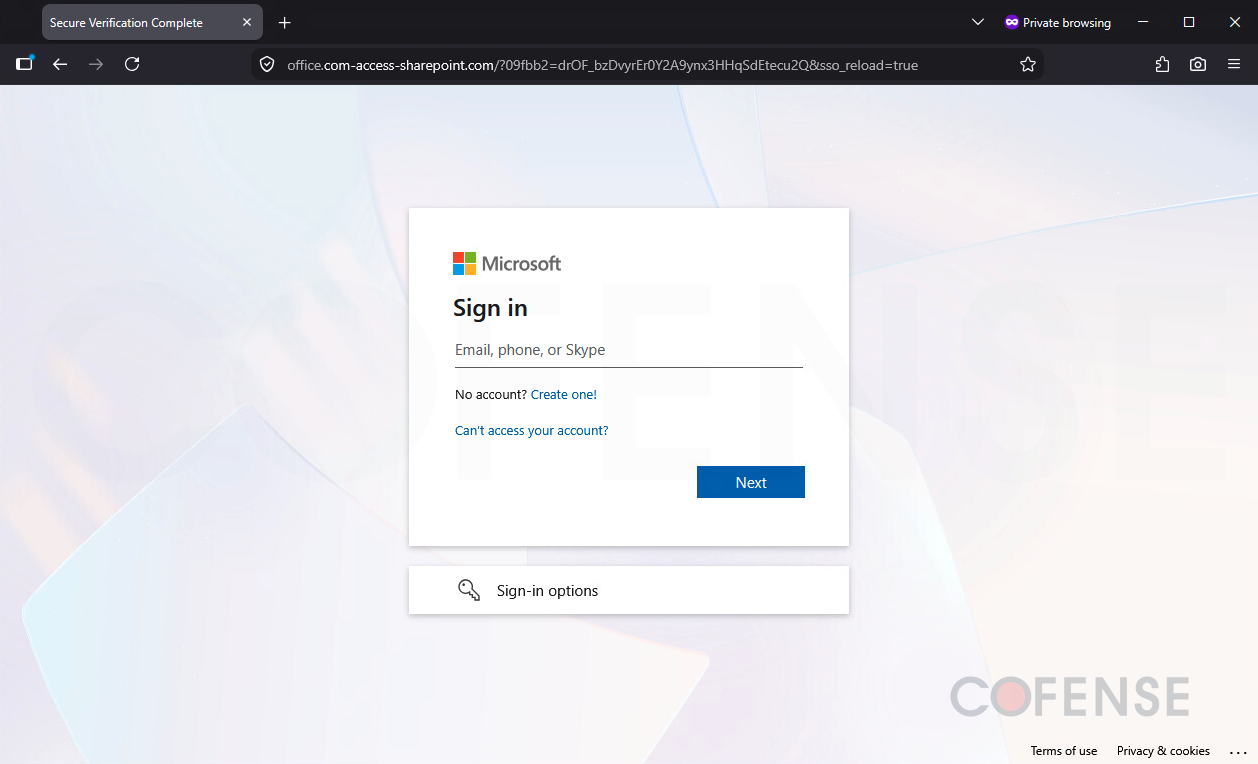
Figure 6: Microsoft credential phishing page after custom CAPTCHA (ATR 423475).
If instead of clicking on “Continue with Google”, the user clicked “Continue with Microsoft”, the Microsoft credential phishing page would load. Just like the previous Google Credential Phishing section, the CAPTCHA must be completed (Figure 4) before the phishing content is shown. Unlike the Google credential phishing page, the Microsoft version captures both the username and password. After credentials are submitted, the browser does not redirect to the real Microsoft login page, nor does a fake confirmation appear.
The Microsoft phishing page mimics the real Microsoft login page well. It also has a tricky subdomain, where office[.]com-access-sharepoint[.]com mimics the real office[.]com or sharepoint[.]com domain. Entering credentials into this page exfiltrates them to the threat actor.
Conclusion
This report covers the private Anthropic AI Preview campaign that uses a fake invitation lure, multiple CAPTCHAs, and Google and Microsoft login page replicas. The campaign was very likely designed by threat actors to bypass current email security technologies and tools used by defenders. Once the employee has reached the credential phishing page, they may not be looking for warning signs anymore. The Google credential phishing page only targets usernames, whereas the Microsoft credential phishing page asks for both the username and password. Stolen credentials give threat actors access to a trusted account, the emails stored in it, and a foothold for future attacks against the organization.
Mitigations
- Check if the brand remains consistent from the email to a login page. Although organizations can use services like GoTo Webinar to send meetings on their behalf, a GoTo Webinar email is unlikely to redirect to a Zoom event registration page. Searching for small inconsistencies can help identify an email as part of a phishing campaign.
- Remind employees that both the URL and domain determine whether a login page is legitimate. Although the logos and design of the page may look correct, threat actors are skilled at mimicry especially now with the use of AI. Note that the URL in the email might not be the same URL as the login page due to URL redirects.
- Use Cofense Vision. Vision AI can cluster structurally related messages even when threat actors rotate senders, subjects, URLs, and page elements.
- Invest in human-vetted threat intelligence to complement automated feeds. Automated systems are fast but cannot always tell the difference between a legitimate tool being used by IT and the same tool being abused by threat actors, and human analysis adds the context and confidence that AI-based speed cannot provide.
To learn how Cofense combines AI-driven detection, human-vetted threat intelligence, and rapid remediation to identify and stop sophisticated phishing attacks that bypass traditional security defenses, visit cofense.com/platform.