By: Jacob Malimban, Intelligence Team
GitHub and GitLab are often used and trusted by programmers, project managers, and software end-users, but that trust is increasingly being abused by threat actors. These Git repository websites are necessary and can’t be blocked because of their use by enterprise software and normal business operations. By uploading malware or credential phishing pages to repositories hosted on these domains, threat actors can generate phishing links that won’t be blocked by many email-based security defenses like secure email gateways (SEG). GitHub and GitLab mark the latest trend in abuse of legitimate cloud collaboration platforms.
The rise in Git repository website abuse is particularly concerning as the threat continues to grow. Since 2021, the number of campaigns has increased every year. 2025 was the most abused year, constituting 45% of the total volume. Threat actors also abuse these websites to deliver a plethora of malware. 42% of campaigns delivering malware instead of credential phishing is a lot. Finally, threat actors are also performing hybrid, dual attacks that deliver both malware and credential phishing.
Key Points
- 95% of these malicious campaigns abuse GitHub compared to 5% abusing GitLab.
- 58% of these campaigns deliver credential phishing.
- 42% of these campaigns deliver malware.
- Abuse of Git repositories is increasing, with just under 50% of abuse from 2021 to 2025 happening in 2025.
- Git repository management websites like GitHub and GitLab may be integral to an organization’s operations and can’t be wholly blocklisted, like some .es domains.
- The trust in these Git repository management websites may help phishing emails bypass email-based security controls because less scrutiny is applied.
Context and Background Information
To understand GitHub and GitLab, it helps to understand their core components: code repositories, Git, and cloud services.
Code Repositories
A repository is where the code is stored. If something is related to the final program, it is in the repository. For programs, repositories can also store README documents and configuration files. As there is usually one main repository, it is easy to find the different files that constitute a final program. Before adding Git, a repository is like a developer folder that contains all program files, or a raw footage folder for video editors, or a project folder for project managers. Repositories with a version control system like Git become easier to manage.
Git
Git is a version control system (VCS). It allows each developer to make their own copy (branch) of the repository files. From there, they can make edits to their personal copy without interfering with the central repository. After ensuring everything is stable, the developer can merge their changes with the central repository. This helps avoid having multiple FINAL_FINAL_ACTUALLY_FINAL versions, as the files found in the repository at the time of checking are final. As a VCS, Git also maintains the historical versions of the files if they need to be referenced.
GitHub and GitLab not only host Git repositories but also act as developer platforms for managing software. As YouTube serves user-generated videos, GitHub and GitLab serve code repositories made by developers. Although these two repository websites and other similar ones may have specific advantages when compared to each other, they generally have the same core features, like issue tracking and free downloading of public repository files.
Cloud Services
For threat actors, GitHub and GitLab are legitimate cloud storage providers that can allow malware upload and file hosting. As those domains are trusted by developers, programmers, and most enterprises, threat actors hope to hide their malicious activity among the legitimate traffic. Instead of malware, they can alternatively upload malicious website files. When threat actors host a malicious site through GitHub Pages or GitLab Pages, it is typically for a credential phishing attack. There, they try to steal login details by spoofing Microsoft, Google, and other major sensitive business accounts.
The GitHub websites in this analysis include github.com, githubusercontent.com, and github.io. The GitLab websites include gitlab.com and gitlab.io.
github.com and githubusercontent.com
- github.com and githubusercotent.com primarily deliver malware only when abused.
- 53% of all campaigns abusing the GitHub domains deliver malware.
- github.com download links typically redirect to githubusercontent.com.
Threat actors use both the github.com and githubusercontent.com links, which are generated when they upload files to GitHub, to distribute malware. The github.com links may be less suspicious, as those links can look indistinguishable from developers sharing legitimate repositories. githubusercontent.com is typically used to quickly retrieve a file.
Although the content on these websites is the same, the presentation is different. For instance, code files viewed on github.com use the GitHub UI which has syntax highlighting, the repository path, and links to the latest merge request. Viewing the file on raw.githubusercontent.com instead shows code in plain text. As the raw version provides fewer resources, it requires less network traffic to access and download the file, and can be done automatically without user consent. This is useful for quickly accessing a file when the UI is not needed, like when silently downloading malware.
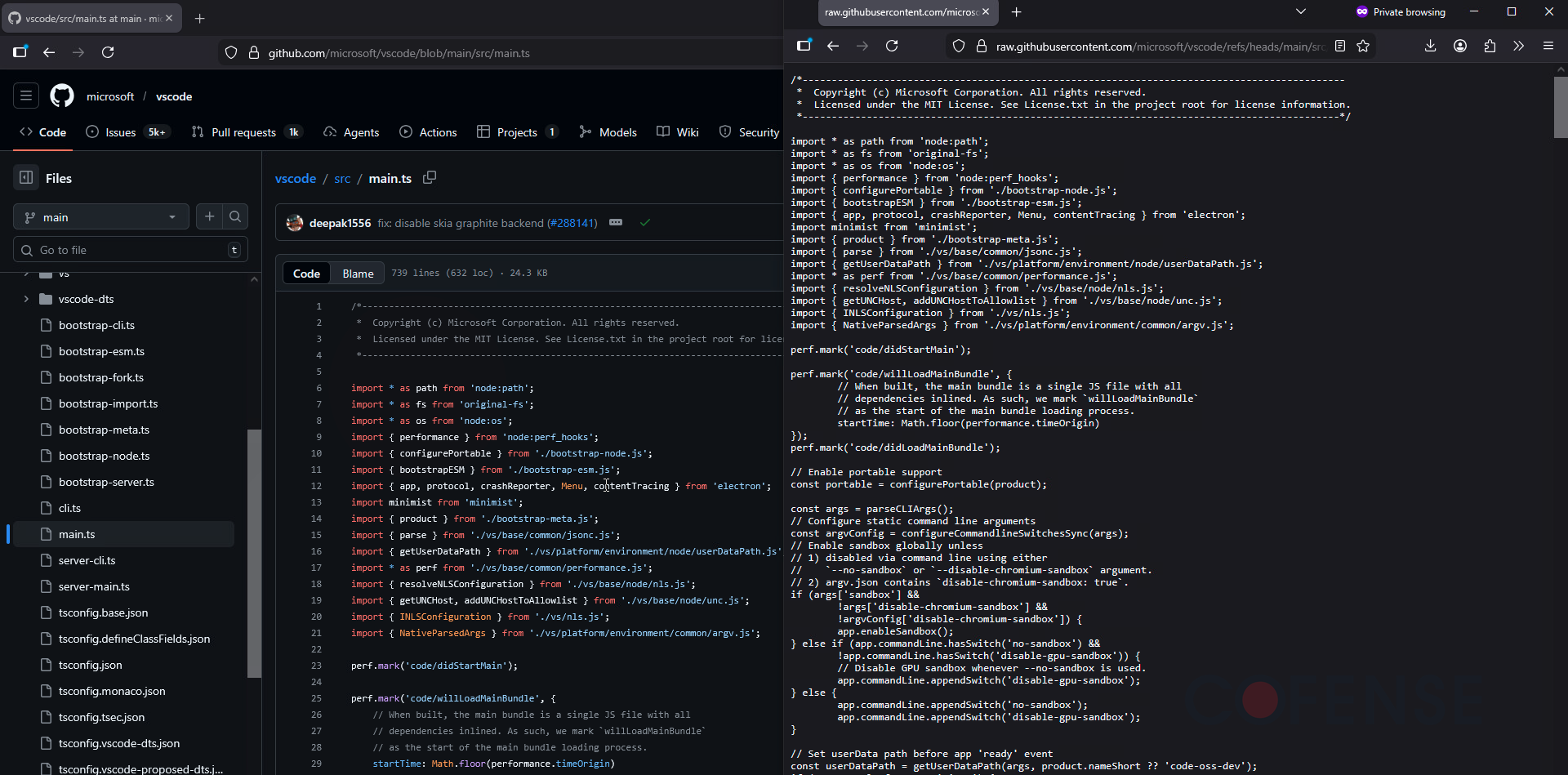
Figure 1: A file viewed through GitHub’s UI vs githubusercontent’s plaintext version.
Like Google Drive, threat actors can abuse GitHub as a cloud service to deliver malware. They typically use githubusercontent to deliver their malicious payloads. Although they upload remote access trojans (RATs) that are clearly malicious like XWorm RAT and Venom RAT, threat actors also repurpose and abuse legitimate remote access tools like GoTo RAT and ConnectWise RAT. They can also prevent anti-malware scanning by putting the malware in password-protected archives, like .zip and .7z. These measures can make it difficult for GitHub to determine legitimate use from abuse of their platform.
GitHub has been used to propagate advanced campaigns, like the highly targeted tax extension campaign. Threat actors did not own the repository, but still associated malicious files to legitimate repositories via GitHub comments.
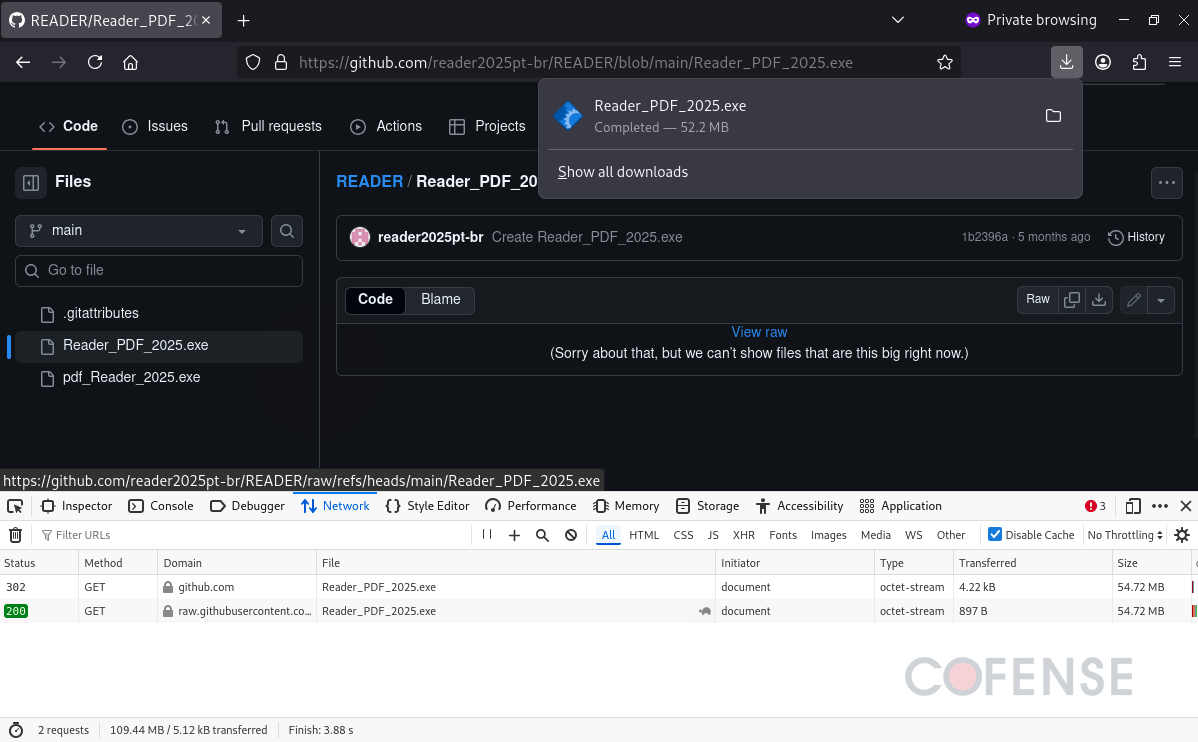
Figure 2: A malicious RAT disguised as a PDF reader delivered via GitHub in ATR 397723.
Campaigns by threat actors are tracked by Cofense Intelligence in Active Threat Reports (ATRs). With details in ATR 383659, threat actors first used GitHub to host malware. After visiting a page that downloads Muck Stealer, a credential phishing page automatically opens. If a victim installs the fake PDF malware, they may not realize that the pop-up window to access a DocuSign document is also malicious. This dual threat provides both ongoing infection and a quick account credential phishing attempt.

Figure 3: Infection chain of a campaign delivering Muck Stealer and then encouraging victims to interact with a credential phishing page.
github.io
- github.io primarily delivers credential phishing when abused.
- 47% of all campaigns abusing the GitHub domains deliver credential phishing, usually via github.io.
- Malicious github.io websites can also contain an embedded redirect to obfuscate the final malware or credential phishing page.
github.io is used to host static GitHub Pages. By uploading the necessary HTML, CSS, and JavaScript files to a GitHub repository, an internet-accessible site can be created, as seen in Figure 4.
Threat actors can use GitHub Pages to host credential phishing pages. Since the github.io is a long-lived domain, security solutions may not properly vet the subdomains and improperly trust new GitHub Pages hosted on subdomains. As intent is hard to determine, security solutions may not be able to recognize malicious credential phishing pages from legitimate login pages. Threat actors typically exfiltrate credentials using HTTP POST requests.
Although these pages typically deliver credential phishing, sometimes they act as redirect websites instead. Like SEG-encoded URLs, threat actors use GitHub Pages to obfuscate a malware download page. They likely do this to bypass email-based security controls and install malware.
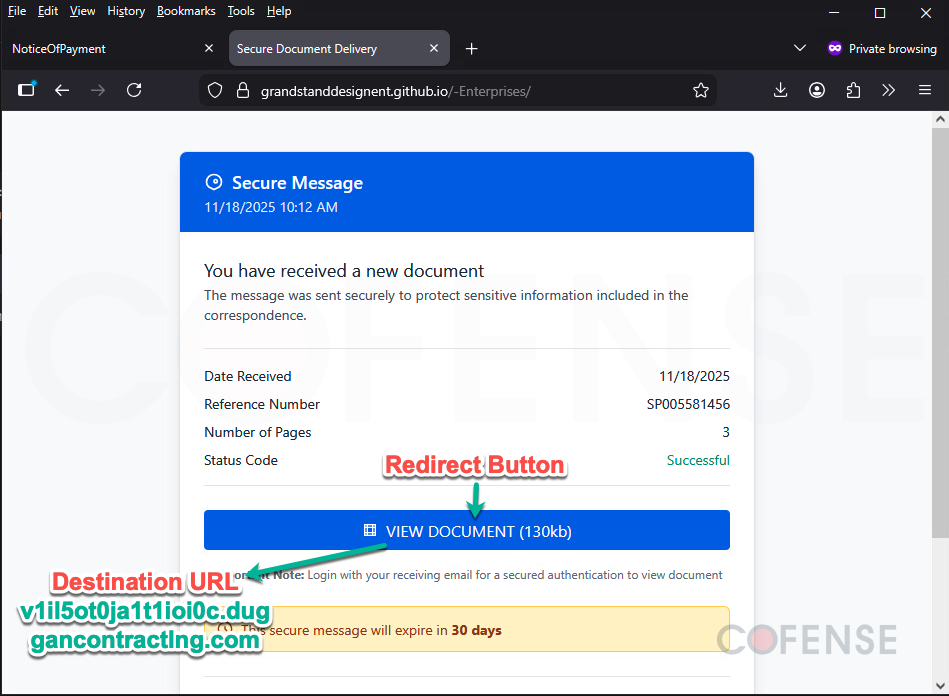
Figure 4: github.io abused to obfuscate a credential phishing page in ATR 404564.
gitlab.com
- gitlab.com usually delivers malware only.
- 64% of campaigns abusing GitLab domains deliver malware.
- In some advanced campaigns, the user’s device is detected to determine what should be delivered (see Figure 5 and 6).
- If the device is Windows, an abused GoTo RAT is delivered.
- If the device is not Windows, like a Mac or Android, a credential phishing page is delivered.
Like github.com, gitlab.com is also used by developers to collaborate on projects. Although they prioritize different features, they provide the same use to threat actors: malware or credential phishing delivery hosted on a legitimate and trusted platform.
Threat actors primarily use GitLab to host malware like DcRAT and legitimate, abused tools like GoTo RAT. By using a link to GitLab instead of a newly registered domain in their phishing emails, threat actors bypass some email security measures, and their phishing emails successfully appear in user inboxes. Like with GitHub, these malicious files on GitLab are often packaged in password-protected archive files. Only the email recipient can analyze the file (and not GitLab’s antimalware solution) because only the recipient has the archive password from the email.
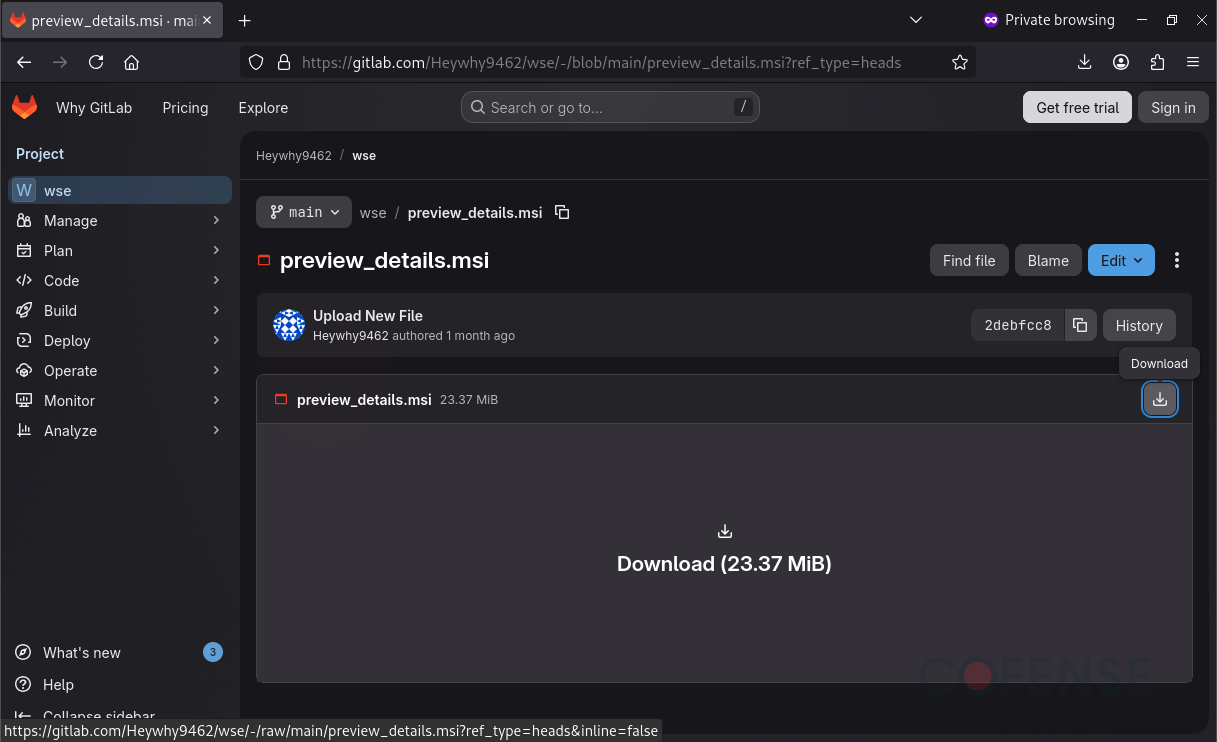
Figure 5: GoTo RAT delivered via GitLab without using a password-protected archive in ATR 404322.
GitLab was also part of a dual threat attack chain like GitHub, but a different type. Instead of delivering credential phishing after downloading malware, this GitLab campaign would deliver credential phishing instead of malware if malware can’t be installed. Specifically, threat actors used an initial landing page to determine whether the victim device was a Windows-device or not. By using the browser’s user agent , threat actors would either install an abused GoTo RAT or steal credentials via credential phishing. This is so that an account password can be stolen even if malware can’t be installed because the recipient accessed the phishing link from a phone instead of a Windows laptop.
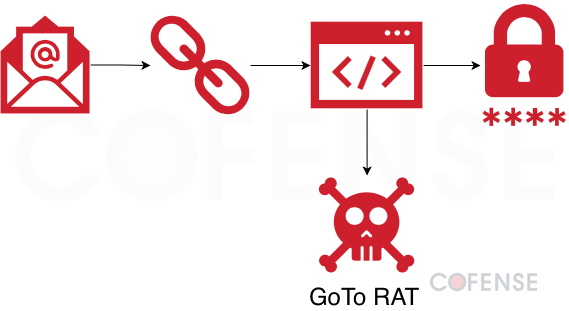
Figure 6: Infection chain of a campaign delivering credential phishing or a GoTo RAT uploaded to GitLab based of the browser user agent used to access the initial URL in ATR 404322.
gitlab.io
- gitlab.io typically delivers credential phishing only when abused.
- 36% of campaigns abusing GitLab domains deliver credential phishing, usually via gitlab.io and not gitlab.com.
- Malicious gitlab.io websites can also use an embedded link to redirect to a different site instead when performing credential phishing.
gitlab.io uses GitLab repositories to publish GitLab Pages, in a similar process to github.io. So far, Cofense Intelligence has seen gitlab.io only be abused to deliver credential phishing websites.
Like Google AMP open redirects, some malicious GitLab Pages require no interaction and will immediately redirect the victim to a malicious website. Unlike Google AMP open redirect where any arbitrary redirect destination can be set, the target URLs have been hard coded into the malicious GitLab Pages. More pages seem to use anti-automation techniques like Cloudflare or Google CAPTCHAs before redirecting, so only humans can visit the credential phishing page. By combining URL obfuscating with anti-automation, links in phishing emails are more likely to appear legitimate to email-based security controls.
Malware Delivered by GitLab and GitHub
- 42% of campaigns abusing Git repository websites deliver malware instead of credential phishing.
- The top malware delivered by GitLab is DcRAT.
- The top malware delivered by GitHub is Remcos RAT.
- Over 30 different malware families are delivered.
Compared to credential phishing, malware is typically more dangerous. Even after restarting a computer, malware can usually be used to spy on sensitive information, encrypt files, spread to other computers on the same network, and have anti-analysis features. The three primary types of malware uploaded to Git repository websites are RATs, Information Stealers, and malware of other types. RATs are worrying because they can give threat actors remote control and administrator access to an infected computer. Threat actors can use malware to both automatically search and steal information or manually navigate files and exfiltrate them for extortion. Like RATs, information stealers can typically copy the keyboard, but some have extra functionality like stealing passwords saved in the browser or cryptocurrency wallets. Finally, the Other Types category includes custom-made malware like reconnaissance tools and cryptocurrency mining malware. The cryptocurrency mining malware uses the victim’s power and CPU time to provide financial gain to the threat actors.
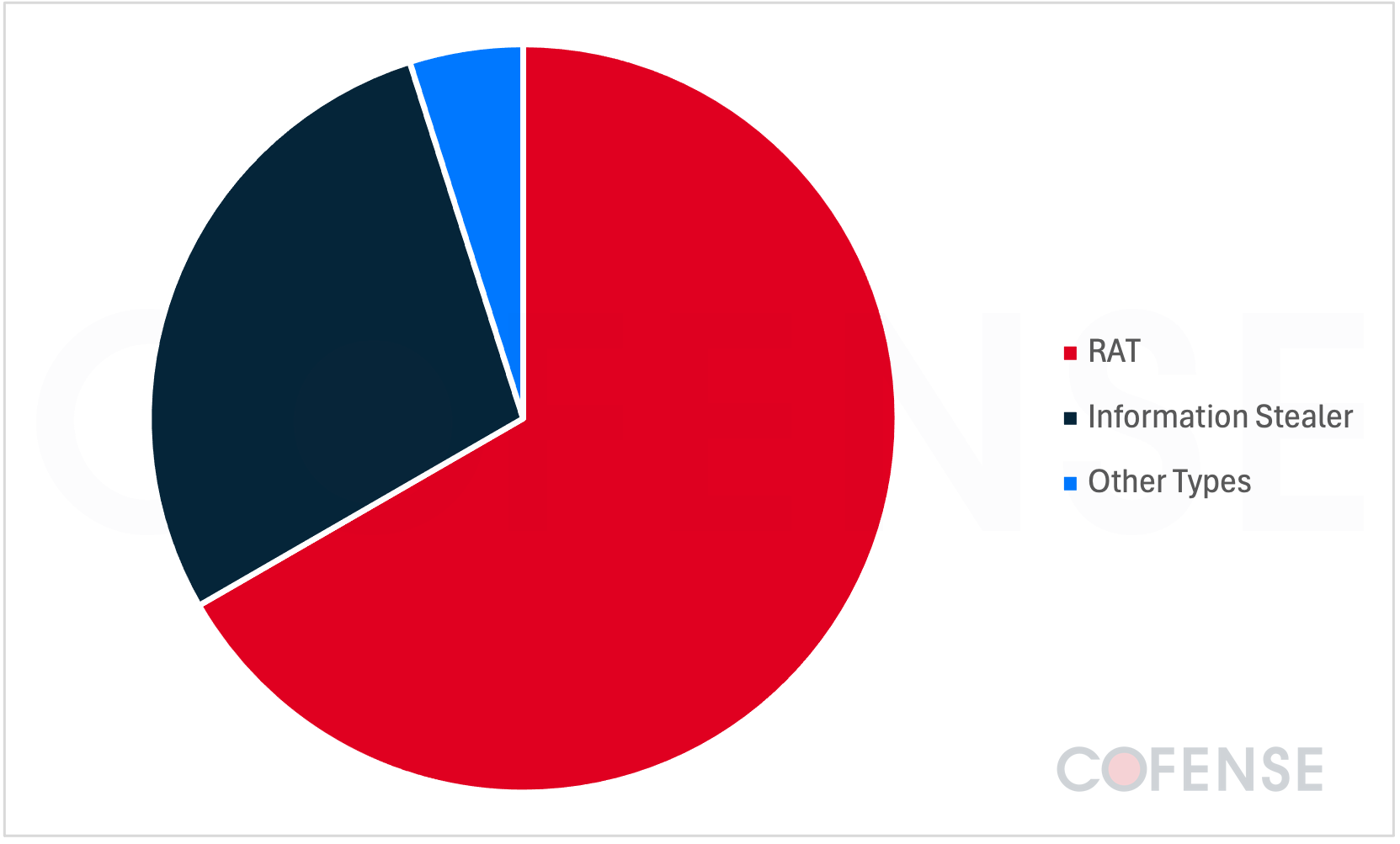
Figure 7: Malware types delivered in Git repository website campaigns.
The #1 malware most delivered using GitLab or GitHub repositories is Remcos RAT. At 21% of the volume, it is likely the top choice for threat actors due to the ease of acquisition and ease of use. Remcos is also the primary malware delivered by GitHub. Byakugan is #2 at 9% of total volume. It is an Information Stealer targeting passwords and cookies but can also take screenshots and mine cryptocurrency on victim machines. Async RAT is #3 by volume, consisting of 7% of campaigns. It is yet another malware with keystroke logging, password stealing, and file upload and download capabilities. DcRAT is #4 by overall campaign volume, but it is the top malware delivered using GitLab. This malware is based on Async RAT. Ironically, cracked versions of DcRAT not sold by the malware developer can be found for free on GitHub, which other threat actors can use in their campaigns.
These campaigns appear to follow the previous trend of preferring malicious RATs instead of abusing legitimate remote administration tools.
Conclusions
This report shows recent and historical abuses of GitHub and GitLab for both malware and credential phishing delivery. Some key insights include difficulties in separating legitimate repositories from malicious ones, and the increasing risk of dual threat attacks. Threat actors aim to steal both account and personal information, which can be used for future intrusions. GitHub and GitLab typically do a good job of removing malicious content, but the flood of abuse means there can be a delay in removal. It can take around two weeks for GitHub to purge a repository flagged by one of its users. It is up to email recipients to determine if GitHub or GitLab is part of a phishing attack when all other security measures fail. Email recipient vigilance is especially important if Git repository abuse continues to increase year over year, since 45% of these campaigns occurred in 2025.
As phishing tactics continue to increase in sophistication and scale, a more layered approach to phishing defense is key. At Cofense, our platform combines user reporting, threat analysis, and response workflows to help identify and contain threats more effectively. By adding visibility into real-world phishing activity and enabling faster remediation, Cofense supports security teams in addressing attacks that may bypass traditional defenses. To learn more about how Cofense can strengthen your organization’s resilience against sophisticated phishing attacks like these, request a demo today.